Rerun Schedule Job parameters jacked up

Parameters look normal when editing a script's schedule like below: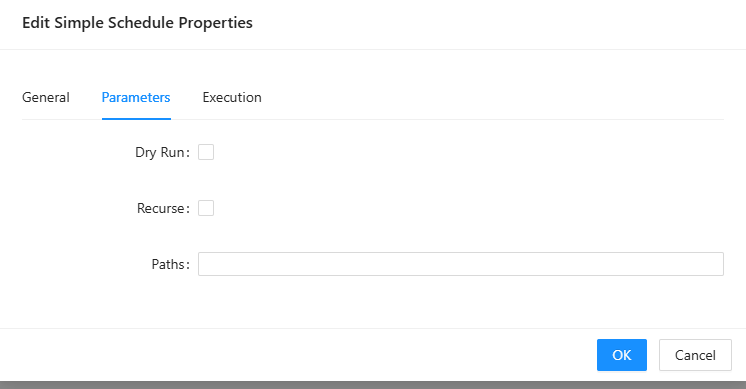
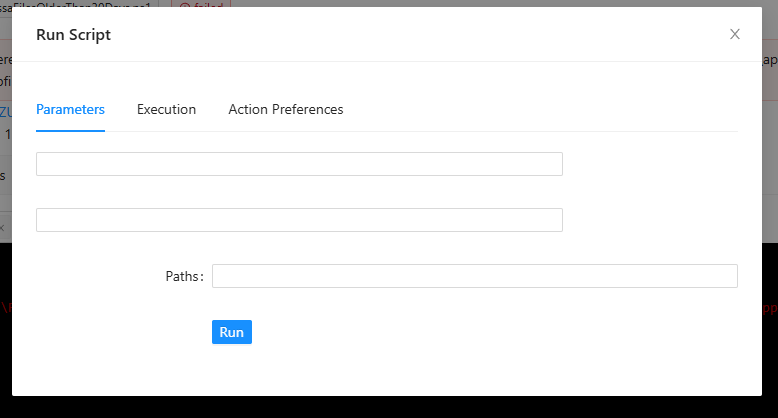
Re-running a failed job the parameters show up like this:
'
25fc805a-f57c-4d69-b837-6321c7b36b8b.png
jackedup.png
All Comments (2)
Hello Jaltmann,
Thank you for reporting this and for including the screenshots. They show that the schedule editor displays the Dry Run, Recurse, and Paths parameter labels, while the Run Script dialog presented during the rerun does not display the first two labels.
To help us determine whether this is a version-specific issue and reproduce the same behavior, could you please provide:
* Your exact PowerShell Universal version and build.
* Your hosting method and operating system.
* A minimal sanitized copy of the script’s `param()` block.
* Whether only the labels are missing or the original parameter values are also lost.
* Whether this occurs with every rerun, only failed jobs, or only jobs originally started by a schedule.
* The last PSU version where this worked correctly, if known.
Because this is a public forum, please sanitize all evidence before posting. Remove credentials, tokens, license keys, cookies, private keys, full connection strings, email addresses, usernames, customer data, tenant or account identifiers, internal domains, hostnames, IP addresses, and private URLs. Please do not upload unredacted HAR files, memory dumps, database backups, or complete configuration files to this public thread.
Once we have those details, we can test the same parameter types and execution path against the reported version.
Best regards,
Ruben Tapia
Hello Ruben,
We're running the latest version (2026.2.2) on Server 2025 as a virtual machine.
[CmdletBinding()]
param(
[Parameter(Mandatory = $false)]
[string[]] $Paths = @(
"\\host\sanitizedpath1",
"\\host\sanitizedpath2"
),
[Parameter(Mandatory = $false)]
[switch] $Recurse,
# Set true to simulate deletions (no files removed)
[Parameter(Mandatory = $false)]
[switch] $DryRun
)
To test, I edited the script and reselected the "dry run" option when selecting the schedule's parameters. The job ran successfully. I clicked the job details and clicked "Rerun Job" and I'm met with the same output as the original screenshot (no checkbox or anything indicating "dry run" is checked.
I just saw this today, so unsure if it was previously an issue.