GIT sync seemingly not working

I don't know when that started. (EDIT: it started after the 2026.2.1 update)
We are on 2026.2.2 now with DEV and PROD server.
Doing an edit / save in the GUI does not show any error.
Clicking "Synchronize Now" seems to work fine.
But nothing will happen in GIT.
When I click "fetch remote branches" I get this error:
We did not change auth type.
9954f035-c871-4a9a-8dcd-4a2f1fe4c843.png
All Comments (4)
Dear Deroppi,
Thank you very much for contacting Ironman Software!
My name is Ruben Tapia, a support engineer in charge of request #F-55557. While we review the details provided, please remember that you can add additional information by replying to this email.
Based on the screenshot, the built-in Git client is failing while authenticating with the remote repository. Since the behavior started after upgrading to 2026.2.1 and remains present in 2026.2.2 on both DEV and PROD, we would like to confirm whether the stored credentials or remote authentication requirements have changed.
Please share the following information:
• Git provider and version
• Sanitized remote repository URL and whether it uses HTTPS or SSH
• Authentication method currently configured
• Whether Use External Git Client is enabled
• PSU installation type and operating system
• PSU version used before upgrading to 2026.2.1
• PSU logs covering a failed Fetch Remote Branches or synchronization attempt
As an initial controlled test, please open Settings > Git on DEV, manually re-enter the username and personal access token, save the settings, and then retry Fetch Remote Branches and Synchronize Now.
Please perform this test on DEV first without modifying PROD and let us know whether the same authentication error remains.
https://docs.powershelluniversal.com/config/git
Best regards,
Ruben Tapia
I was able to fix it.
PSU internal Git used, but GIT is also installed on that server
hXXps://FQDN/path/path/powershelluniversal/psuprod.git
Auth is a project access token
Windows Server 2022 Data Center
MSI installation
PSU version before 2026.1.7
Not much in the logs except this:
2026-07-13 09:02:06.760 +00:00 [ERR][UniversalAutomation.GitSyncService] Failed to sync ("Failed"): server requires authentication that we do not support at LibGit2Sharp.Core.Ensure.HandleError(Int32 result) in /_/LibGit2Sharp/Core/Ensure.cs:line 154
Line 30732: at LibGit2Sharp.Commands.Pull(Repository repository, Signature merger, PullOptions options) in /_/LibGit2Sharp/Commands/Pull.cs:line 19
Line 30733: at PowerShellUniversal.Git.GitService.PullAsync() in D:\a\powershell-universal\powershell-universal\src\PowerShellUniversal.Git\GitService.cs:line 1050
Line 30734: at UniversalAutomation.GitSyncService.TrySync(GitStatus status, GitSettings settings) in D:\a\powershell-universal\powershell-universal\src\PowerShellUniversal.Git\GitSyncService.cs:line 201
Line 30735: at UniversalAutomation.GitSyncService.Sync(Boolean force, Boolean throwOnFailure) in D:\a\powershell-universal\powershell-universal\src\PowerShellUniversal.Git\GitSyncService.cs:line 90
Line 38555: 2026-07-13 10:02:11.401 +00:00 [ERR][UniversalAutomation.GitSyncService] Failed to sync ("Failed"): server requires authentication that we do not support at LibGit2Sharp.Core.Ensure.HandleError(Int32 result) in /_/LibGit2Sharp/Core/Ensure.cs:line 154
I started on the server back then with version 5.
For GIT we used the config in appsettings.json and never touched it except the frequent cycle of tokens.
No issues.
"GitRemote": "hXXps://FQDN/path/path/powershelluniversal/psuprod.git",
"GitUserName": "PSUprod",
"GitPassword": "projectaccesstoken",
"GitBranch": "main",
"GitSyncBehavior": "TwoWay",
"GitInitializeBehavior": "init",
"GitSyncInterval": "60",
"GitSyncTimeout": 30,
It seems that the latest version of PSU uses the UserName/Password in a way so that the GIT instance claims it is a basic auth attempt, which is forbidden.
I removed the GIT settings from the appsettings.json file and restarted the server.
Then I added GIT settings in the GUI.
That worked.
Now the question is:
How can I update the token?
In the GUI I can't edit.
And each time deleting and re-creating the settings is not convenient.
We do frequent token cycles.
In the json file this could be simply done.
Dear Deroppi,
Thank you for the detailed update. I am glad to hear that removing the Git configuration from appsettings.json and recreating it through the Admin Console restored synchronization.
In PowerShell Universal 5.x and later, Git credentials created through the Admin Console are stored in the database. To rotate the project access token, please try the following:
1. Navigate to Settings > Git.
2. Open the Repositories tab.
3. Edit the active repository configuration.
4. Re-enter the username and the new project access token.
5. Save the configuration.
6. Click Synchronize Now to confirm that authentication succeeds.
The token must be entered again when saving the Git settings, even if the credential field appears populated.
Please also avoid defining the same Git repository in both the Admin Console and appsettings.json. When a database-backed Git configuration exists, PSU ignores the corresponding Git settings in appsettings.json.
You mentioned that the configuration cannot be edited from the GUI. Could you please share a screenshot of the Repositories tab and describe what happens when you select the repository? For example, please confirm whether the Edit option is missing, the credential fields are disabled, or the changes cannot be saved.
If the token field is unavailable in PSU 2026.2.2, we will review that behavior further because it would not match the documented workflow (Lab)
https://docs.powershelluniversal.com/config/git
Best regards,
Ruben Tapia
@2 the tab is named "settings"
The accessToken field is greyed out.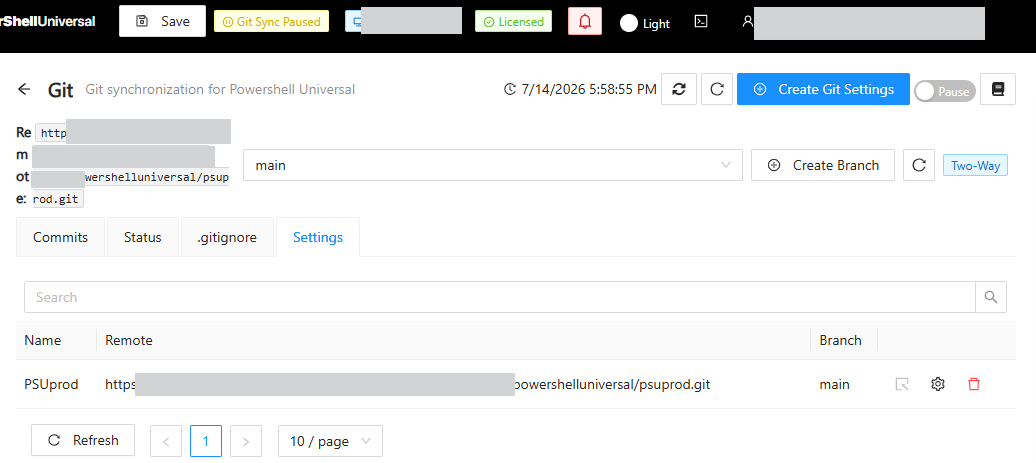
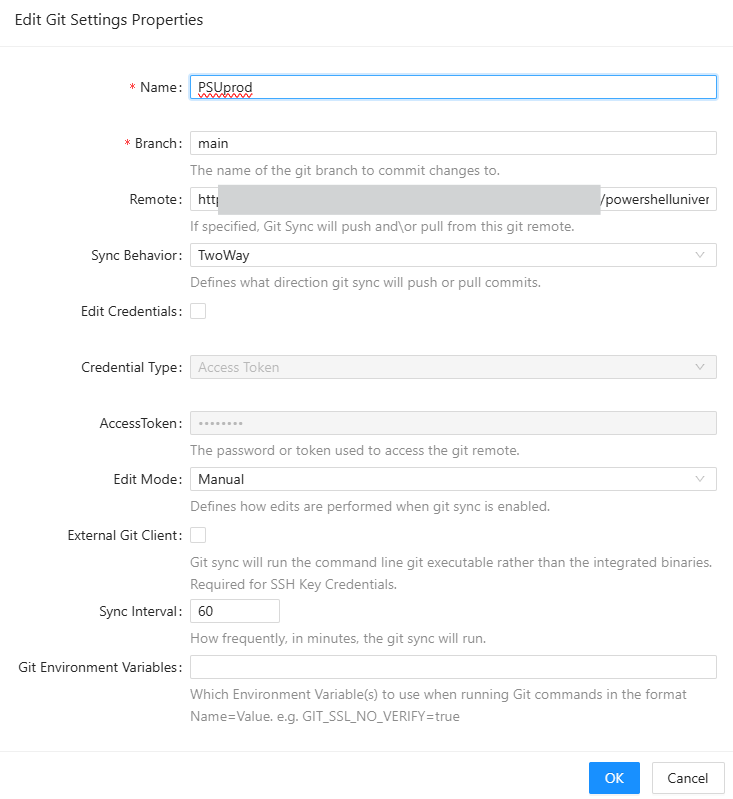
But now that you pointed me to it again,
I see the "edit credentials" check box.
Stupid me...
Thanks.
5f462233-8126-4898-ab21-087fb78cde3f.png
759e313c-64ab-4306-a20f-06bb4f5c5df5.png