Port access to 7171 / 8181 really needed?

Hello Devolutions,
we evaluate implementing Devolutions Gateway.
We recognized, that we need connectivity on Port 7171 to the Devolutions Gateway for it to work from the Clients Web-Browser, which is different than what is shown on your architecture sketch.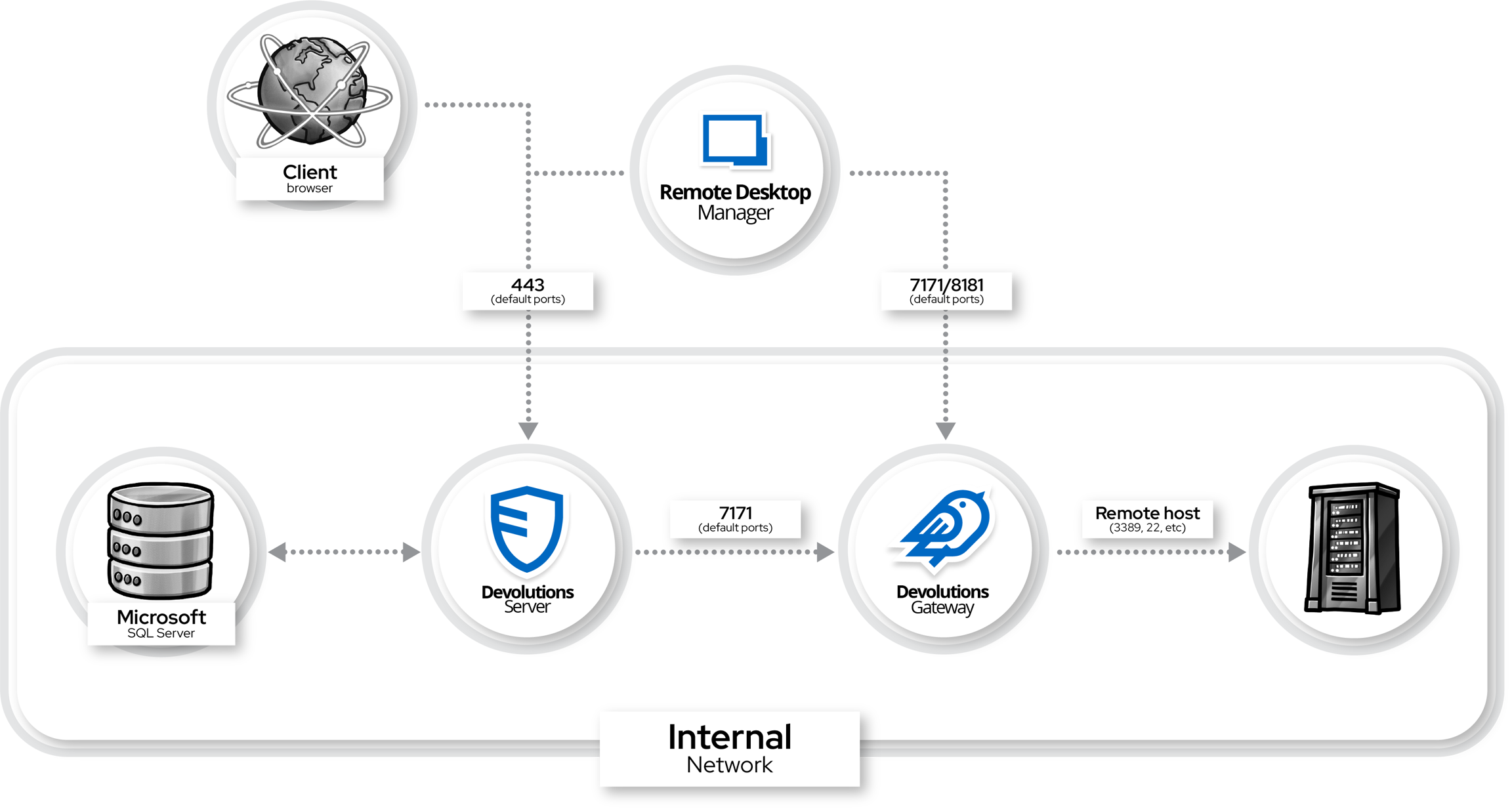
1.)
Is this some kind of misconfiguration on our side or is 7171 from the Clients Web-Browser to the Devolutions Gateway really needed to do RDP from Devolutions Server using the Gateway in Web-Browser.
2.)
By security policy, we are not allowed to have direct Internet access to the Devolutions gateway. How shall we secure the 7171/8181 Ports (e.g. is there Reverse Proxy support) - especially in case of 8181 which is TCP and not HTTPs.
Can this be tunneled using HTTPs ?
I am thinking about 2 scenarios
A) Using Azure Frontdoor + WAF with Azure Private Link to Devolutions Gateway, forwarding connections from 443/HTTPS to 7171/HTTPS and tunnel Connections on 443/HTTPS to 8181 TCP
B) Using Azure Application Gateway V2 +WAF with 443 forwarding to 7171 and TLS proxy for 8181
Thank you for your support !
Greetings Jean Pascal
bf3b0dfd-1c7d-4ed4-8b55-91f382421d3a.png
Recommended Answer
Hi Jean Pascal,
Thanks for the detailed write-up. On your first question, this is not a misconfiguration. The Gateway has two separate listeners: an HTTP(S) listener on port 7171 and a TCP listener on port 8181. When a session is opened from the web interface, the browser acts as the client and connects directly to the HTTP(S) listener; Devolutions Server only serves the web page. The high-level architecture diagram shows the DVLS and RDM to Gateway flow but does not draw the browser separately, which is why the port 7171 requirement can look unexpected.
That also simplifies your second question. The TCP listener on port 8181 is used by native client sessions in Remote Desktop Manager and is not part of the web client path. If your use case is browser-based access only, you only need to publish the HTTP(S) listener, and 8181 does not need to be reachable from the Internet at all, so the challenge of tunneling raw TCP over HTTPS does not apply here.
On placing something in front of the Gateway, the documentation covers two specific configurations with their own step-by-step guides: Cloudflare Tunnel and ngrok, both of which work as outbound tunnel agents running on the Gateway host. There is no published guide for a generic inbound reverse proxy or WAF. If you do place your own Azure layer in front of the HTTP(S) listener, the technical requirement on the Gateway side is straightforward: the listener needs to receive the connection transparently. The HTTP(S) listener port can be changed from 7171 to 443 in the configuration if that helps align with your Azure design. What you will want to validate on your side is that your chosen Azure product carries long-lived upgraded connections without buffering or dropping them on an idle timeout, since the browser-based session depends on that.
A practical first check once it is in place is to point a probe at the Gateway health endpoint, https://your-gateway-address/jet/health, through your Azure layer. If that responds cleanly you have confirmed the path, and you can then validate a full web session. The documented tunnel guides and the listener and port reference are here:
https://docs.devolutions.net/gateway/knowledge-base/how-to-articles/reverse-proxying
https://docs.devolutions.net/gateway/getting-started/devolutions-server/devolutions-gateway-configuration-with-devolutions-server
https://github.com/Devolutions/devolutions-gateway/blob/master/README.md
Best regards,
Michel
Michel Audi
All Comments (2)
Hi Jean Pascal,
Thanks for the detailed write-up. On your first question, this is not a misconfiguration. The Gateway has two separate listeners: an HTTP(S) listener on port 7171 and a TCP listener on port 8181. When a session is opened from the web interface, the browser acts as the client and connects directly to the HTTP(S) listener; Devolutions Server only serves the web page. The high-level architecture diagram shows the DVLS and RDM to Gateway flow but does not draw the browser separately, which is why the port 7171 requirement can look unexpected.
That also simplifies your second question. The TCP listener on port 8181 is used by native client sessions in Remote Desktop Manager and is not part of the web client path. If your use case is browser-based access only, you only need to publish the HTTP(S) listener, and 8181 does not need to be reachable from the Internet at all, so the challenge of tunneling raw TCP over HTTPS does not apply here.
On placing something in front of the Gateway, the documentation covers two specific configurations with their own step-by-step guides: Cloudflare Tunnel and ngrok, both of which work as outbound tunnel agents running on the Gateway host. There is no published guide for a generic inbound reverse proxy or WAF. If you do place your own Azure layer in front of the HTTP(S) listener, the technical requirement on the Gateway side is straightforward: the listener needs to receive the connection transparently. The HTTP(S) listener port can be changed from 7171 to 443 in the configuration if that helps align with your Azure design. What you will want to validate on your side is that your chosen Azure product carries long-lived upgraded connections without buffering or dropping them on an idle timeout, since the browser-based session depends on that.
A practical first check once it is in place is to point a probe at the Gateway health endpoint, https://your-gateway-address/jet/health, through your Azure layer. If that responds cleanly you have confirmed the path, and you can then validate a full web session. The documented tunnel guides and the listener and port reference are here:
https://docs.devolutions.net/gateway/knowledge-base/how-to-articles/reverse-proxying
https://docs.devolutions.net/gateway/getting-started/devolutions-server/devolutions-gateway-configuration-with-devolutions-server
https://github.com/Devolutions/devolutions-gateway/blob/master/README.md
Best regards,
Michel
Michel Audi
Thank you for confirming!