System permission - Different behavior and rights

Hi Everyone.
I'm facing a new behavior in the 2026.2.0.6. I'm not allowed to do anything into the root of a vault.
I can't see properties, more or add new entries...
On Windows client, connected with the same user, I have the permissions.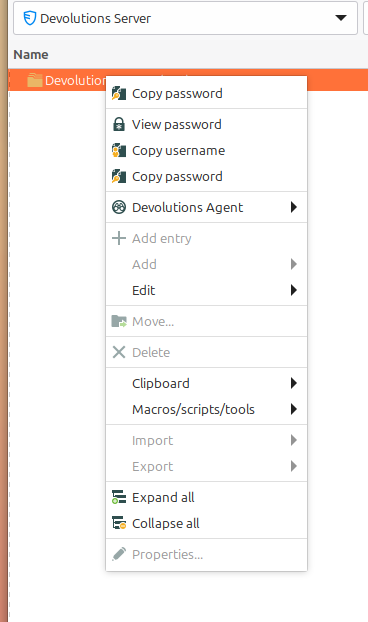
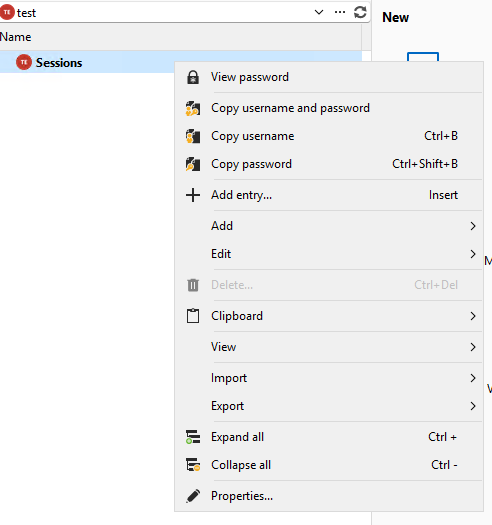
It seems like the system permissions aren't applied correctly.
Thank you in advanve.
32045447-44ca-4a7f-a683-1a94fe24ed22.png
21210e2a-414c-4e76-9c19-7c6a1444796f.png
All Comments (2)
Hello Guillaume,
Thank you for the report.
Could you confirm if the user connected in Remote Desktop Manager for Linux has administrative permissions on the data source/vault?
Since the same user appears to have the expected permissions on the Windows client, we would like to confirm whether the Linux client is correctly recognizing the account as an administrator or if the issue is specific to system permission handling on Linux.
Best regards,
Carl Marien
Hi Carl,
I don't want to confuse anyone. I've opend feature request about adding custom variable capabilities. As I wanted to make a printscreen of the "issue" I found out I could not go anymore into the properties of the vault. So your colleague David also asked about this diagnostic.
But the administrative permissions is a point: it says no, but in the windows Client, it says yes ..
========== DIAGNOSTIC ==========
LinuxMint 22.3
Kernel version [6.17.0.35]
Container [None]
Desktop environment [X-Cinnamon]
Display server [x11]
Architecture [X64]
Support local password saving [Ok]
Is administrator [Ok]
Is a system administrator [No]
Is a database administrator [No]
Is elevated privilege [No]
Workspace size [1517 / 922]
Is the Internet connected [Ok]
Allow multiple instances [No]
Allow drag and drop [Ok]
Auto-refresh [No]
Debug level [0]
Running since [Running since: 10 min]
========== DATA SOURCE ==========
Data source ID: xxxx
Server name: xxxxx
Description:
Server version: 2026.2.4.0
DB version: 1179
Data source type: Devolutions Server
Data source size: 13.7 MB
User specific settings count: 0
Data source settings size: 9.6 KB
User specific settings size: 231 Bytes
Connection protocol: https
Caching/Offline: ReadOnly (File, OpenMCDFv2)
Allow connection states: True
