RDM loses focus and becomes unresponsive under wayland/gnome 49
RDM loses focus and becomes unresponsive under wayland/gnome 49

Good Morning,
i'm running RDM v 2026.2.0.6 64 Bit on Fedora 43 (Linux 7.0.12-101.fc43.x86_64) with Gnome 49. Ever since I've started using RDM under Linux I've had the problem that the application sometimes looses focus and becomes unusable. I usually have to close and restart the app.
I'm assuming this has something to do with the incomplete Wayland support that will hopefully remediated via the Avalonia Gui update. However, since the last two updates I've encounter the issue much more frequently and in addition got an error message displayed. Strangely the option to "send error report" doesn't seem to work for me.
Therefor, I though I share a screenshot as well as text of the error message for you to have a look and maybe it is possible with a small fix to resolve this issue under wayland. if it's a bigger issue don't bother. I'll wait for the Avalonia Gui then.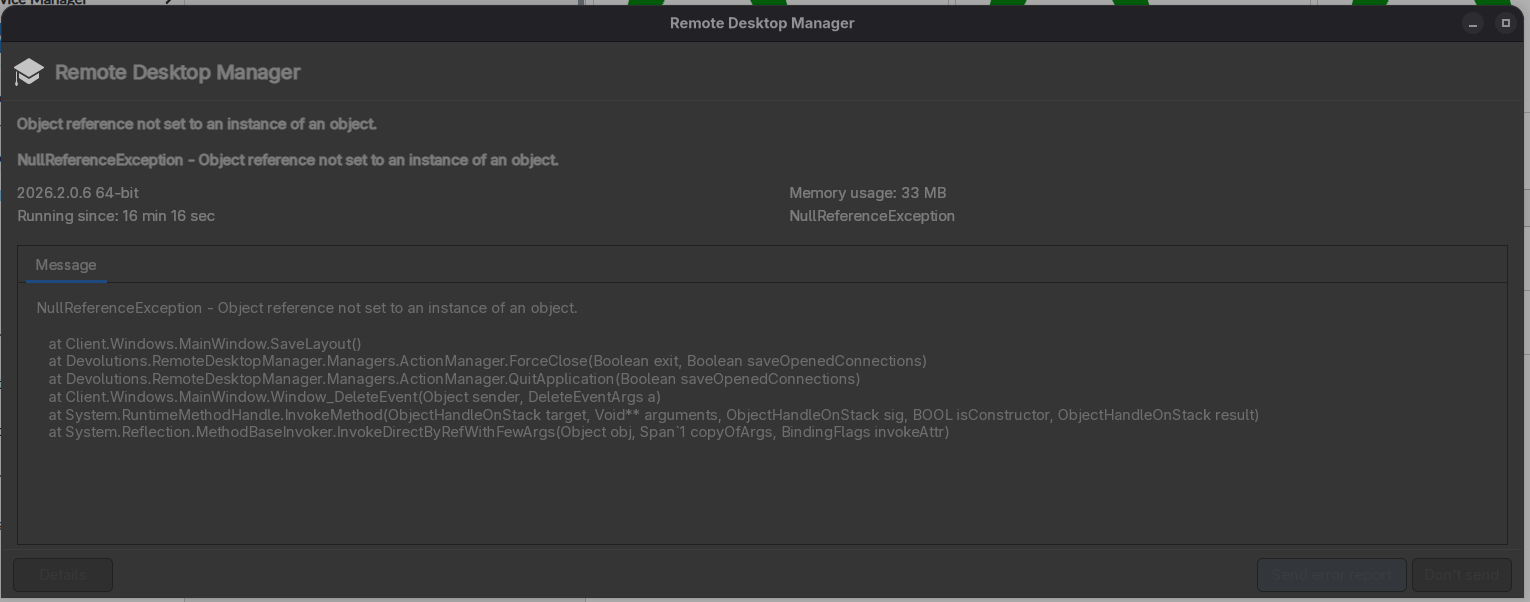
Error message in text:
NullReferenceException - Object reference not set to an instance of an object.
at Client.Windows.MainWindow.SaveLayout()
at Devolutions.RemoteDesktopManager.Managers.ActionManager.ForceClose(Boolean exit, Boolean saveOpenedConnections)
at Devolutions.RemoteDesktopManager.Managers.ActionManager.QuitApplication(Boolean saveOpenedConnections)
at Client.Windows.MainWindow.Window_DeleteEvent(Object sender, DeleteEventArgs a)
at System.RuntimeMethodHandle.InvokeMethod(ObjectHandleOnStack target, Void** arguments, ObjectHandleOnStack sig, BOOL isConstructor, ObjectHandleOnStack result)
at System.Reflection.MethodBaseInvoker.InvokeDirectByRefWithFewArgs(Object obj, Span`1 copyOfArgs, BindingFlags invokeAttr)
The issue occurred early this morning, I just had one websession open to a remote system.
If you need any further information just let me know. The issue happens quite frequently so I can provide further logs if needed.
Screenshot From 2026-06-15 06-54-45.png
All Comments (7)
Just wanted to add the application log show the frequency and maybe some more details on the issue. In addition I found this error which might explain why i can't send the error report directly though the application:
[6/12/2026 4:11:26 PM - 2026.2.0.6 - 64-bit] Error silent: Could not find the top-level widget ID for RDMOSendErrorMessageWindow.
RMD App Log.log
Hello,
Thank you for the detailed report, screenshot, and log excerpt.
To help us investigate this further, could you please launch Remote Desktop Manager from a terminal and send us the output/logs generated when the issue occurs?
You can start RDM using the following command: remotedesktopmanager
Then, keep the terminal open while using RDM normally. Once the focus/unresponsive issue happens again, please copy the terminal output and send it to us, along with the latest RDM application logs.
This should help us capture additional details that may not appear in the standard application log, especially since the built-in error report window also seems to be failing with:
Could not find the top-level widget ID for RDMOSendErrorMessageWindow.Thank you again for taking the time to report this.
Once we have those logs, we’ll be able to review the issue more thoroughly.
Best regards,
Carl Marien
Hi,
thanks for getting back to me. I tried to recreate the issue today but since I've started RDM via CLI i haven't experienced the issue (...).
I'll keep at it this week trying to recreate the issue and provide the requested log.
Just wanted to give you a short feedback that your reply wasn't overlooked.
BR
Sebastian
Hi #2,
when closing the app it finally happend. Got the error message again.
Please find below the CLI Output and the applog attached.
(RemoteDesktopManager:25783): GLib-GObject-CRITICAL **: 15:16:07.648: g_object_ref: assertion 'G_IS_OBJECT (object)' failed
(RemoteDesktopManager:25783): Gtk-WARNING **: 15:16:21.314: Attempting to add a widget with type GtkStatusbar to a GtkEventBox, but as a GtkBin subclass a GtkEventBox can only contain one widget at a time; it already contains a widget of type GtkStatusbar free(): corrupted unsorted chunks
rdm applog 2026-06-16.log
Hello Sebastian,
We have just released a new version (2026.2.0.7) that contains a potential fix for this issue. Could you please try this version and let us know if it works for you?
Regards,
Gabriel Dubois
Hi,
you can close this issue. It has been resolved with the RDM 2026.3.x Train.
Thanks for your help!
BR
Sebastian
Hello Sebastian,
Thank you for the update and for confirming that the issue has been resolved with the RDM 2026.3.x release.
We’ll go ahead and close this case.
Thank you for your cooperation and for helping us troubleshoot the issue.
Best regards,
Carl Marien