Gateway versuib 2926.2.2.0 not working

Yesterday we updates Devolutions Server and Gateway to the latest version.
When I try to open an asset through the gateway I get this error: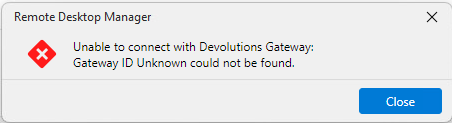
Also when I try to edit the settings in Devolutions Server Console I get an error: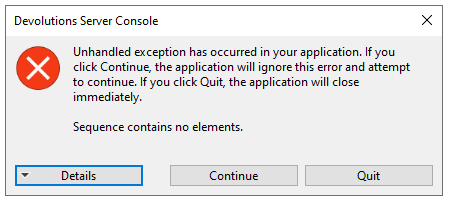
Attached the details of the error.
Is this a known issue and what can I do to fix this?
3b09ebf5-6ff0-4dca-99b0-6829fe4e4200.png
c473aec8-1533-4f88-8746-9c0c4c8e34fa.png
Error Details.txt
All Comments (4)
Hello,
Thank you for reaching to our forum, both errors are related and have a known root cause: your gateway.json contains a WebApp section that the DVLS Console can no longer parse correctly after the upgrade, which triggers that unhandled exception when you click Edit on the Gateway. That same broken config state is also what is causing the "Gateway ID Unknown" error when RDM tries to open a session through it.
The fix is straightforward:
- Stop the Devolutions Gateway service on the Gateway host (open Services.msc, find "Devolutions Gateway", stop it).
- Open C:\ProgramData\Devolutions\Gateway\gateway.json in a text editor.
- Find the "WebApp" block and delete it entirely, along with the comma that immediately precedes the opening brace of that section.
- Save the file, then start the Devolutions Gateway service again.
- In DVLS Console, try editing the Gateway settings again. The exception should be gone.
- In the DVLS web interface, go to Administration > Devolutions Gateway and confirm the Gateway shows as Online.
- Try opening a session from RDM.
If the "Gateway ID Unknown" error in RDM persists after all of that, please reply with the DVLS and Gateway versions you upgraded from and to, and we can look at whether a re-pairing step is needed.
Best regards,
Michel Audi
Hi Michel,
Removing the WebApp section solved the problem with editing the settings but we still get the Gateway ID error.
We upgraded from these versions:
DVLS: 2026.1.16.0 => 2026.2.5.0
Gateway: 2026.1.0 => 2026.2.2
RDM: 2026.1.10.0 => 2026.2.8.0
I also got the Gateway ID error before updating the gateway to 2026.2.2 after I updated DVLS.
Today I upgraded to DVLS version 2026.2.7.0 and still the same problem.
Please let me know what the next steps are to fix this problem.
Hi hjbos,
Thanks for the follow-up, and good to hear the WebApp change cleared the Console error.
For the Gateway ID error, let's confirm the ID first, since that error usually means the ID the server has for the Gateway and the one in the Gateway's own config no longer line up. Could you do the following:
- In the DVLS web interface, go to Administration > Devolutions Gateway, open the Gateway entry, and note the Gateway ID shown there.
- On the Gateway host, open gateway.json and compare the Id value against what DVLS shows. They should match exactly.
- From the same Administration > Devolutions Gateway screen, use the ellipsis (More) menu and select Publish revocation list to all gateways. If a Publish Gateway configuration option is offered, run that one first, then the revocation list.
If the IDs do not match, or step 3 doesn't clear it, the cleanest fix is to remove the Gateway from the list in the web interface and add it back, then ping it to confirm it shows online. These two pages walk through the Add flow and the publish steps if you want a reference:
https://docs.devolutions.net/server/web-interface/administration/modules/gateway/
https://docs.devolutions.net/gateway/getting-started/devolutions-server/devolutions-gateway-configuration-with-devolutions-server/
If the error still persists after re-adding, let me know and we can open a support case to collect your server logs and gateway.json, or jump on a short session if it isn't clear from the logs.
Best regards,
Michel Audi
