PowerShell Universal on Azure Web App

Having read some good review i thought I'd try this in Azure
I followed the video on YouTube and also found instructions on ironmansoftware but I'm on the point of giving up
Using the docker image ironmansoftware/universal 2026.2.0-azure
The web app just times out on start-up. Set the WEBSITES_CONTAINER_START_TIME_LIMIT to 1800
Error logs don't really say much useful. Can't find anything about problems running it in Azure webapp
Don't know what else to do.
other than look for an alternative product
All Comments (3)
@davp I'm curious if you can try the previous versions? We have a know issue with the 2026.2.0 docker container that will be fixed in 2026.2.1. The version would be: 2026.1.7
That said, I would have expected the container to start.
Adam Driscoll
PowerShell Expert and Software Architect at Devolutions
Looks like its port issue
Web apps default to port 80
If I set it to 5000 then it loads without error
There is no mention of the port number in the YouTube video or the blog page regarding Azure Web apps.
I came across port 5000 whilst reading other pages on installation on Windows and Linux vms and just thought to try it
I ran through this in our tenant. The first startup time is very slow due to Entity Framework SQLite migrations running in the Azure storage account and why i bumped the start time limit. The enabled storage so it persists. We have an optimization for that coming in 2026.3.0, but would typically recommend Azure SQL for production. 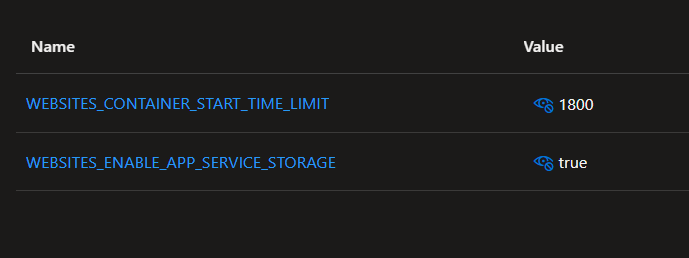
I did have to set the port to 5000. I don't recall having to do this previously but will update our docs to match this. 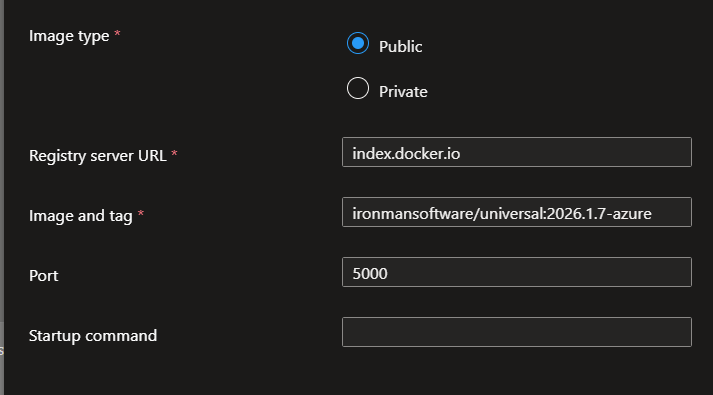
This is running on a B1. Performance is ok but not necessarily something I would want to use all the time or at scale.
Adam Driscoll
PowerShell Expert and Software Architect at Devolutions
fbe8d24d-ced7-416c-8354-814394e06157.png
7ebefa89-05dc-4fb6-93d9-1e32070e5b90.png
2d290555-6d24-4905-a16a-5f85cae09114.png