Devolutions Gateway on Linux

After spending the better part of today trying to get my gateway to work... I will now ask for help...
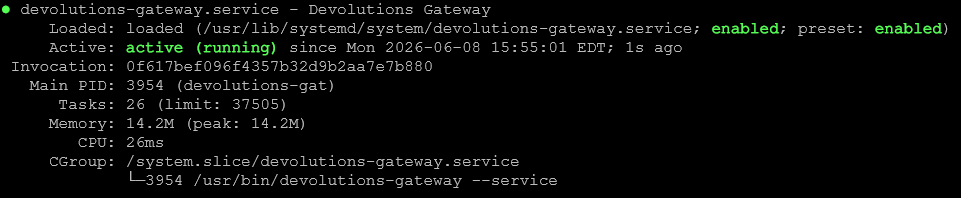
Devolutions Gateway is running on Linux Ubuntu 26.04. TLS Cert from Let's Encrypt.
He says he is happy... See attachments.

Devolutions Cloud... says "Unreachable Gateway". I have confirmed 7171/8181 are indeed reachable from the internet and local LAN.
Each time I get "Unreachable Gateway" error, this is the log entry on the gateway: (My network is a /23... .255 is okay in this case)
I hope someone has gone through this before and can just give me a magic solution ;)
Or... just point me in the right direction... this works too
Screenshot 2026-06-08 164822.png
Screenshot 2026-06-08 164801.png
Screenshot 2026-06-08 164743.png
Screenshot 2026-06-08 164304.png
All Comments (1)
Hello,
Thank you for reaching out to our forum. The status shown in Devolutions Cloud is not decided by the same path you tested. A local or LAN reachability test, and a basic port test from the internet, both reach the Gateway directly, which is why it looks healthy to you. The online/offline status in Cloud depends on the Gateway maintaining its own outbound connection to Cloud the Cloud backend itself never reaches back to the Gateway. A firewall, NAT, or proxy that allows your LAN and a simple port check but blocks outbound HTTPS from the Gateway host to Cloud will produce exactly this state. We have seen this turn out to be an outbound or perimeter firewall rule on the customer side.
Could you check and report back on these:
- From the Gateway host itself, run curl -v https://<your-cloud>.devolutions.app and confirm the outbound HTTPS connection succeeds.
- Confirm whether any firewall, NAT, or proxy sits between the Gateway and the internet, and whether outbound HTTPS from the Gateway is unrestricted.
- Confirm the external URL configured for the Gateway matches a hostname that resolves and is reachable from outside your network, not just on the LAN.
It may also help to capture what the browser sees at the moment of the error. In the Cloud web interface, open the developer tools, go to the Network tab, enable Preserve log, reproduce the "Unreachable Gateway" result, then export the capture as a HAR file.
You also have a support case open with us for this, so if you would rather share the Gateway log, your gateway.json, or the HAR file privately rather than on the forum, you can send them there and we will keep both in sync.
Best regards,
Michel Audi