RDM Linux 2026.2.0.4 UI extremely small on Ubuntu 26.04 Wayland/XWayland
RDM Linux 2026.2.0.4 UI extremely small on Ubuntu 26.04 Wayland/XWayland

Hi,
I am having a scaling issue with Remote Desktop Manager for Linux 2026.2.0.4 on Ubuntu 26.04 / GNOME Wayland.
The remote session content itself is readable, for example SSH terminal text is fine, but the RDM interface around it is extremely small:
- top menus;
- toolbar icons;
- filter bar;
- small UI controls.
This makes RDM difficult to use on my setup.
Environment
Ubuntu 26.04
GNOME Wayland session
Remote Desktop Manager 2026.2.0.4
5-monitor HiDPI / mixed scaling setup
RDM version:
apt policy remotedesktopmanager
remotedesktopmanager:
Installed: 2026.2.0.4
Candidate: 2026.2.0.4
Monitor layout:
Monitors: 5
0: +*HDMI-4 6144/700x3456/390+2160+2880 HDMI-4
1: +DP-5 2160/600x3840/340+8304+2880 DP-5
2: +DP-6 2160/600x3840/340+0+2880 DP-6
3: +DVI-D-1 3840/600x2160/340+7280+720 DVI-D-1
4: +HDMI-5 5120/610x2880/350+2160+0 HDMI-5
RDM process environment:
XDG_SESSION_TYPE=wayland
WAYLAND_DISPLAY=wayland-0
DISPLAY=:0
GDK_BACKEND=x11
XAUTHORITY=/run/user/1000/.mutter-Xwaylandauth...
So RDM appears to run under XWayland, while the desktop session is Wayland.
What I tried
I already tried the following without success:
AVALONIA_GLOBAL_SCALE_FACTOR=1.5 remotedesktopmanager
AVALONIA_GLOBAL_SCALE_FACTOR=2 remotedesktopmanager
AVALONIA_GLOBAL_SCALE_FACTOR=4 remotedesktopmanager
Also tried per-monitor scaling:
AVALONIA_SCREEN_SCALE_FACTORS='HDMI-4=1.5;DP-5=1.5;DP-6=1.5;DVI-D-1=1.5;HDMI-5=1.5' remotedesktopmanager
and also with scale factor 4.
The variable is visible inside the RDM process environment, but it has no visible effect.
I also tried:
printf 'Xft.dpi: 144\n' | xrdb -merge
printf 'Xft.dpi: 192\n' | xrdb -merge
No effect.
I tested with a clean RDM profile by moving ~/.rdm, but even the initial setup wizard starts extremely small, so it does not seem to be caused by my profile or saved layout.
I also tried gamescope. It can make the whole window larger, but it causes mouse/input and resize issues, so it is not usable as a real workaround.
Strange behavior
A couple of times RDM seemed to start with normal scaling by itself, but I could not reproduce why. Most of the time it starts with the UI extremely small.
This makes me suspect a DPI/scaling detection issue related to XWayland, monitor ordering, startup timing or initial window placement.
Questions
Is this a known issue with RDM Linux 2026.2.0.4 on Wayland/XWayland with HiDPI/fractional scaling?
Is there an official way to force RDM UI scaling on Linux?
Does RDM read any specific config file, command line option or environment variable for UI scaling?
Thanks.
All Comments (18)
Hello AndreaB,
Can you please try to change the Avalonia scaling value in "Settings > User interface > User interface > Scaling" and let us know if that helps?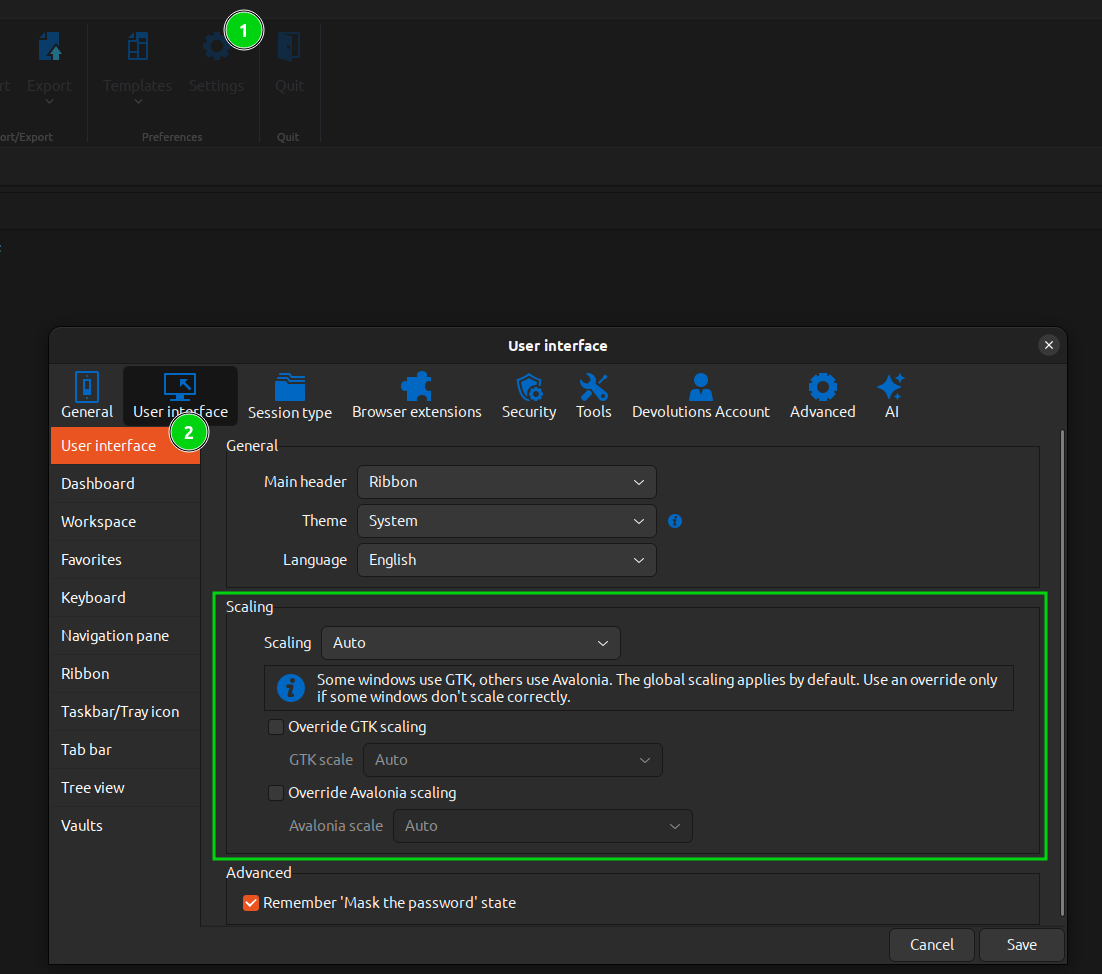
Regards,
Gabriel Dubois
217110c9-5046-4375-918e-f6da8efa2a2f.png
Hi Gabriel,
Thanks for your reply.
I tried the scaling options but some scaling options do have an effect, but not on the problematic parts of the UI.
The generic scaling / GTK scaling options seem to work, but they mostly enlarge the parts of the application that are already displayed correctly, for example the remote session/content. This makes those areas too large, while the small menus, toolbar icons and UI controls remain difficult to use.
The Avalonia scaling option, instead, does not seem to affect any visible part of the application. I tested different values, saved the settings, fully closed RDM and restarted it, but I could not see any change.
Is there a way to check which scaling factor RDM/Avalonia is detecting at startup?
Also, are the top menus, toolbar icons and small UI controls actually rendered by Avalonia, GTK, or another layer?
Thanks.
Hi AndreaB,
Thank you for this additional information. We have just released a new version, 2026.2.0.6, which contains some fixes for Avalonia scaling. Could you please update to this version and let us know if you can still reproduce the issue?
If you are already up to date, or if you can still reproduce the issue with the new version, could you please send us a screenshot of what it looks like?
Regards,
Gabriel Dubois
Hi Gabriel,
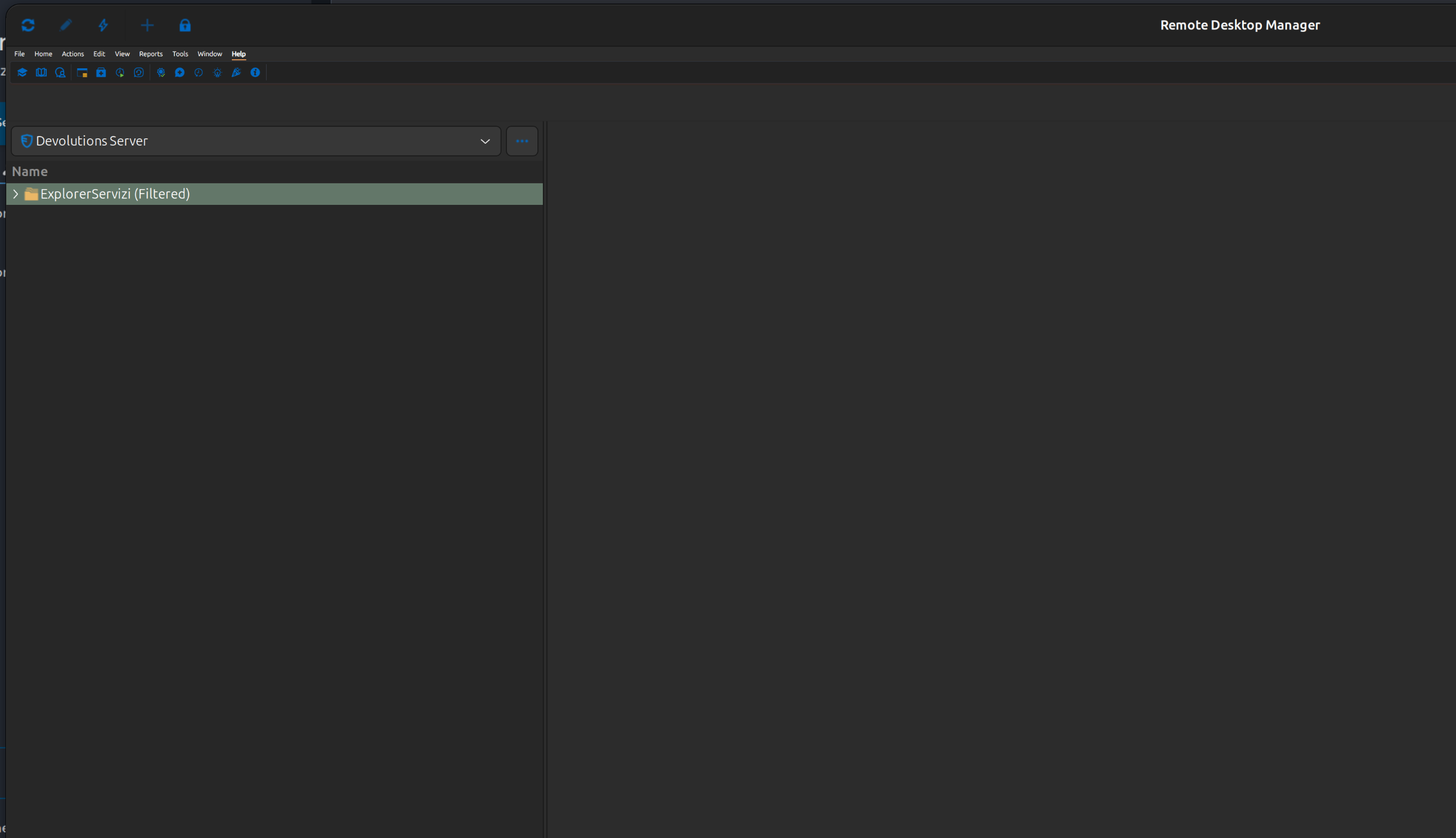
I attached two screenshots to better show the issue.
It may not be immediately obvious from the screenshots because of image scaling/compression, but the icons in the top toolbar are extremely small in real use.
The same applies to the contextual menus related to those toolbar icons: they are very small and difficult to read/click accurately.
Thank you
Andrea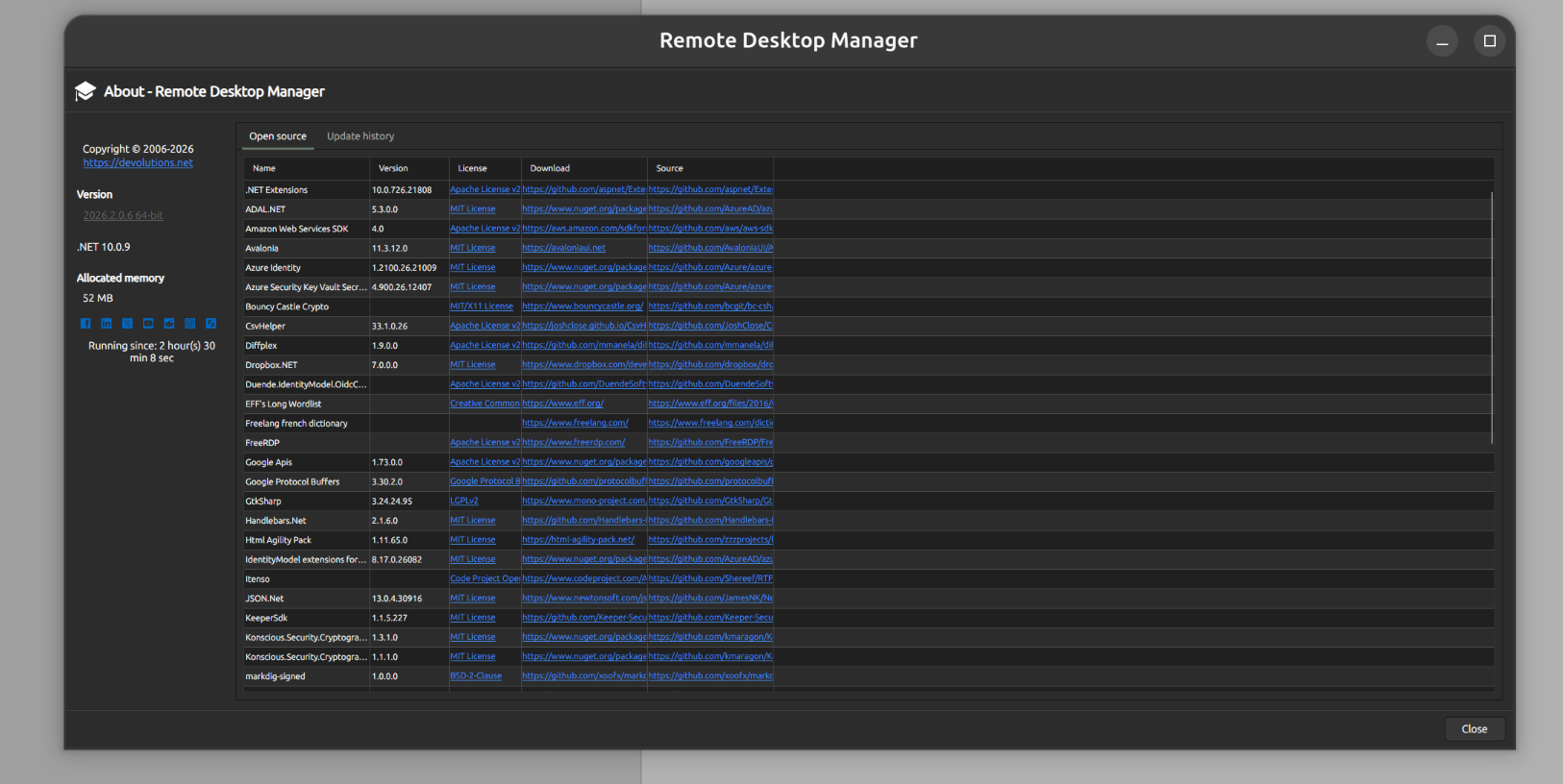
73224128-3c65-4850-a926-b7e43bc38e38.png
50f8e988-acb3-4e44-b11b-81fb930e98d6.png
Hello,
Thank you for your feedback.
Maybe a short recording could give us a better idea of the issue you are describing. I'll send you a link in a private message for you to upload the video to a safe shared folder.
Thank you for your collaboration.
Best regards,
Érica Poirier
Hello,
Thank you for your message.
I have sent you a link because the system did not allow me to upload the video directly.
Best regards,
Hello Andrea,
I wanted to check in and see how things are looking now. Could you let us know whether the interface is still displaying too small, particularly around the toolbar icons and menus you mentioned?
If the issue persists, we'd be glad to pick things back up and continue the investigation with you.
We may need a new quick recording.
Looking forward to your update.
Best regards,
Stephan
HI @Stephan Haupt i'm also experiencing this.
Set up a fresh laptop yesterday (Debian 13 - all updates). Installed RDM v2026.2.1.4. Plugged into a Dell 27" 4k monitor at 150% scaling.
Here's the initial screen - The icons are so small I can't even make them out - The Actions bar and Local Workspace are the expected sizes - you can just make out the "quick connect" in the middle of the screen, and the menu bar icons are so small the mouse pointer obscures them completely.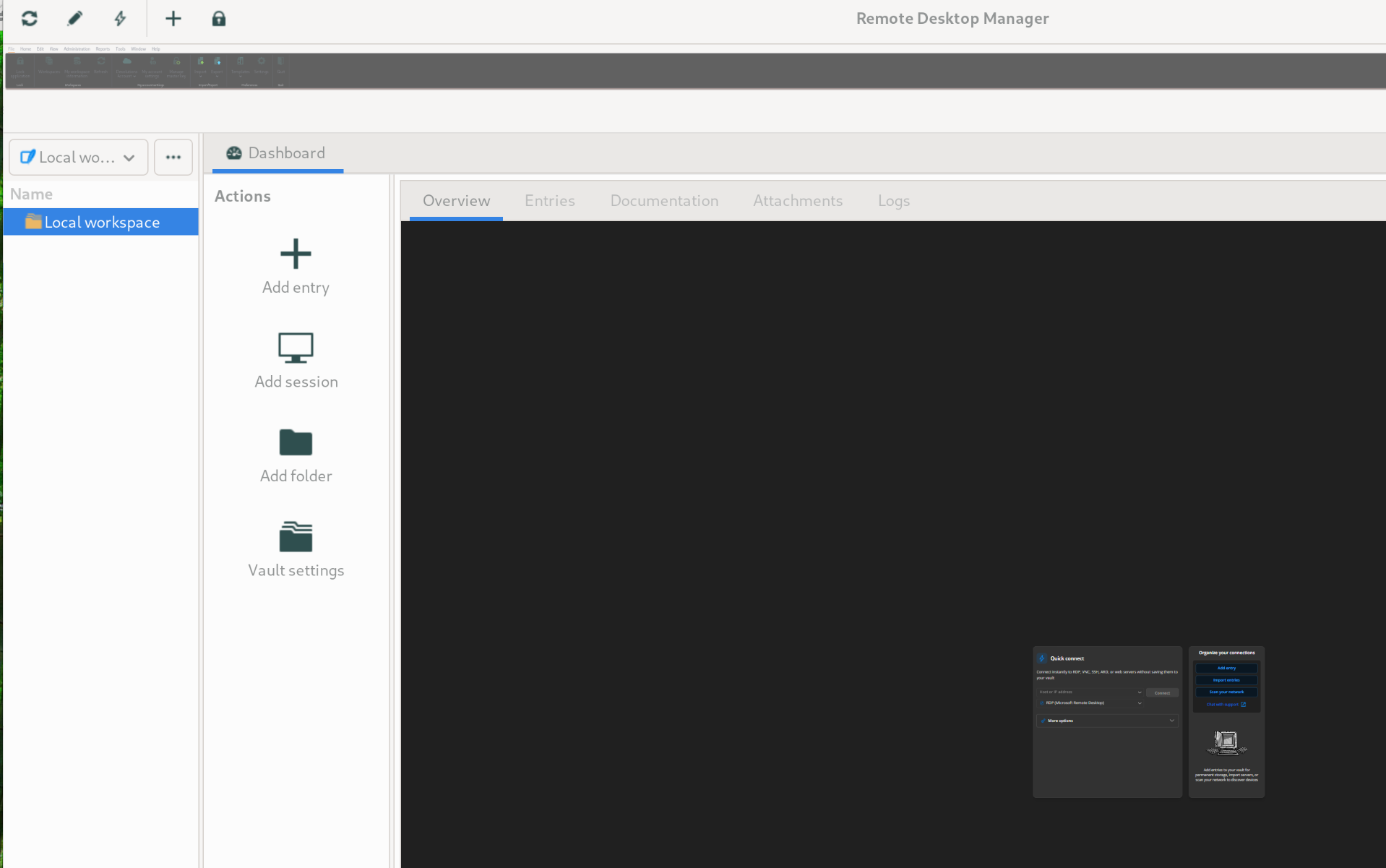
Through trial and error I can get to the Settings\User Interface
I have tried lots of combos of the scaling options - I'm not able to find a good combo though.
Scaling: Auto
GTK: Unchecked
Avalonia: 200%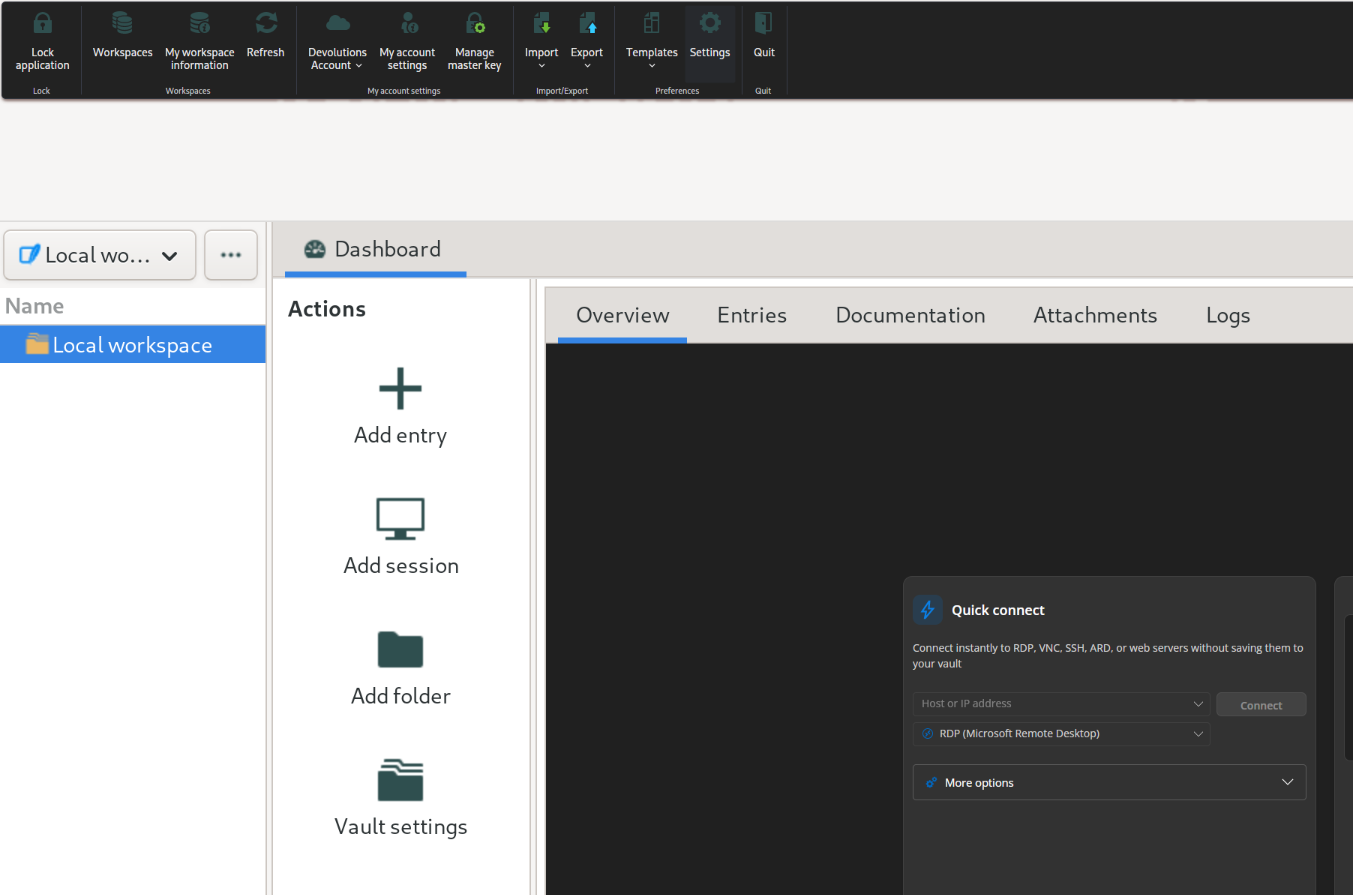
Scaling: Auto (also tried 200% - exact same output)
GTK: 200%
Avalonia: 200%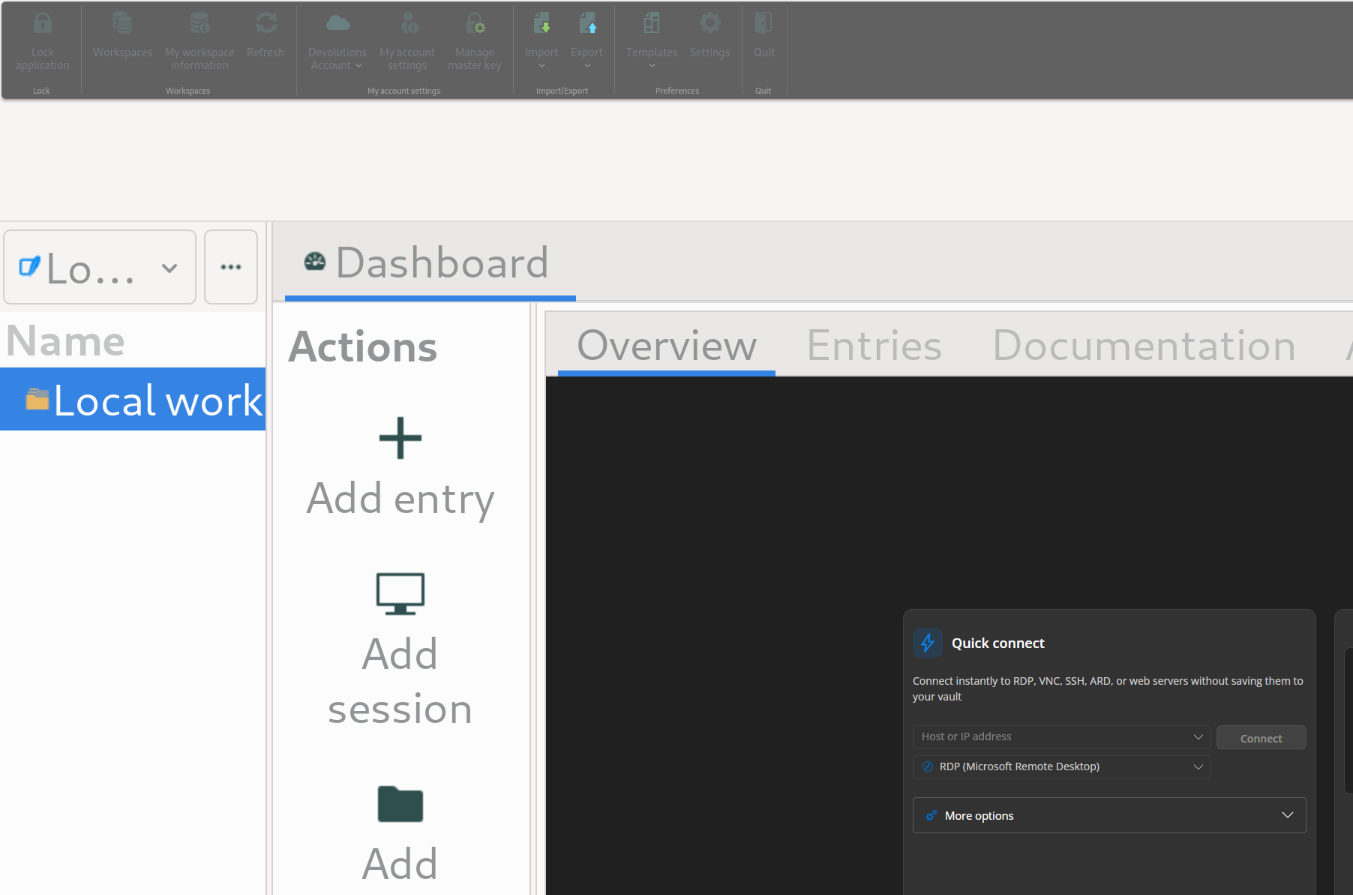
(Note that with this config, the Settings window is ridiculously large - this screenshot is the same screen area as above, without any zoom)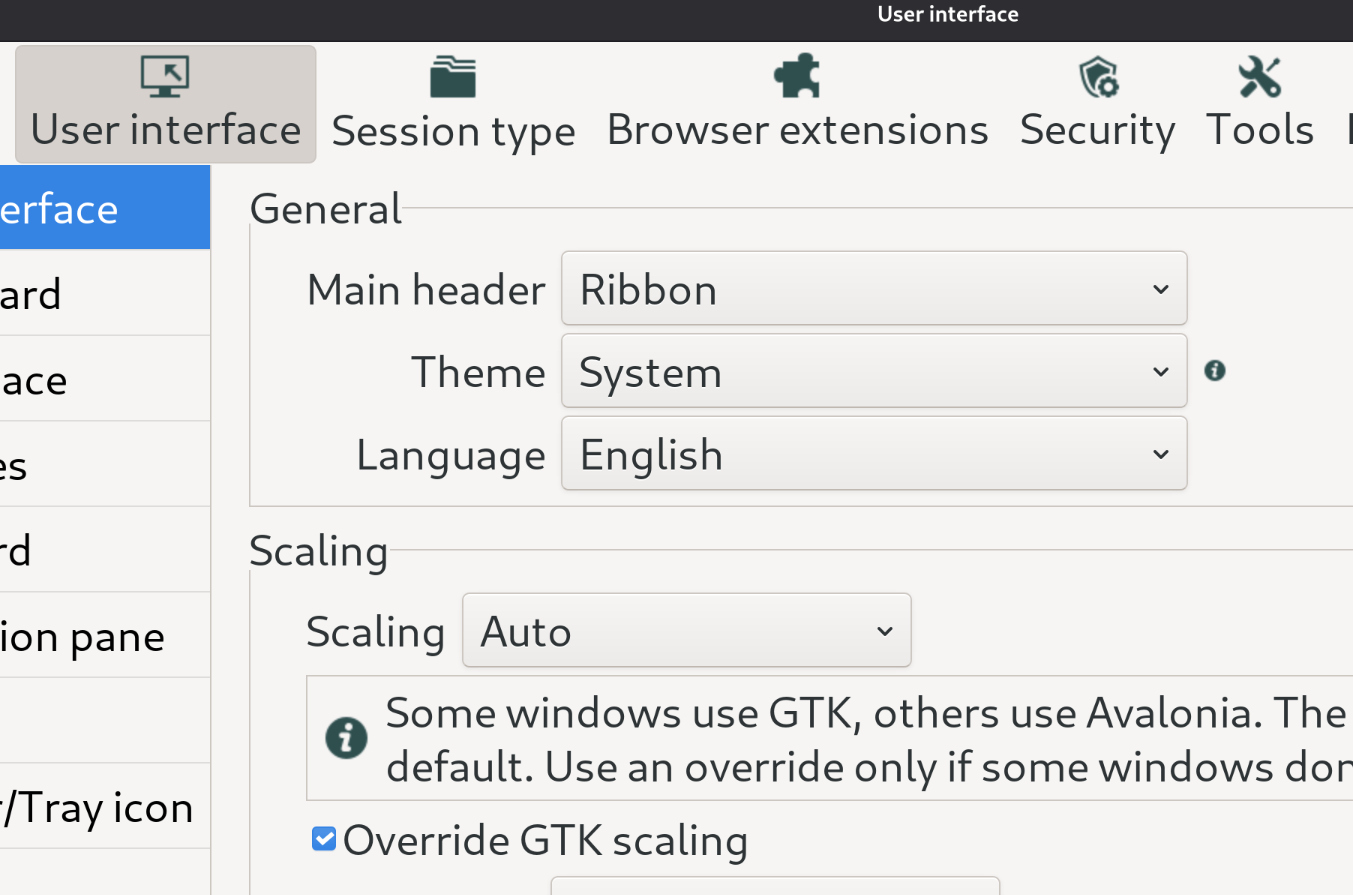
Scaling: 200%
GTK: Unchecked
Avalonia: Unchecked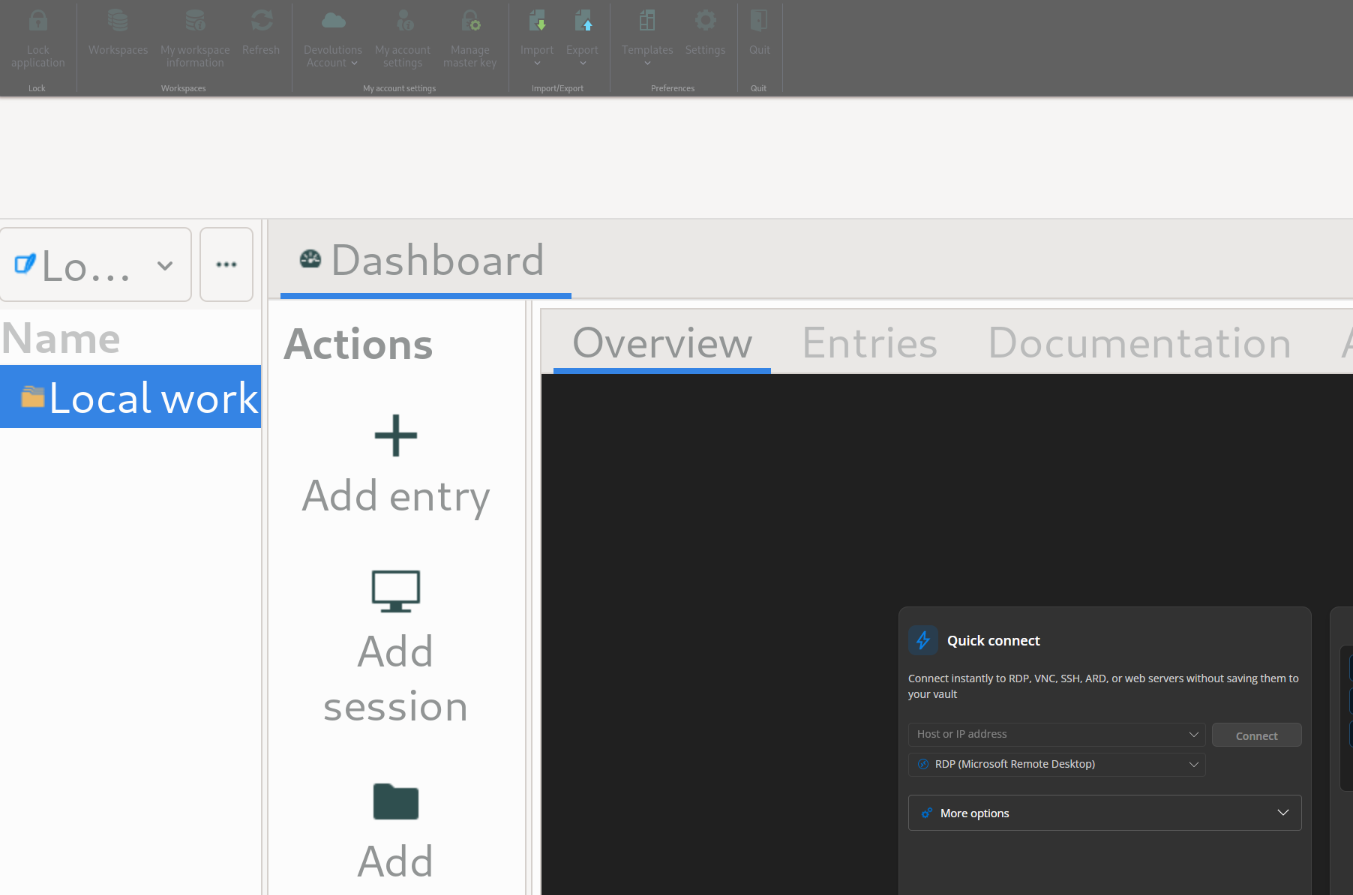
Please let me know if I can provide any more information.
36dd2cba-84dc-4b41-b3a5-a24860ce8491.png
85570bc4-caf0-4b0d-b34b-8593c7dd5ef2.png
d62b92a7-6e2e-46c8-919b-171715caf7f1.png
1298a3bf-4047-4edf-972c-17caba540b02.png
d702a208-889f-4ac2-a9f9-3e352ad7367a.png
I should also add in case it is related - It doesn't seem to like Dark system theme very much;
Here is the "Workspaces" setup - completely unreadable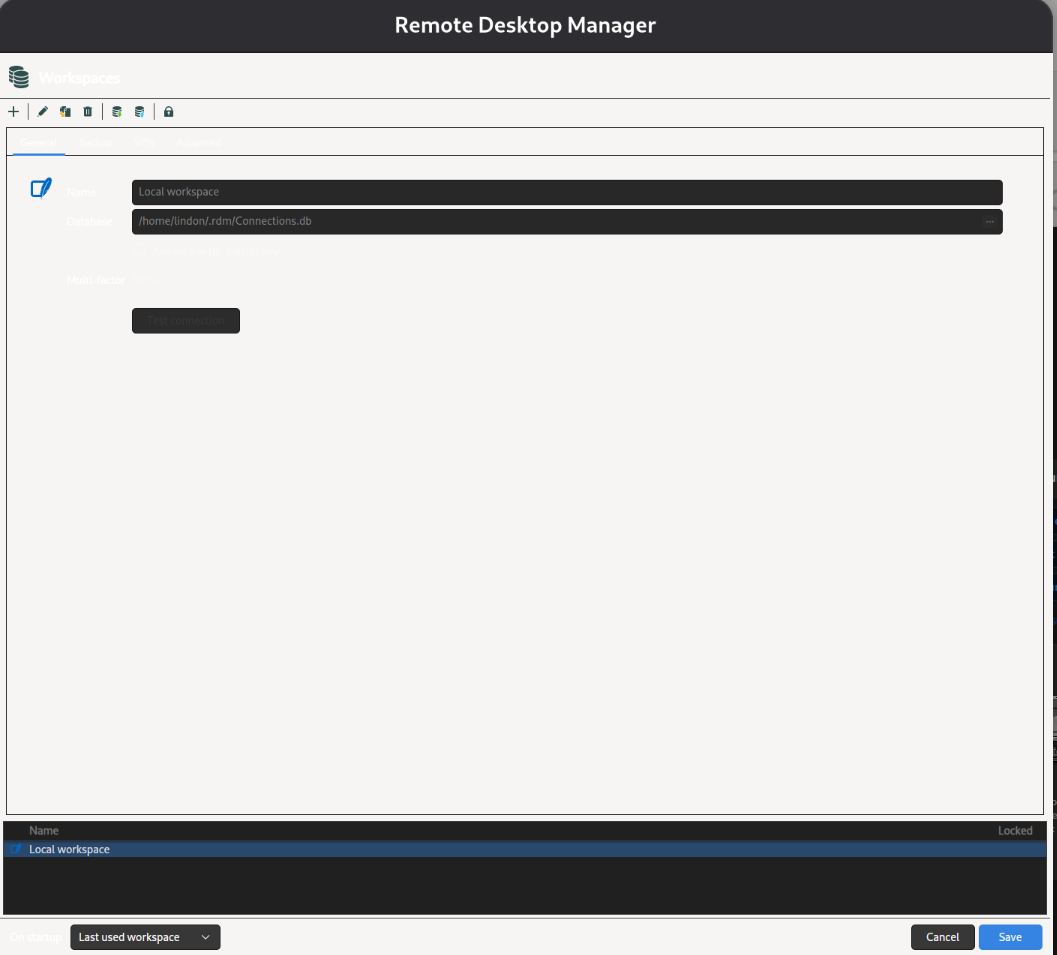
21c0ee78-9b64-40de-9d5f-292c54929ef0.png
Hi all,
depending on what Gnome version you are running the following worked for me:
Gnome >50:
gsettings set org.gnome.mutter experimental-features "[]"
Default: org.gnome.mutter experimental-features "['scale-monitor-framebuffer', 'xwayland-native-scaling']"
Gnome = 50 (Fedora 44):
gsettings set org.gnome.mutter.wayland xwayland-scaling-factor 1 (Default: 0).
After a reboot the GUI was working for me just fine without scaling issues. Seems to be an issue with Avalonia and XWayland. Hoping the native Wayland integration with Avalonia 12.1 will fix this...
BR
Setting xwayland-scaling-factor to 1 as suggested does sort of fix the interface scaling, but at least for me (using 166% scaling for my screen), it comes with two big downsides:
The interface seems to be rendered at 100% and then scaled up, which makes it look blurry, and the mouse cursor becomes extremely large depending on where in the RDM window I move it.
I would suspect that other xwayland apps get similar issues too with this setting set to 1, as this is a general change in the behaviour of xwayland.
I do have a different workaround though, that works better for me but does come with other downsides:
- Set the Avalonia scaling to 200% (which in reality renders as 50%), to make sure that this is written to the configuration file, and than quit RDM.
- Open the file ~/.rdm/RemoteDesktopManager.cfg in a text editor
- Find "<UIAvaloniaScaleFactor>2</UIAvaloniaScaleFactor>", change the number to 4 instead of 2 and save the file
- Open RDM again, and now the scaling is more or less as it should be
The downsides of this is that if any setting in RDM is changed (not for remote connections, but for the application itself), the Avalonia scaling gets overridden and needs to be set in the config file again, and it is of course set to a static value so if I would connect an external display where 100% is the best scaling level, all Avalonia elements would suddenly look too large.
The Avalonia scaling seems to simply be calculated based on the wrong base number, or a wrong understanding of it.
Hello Andrea,
Thank you for your patience while we investigated the UI scaling issue on Linux.
I’m happy to let you know that this issue has been addressed in Remote Desktop Manager 2026.3.
The official 2026.3 release is currently planned for next week. Once it becomes available, please update and test the interface again with your usual Wayland/XWayland and HiDPI configuration.
Please let us know if you still experience any scaling issues after updating.
Best regards,
Stephan
Hello,
Thank you for being so patient!
I'm pleased to inform you that a new version of RDM Linux (2026.3.0.5) has been released, featuring the fix for your issue.
Latest Version: Download RDM
Please let us know if this works or if you encounter any issues.
Best regards,
Maxim Robert
Hi,
i can't speak for Stephan but for me all gui related issues have been resolved with RDM 2026.3.0.5. Really great release @Maxim Robert
BR
Sebastian
Hi,
Yes, I can confirm that the scaling issue is fixed in 2026.3.0.5.
Unfortunately, since updating, the search function has stopped working for me, so I wouldn’t exactly call this a “great release” yet. 🙂
Best regards,
Andrea
Hi Andrea,
Thank you for confirming that the scaling issue is fixed in 2026.3.0.5, and sorry the search is now causing you trouble.
Version 2026.3 brought a lot of changes to the Linux interface, and we are aware of a few search-related issues in it, could you tell us:
- Which search are you using: the filter box in the Navigation pane, or Quick Search (Ctrl+Space)?
- Does the search fail as soon as RDM starts, or only after you have opened a session (for example an SSH tab)?
- In the filter options (the "..." button next to the filter box), is "All vaults" enabled?
- Is the Navigation pane pinned, or set to auto-hide?
A short screen recording would also help a lot.
Best regards,
Stephan
Hi Stephan,
This is not working: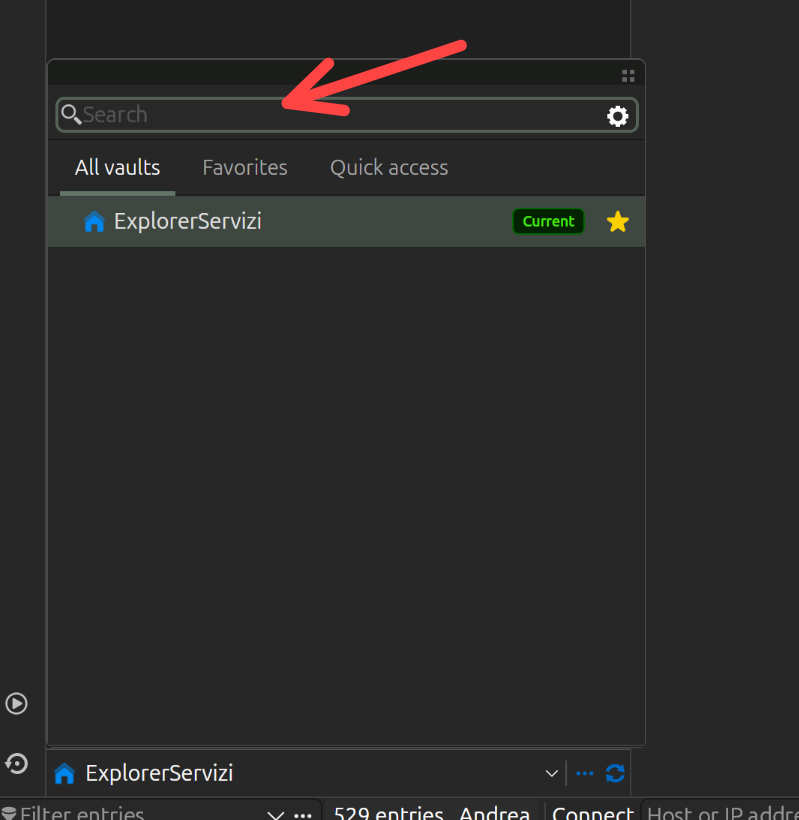
Quick Search (Ctrl+Space) instead is working fine
Andrea
0a7f02d4-a8f2-4d6e-a74e-d8bb5348c382.png
Hi,
Thank you for the screenshot and for confirming that Quick Search (Ctrl+Space) works fine.
So far we haven’t been able to reproduce the problem with the filter box in the Navigation pane on our side. Since your last message, RDM Linux 2026.3.1.1 has come out. It includes several fixes for the All Vaults search, so as a first step, could you please update to that version and test the filter again? You can find the details in the release notes.
If the filter still doesn’t work after the update, could you give us some more details about what exactly fails and your exact workflow:
- What happens when you type in the filter box: no results at all, wrong or incomplete results, or you can’t type into the field at all?
- Does it fail right after RDM starts, or only after you have opened a session (for example an SSH tab)?
- In the filter options (the “...” button next to the filter box), is “All vaults” enabled?
- Is the Navigation pane pinned, or set to auto-hide?
- Which data source are you connected to (local, Devolutions Server, Devolutions Hub, ...)?
A short screen recording of the steps from launching RDM to the moment the filter stops working would help us a lot to reproduce it.
Best regards,
Stephan