RDM Linux 2026.2.0.4 UI extremely small on Ubuntu 26.04 Wayland/XWayland
RDM Linux 2026.2.0.4 UI extremely small on Ubuntu 26.04 Wayland/XWayland

Hi,
I am having a scaling issue with Remote Desktop Manager for Linux 2026.2.0.4 on Ubuntu 26.04 / GNOME Wayland.
The remote session content itself is readable, for example SSH terminal text is fine, but the RDM interface around it is extremely small:
- top menus;
- toolbar icons;
- filter bar;
- small UI controls.
This makes RDM difficult to use on my setup.
Environment
Ubuntu 26.04
GNOME Wayland session
Remote Desktop Manager 2026.2.0.4
5-monitor HiDPI / mixed scaling setup
RDM version:
apt policy remotedesktopmanager
remotedesktopmanager:
Installed: 2026.2.0.4
Candidate: 2026.2.0.4
Monitor layout:
Monitors: 5
0: +*HDMI-4 6144/700x3456/390+2160+2880 HDMI-4
1: +DP-5 2160/600x3840/340+8304+2880 DP-5
2: +DP-6 2160/600x3840/340+0+2880 DP-6
3: +DVI-D-1 3840/600x2160/340+7280+720 DVI-D-1
4: +HDMI-5 5120/610x2880/350+2160+0 HDMI-5
RDM process environment:
XDG_SESSION_TYPE=wayland
WAYLAND_DISPLAY=wayland-0
DISPLAY=:0
GDK_BACKEND=x11
XAUTHORITY=/run/user/1000/.mutter-Xwaylandauth...
So RDM appears to run under XWayland, while the desktop session is Wayland.
What I tried
I already tried the following without success:
AVALONIA_GLOBAL_SCALE_FACTOR=1.5 remotedesktopmanager
AVALONIA_GLOBAL_SCALE_FACTOR=2 remotedesktopmanager
AVALONIA_GLOBAL_SCALE_FACTOR=4 remotedesktopmanager
Also tried per-monitor scaling:
AVALONIA_SCREEN_SCALE_FACTORS='HDMI-4=1.5;DP-5=1.5;DP-6=1.5;DVI-D-1=1.5;HDMI-5=1.5' remotedesktopmanager
and also with scale factor 4.
The variable is visible inside the RDM process environment, but it has no visible effect.
I also tried:
printf 'Xft.dpi: 144\n' | xrdb -merge
printf 'Xft.dpi: 192\n' | xrdb -merge
No effect.
I tested with a clean RDM profile by moving ~/.rdm, but even the initial setup wizard starts extremely small, so it does not seem to be caused by my profile or saved layout.
I also tried gamescope. It can make the whole window larger, but it causes mouse/input and resize issues, so it is not usable as a real workaround.
Strange behavior
A couple of times RDM seemed to start with normal scaling by itself, but I could not reproduce why. Most of the time it starts with the UI extremely small.
This makes me suspect a DPI/scaling detection issue related to XWayland, monitor ordering, startup timing or initial window placement.
Questions
Is this a known issue with RDM Linux 2026.2.0.4 on Wayland/XWayland with HiDPI/fractional scaling?
Is there an official way to force RDM UI scaling on Linux?
Does RDM read any specific config file, command line option or environment variable for UI scaling?
Thanks.
All Comments (1)
Hello AndreaB,
Can you please try to change the Avalonia scaling value in "Settings > User interface > User interface > Scaling" and let us know if that helps?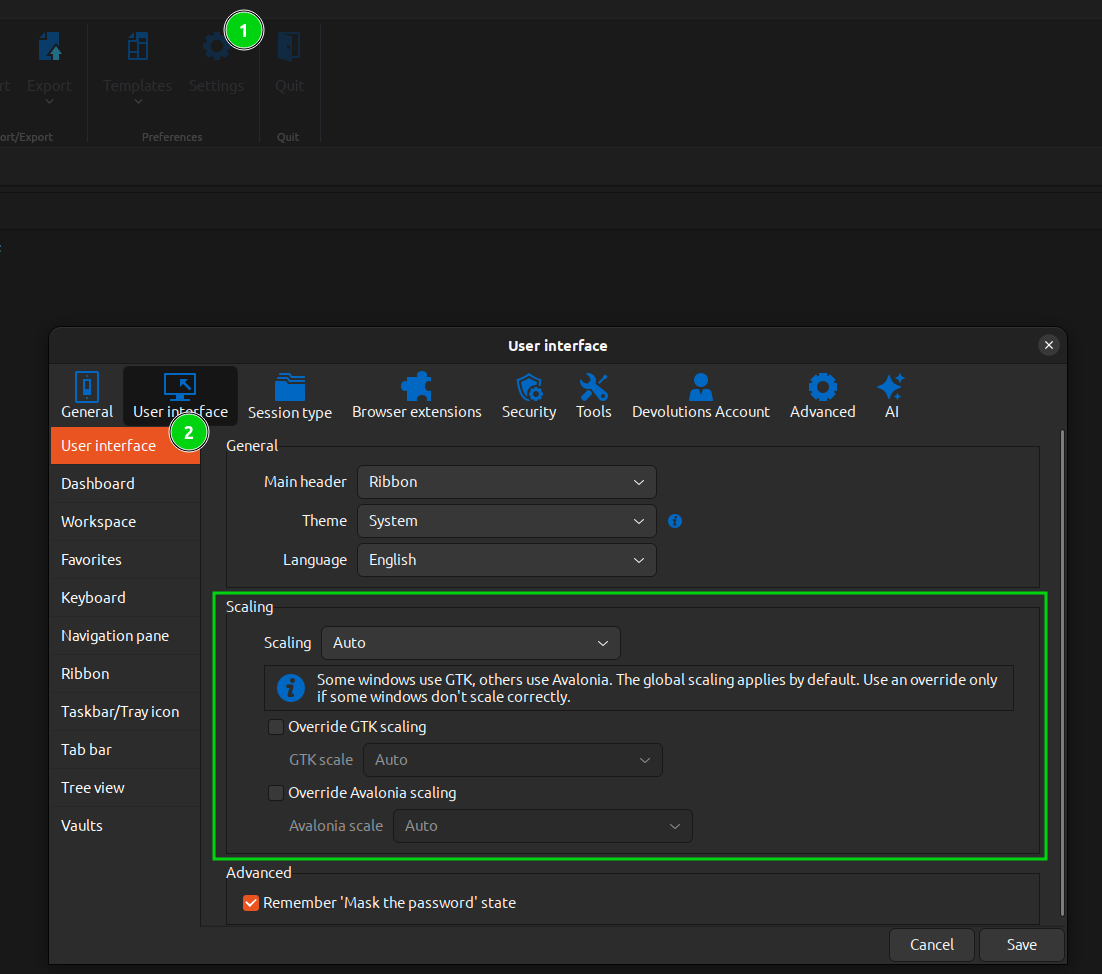
Regards,
Gabriel Dubois
217110c9-5046-4375-918e-f6da8efa2a2f.png
