$Secret: syntax returns empty for Azure Key Vault backed variables in custom environments — 2026.2.0 regression
$Secret: syntax returns empty for Azure Key Vault backed variables in custom environments — 2026.2.0 regression

Description:
- Affected version: 2026.2.0
- Working version: 2026.1.6
- Environment: Windows, custom PowerShell 7.5 environment, Azure Key Vault via Az.KeyVault
Issue: All AKV-backed secret variables return empty when accessed via $Secret:<name> syntax in a custom PS 7.5 environment after upgrading from 2026.1.6 to 2026.2.0.
What works:
- Get-Secret -Name <name> -Vault AzureKeyVault retrieves the value correctly
- Get-SecretVault shows AzureKeyVault registered and set as default
- Plain PSU variables (e.g. $AzureTenantID) resolve correctly
- Same secrets resolve correctly on a separate instance still running 2026.1.6
What doesn't work:
- $Secret:<name> returns empty for any AKV-backed variable
- Affects all AKV secrets, not specific to one variable
All Comments (5)
@vmorrison What version of Az.KeyVault do you have installed? Do you have any errors in the PSU logs related to this?
Adam Driscoll
PowerShell Expert and Software Architect at Devolutions
Hi Adam, we are on KV 6.3.1. We have two environments: DV (2026.2.0) and PD (5.5.2). DV broke after the update to 2026.2.0 and PD is still working fine.
All of the keyvault ones show this error. 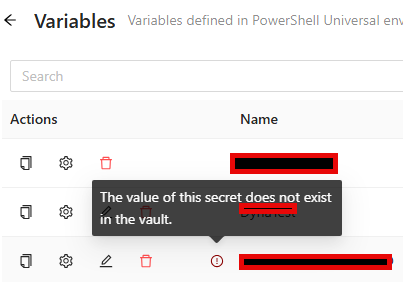
If I run the script that is called from vaults.ps1 it executes without error.
#
##
### DO NOT SCHEDULE THIS SCRIPT TO RUN. IT IS RAN VIA VAULTS.PS1 ON START UP.
### IT MUST BE RAN WITHIN AN NON DEFAULT ENVIRONMENT (NOT INTEGRATED).
##
#
# This script will allow PSU to connect to the Azure Key Vault during restarts of PSU
Write-Information "Starting to register the Azure Key Vault"
Try {
$SubscriptionID = "REMOVED"
$VaultName = "REMOVED"
# Import the modules
Write-Information "Importing the modules"
Import-Module -ErrorAction Stop Az.KeyVault
Import-Module -ErrorAction Stop Az.Accounts
Import-Module -ErrorAction Stop CredentialManager
# Get the credentils
Write-Information "Get the credentials for connecting to Azure from the local credential manager"
$Credentials = Get-StoredCredential -Target REMOVED
# Connect to Azure
Write-Information "Connect to Azure"
Connect-AzAccount -ErrorAction Stop -Credential $Credentials -SubscriptionId $SubscriptionID -WarningAction SilentlyContinue | Out-Null
# Connect to the key vault. This will allow the PSU processes to access the vault
Write-Information "Register the vault"
Register-SecretVault -ErrorAction Stop -ModuleName Az.KeyVault -Name AzureKeyVault -VaultParameters @{
AZKVaultName = $VaultName
SubscriptionId = $SubscriptionID
} -AllowClobber
} catch {
Write-Error "Failed to register Key Vault: $($VaultName): $($_.exception.message)"
}
Write-Information "Completed successfully"
I do see the following errors in DV.
2026-06-08 07:12:57.343 -05:00 [INF][PowerShellUniversal.Automation.JobProcessManager] Starting job using Process as interactive.
2026-06-08 07:12:59.620 -05:00 [ERR][PowerShellUniversal.Secrets.SecretManagerService] Failed to read secret: Your Azure credentials have not been set up or have expired, please run Connect-AzAccount to set up your Azure credentials.
Method not found: 'Void Azure.Identity.Broker.SharedTokenCacheCredentialBrokerOptions..ctor(Azure.Identity.TokenCachePersistenceOptions)'.
Microsoft.Azure.Commands.Common.Exceptions.AzPSArgumentException: Your Azure credentials have not been set up or have expired, please run Connect-AzAccount to set up your Azure credentials.
Method not found: 'Void Azure.Identity.Broker.SharedTokenCacheCredentialBrokerOptions..ctor(Azure.Identity.TokenCachePersistenceOptions)'.
---> System.MissingMethodException: Method not found: 'Void Azure.Identity.Broker.SharedTokenCacheCredentialBrokerOptions..ctor(Azure.Identity.TokenCachePersistenceOptions)'.
at Microsoft.Azure.PowerShell.Authenticators.SilentAuthenticator.GetTokenCredentialOptions(SilentParameters silentParameters, String tenantId, String authority, PowerShellTokenCacheProvider tokenCacheProvider)
at Microsoft.Azure.PowerShell.Authenticators.SilentAuthenticator.GetTokenCredentialOptions(SilentParameters silentParameters, String tenantId, String authority, PowerShellTokenCacheProvider tokenCacheProvider)
at Microsoft.Azure.PowerShell.Authenticators.SilentAuthenticator.Authenticate(AuthenticationParameters parameters, CancellationToken cancellationToken)
at Microsoft.Azure.Commands.Common.Authentication.DelegatingAuthenticator.TryAuthenticate(AuthenticationParameters parameters, CancellationToken cancellationToken, Task`1& token)
at Microsoft.Azure.Commands.Common.Authentication.Factories.AuthenticationFactory.Authenticate(IAzureAccount account, IAzureEnvironment environment, String tenant, SecureString password, String promptBehavior, Action`1 promptAction, IAzureTokenCache tokenCache, String resourceId)
at Microsoft.Azure.Commands.Common.Authentication.Factories.AuthenticationFactory.GetServiceClientCredentials(IAzureContext context, String targetEndpoint, String resourceId)
--- End of inner exception stack trace ---
at Microsoft.Azure.Commands.Common.Authentication.Factories.AuthenticationFactory.GetServiceClientCredentials(IAzureContext context, String targetEndpoint, String resourceId)
at Microsoft.Azure.Commands.KeyVault.Models.KeyVaultDataServiceClient..ctor(IAuthenticationFactory authFactory, IAzureContext context)
at Microsoft.Azure.Commands.KeyVault.Models.KeyVaultCmdletBase.get_DataServiceClient()
at Microsoft.Azure.Commands.KeyVault.GetAzureKeyVaultSecret.ExecuteCmdlet()
at Microsoft.WindowsAzure.Commands.Utilities.Common.AzurePSCmdlet.ProcessRecord()
5b4f6384-3ef9-4f0e-b409-c96f5e21f0c6.png
Hi @vmorrison,
Thanks for the logs,
That confirms it. This is a known 2026.2.0 regression, not an actual credential issue. The "credentials expired" message is misleading; the real error is an assembly version conflict:
MissingMethodException: ...Azure.Identity.Broker.SharedTokenCacheCredentialBrokerOptions..ctor(Azure.Identity.TokenCachePersistenceOptions)
In short: PSU 2026.2.0 ships a newer Azure.Identity than the Az modules expect, so when $Secret:<name> is resolved inside the PSU host process, two incompatible versions collide. That's why Get-Secret and your vaults.ps1 work (they run in your separate PS 7.5 environment) but $Secret: fails — and why 2026.1.6 is fine.
Workaround: in the affected scripts, swap the $Secret: syntax for an explicit Get-Secret call, run in your non-integrated PS 7.5 environment:
# instead of: $value = $Secret:MySecretName
$value = Get-Secret -Name 'MySecretName' -Vault AzureKeyVault -AsPlainText
That's the same call you've already confirmed works. If refactoring isn't practical, rolling DV back to 2026.1.6 also resolves it.
Best regards,
Patrick Ouimet
Hi Patrick,
Thank you for the clarification. We tested Get-Secret in a PSU job script and can confirm it does retrieve the value successfully. However, we are seeing the result returned as CLIXML-wrapped text rather than a plain string, even with -AsPlainText specified. We are able to work around this by parsing the XML to extract the value:
$raw = Get-Secret -Name 'MySecretName' -Vault AzureKeyVault -AsPlainText
$val = ([xml]$raw).Objs.S
So the workaround is functional, but it requires changes to all scripts that currently use $Secret: syntax, plus the additional XML parsing step.
Can you confirm whether the underlying assembly conflict will be addressed in an upcoming PSU release? We would prefer to avoid refactoring all of our scripts if a proper fix is on the roadmap.
Thanks,
Vance
Hello Vance,
Regrettably, the Support Department cannot provide an exact release date as the full process (Build – Quality Assurance – Release) is out of our control.
The development team needs to implement a fix. After that, a series of events must take place:
- A pull request must be approved, by a peer primarily, but sometimes also by a security specialist;
- A build must be generated;
- The whole build contains typically many fixes, which each must be validated by our QA department
- if need be, the build is rejected for a specific issue, or a combination thereof, which would trigger another build cycle
Best regards,
Patrick Ouimet