Custom File Naming for Session Recordings via Devolutions Gateway
Custom File Naming for Session Recordings via Devolutions Gateway
1 vote

Hello,
After several tests, we noticed a difference in behavior between local recording through RDM and remote recording through Devolutions Gateway.
We understand that:
- Local recording via RDM is managed directly from the user workstation, which provides more flexibility regarding certain output parameters, specially the generated file name.
- Remote recording through the Gateway is designed more for centralized management, session traceability, and auditing purposes, with a more controlled and consistent handling of recordings.
However, in our environment, we would need the ability to customize file names for recordings generated through Devolutions Gateway as well, in order to better integrate them into our workflow and archiving processes.
Would it be possible to consider adding this functionality in a future version of Devolutions Gateway?
Thanks for your feedback.
All Comments (2)
Hello,
Thank you for the feedback.
Before we evaluate this, we would like to better understand what level of customization you need. Today, Gateway recordings rely on a structured layout using internal identifiers, such as the session ID, recording manifest, and generated recording file names. This structure is important because Gateway uses it to know where recordings are stored, how to list them, retrieve them, delete them, and associate them with the correct session. Because of that, naming customization may need to be limited to avoid breaking recording traceability and retrieval.
We should also mention that Gateway currently has access to a limited amount of metadata when saving recording files. Depending on what you need in the filename, we may need to evaluate whether additional metadata should be passed to Gateway or stored with the recording.
Could you clarify the following?
What filename is currently generated in your environment, and what filename would you like to see instead?
Do you need to customize the actual file name stored on the Gateway, or would it be enough to customize the name when the recording is downloaded, exported, or archived?
Which values would you need in the filename? For example: session ID, username, target host, start date/time, protocol, entry name, ticket number, or custom fields.
If some of those values are not currently available to Gateway, would it still be useful if we supported a smaller set first, such as session ID, timestamp, protocol, and recording type?
Are you reading the recordings directly from the Gateway storage folder, or retrieving them through an API or another integration?
This will help us determine whether the best approach is to support a display/export filename, a limited configurable naming template, or a broader metadata enhancement for Gateway recordings.
Benoit Cortier
Hello,
Thank you for your feedback. No problem, please find the details below.
In first about my environnement, i have :
- 1 server Devolutions-server + 1 server MSQL
- 1 Devolutions Gateway farm with 2 Gateway
- In the Dvls Gateway 1 & 2, the "RecordingPath" is customized --> Dedicated storage
What filename is currently generated in your environment, and what filename would you like to see instead?
Currently, the files are generated as follows:
- Directory Name = ID (9046b68c-b219-4194-8671-40acfbd54cde)
- Recording Name = recording-0.webm
As part of the local testing, I customized it as follows, and this would be the desired result:
- SRVTEST01 - John Doe - 2026-05-19 08 h 48.webm
Do you need to customize the actual file name stored on the Gateway, or would it be enough to customize the name when the recording is downloaded, exported, or archived?
At the start/end of each session via RDM, the directory name is therefore generated using its UID, and the session file is named recording-0. This is where our requirement comes into play, namely customizing the directory name or the .webm filename.
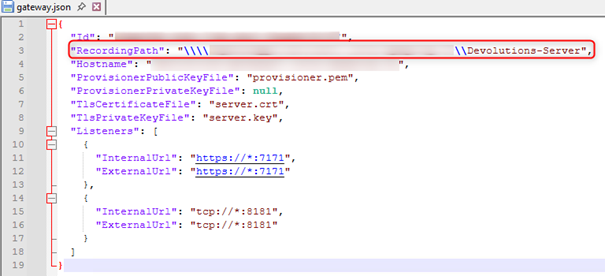
Regarding the recordings, they are not stored on the Gateway, but directly on a dedicated storage space.
Configuration of my gateway.json:
Which values would you need in the filename? For example: session ID, username, target host, start date/time, protocol, entry name, ticket number, or custom fields.
For my tests, I used the following variables:
$NAME$ - $DATA_SOURCE_USERPROFILE_FIRSTNAME$ $DATA_SOURCE_USERPROFILE_LASTNAME$ - $DATE$ $TIME$
Result :
Server – Users – Date & Time
Are you reading the recordings directly from the Gateway storage folder, or retrieving them through an API or another integration?
The recordings are accessed directly from the destination configured in the gateway.json.
Nothing is stored on the recording gateways.
Regards
aba1dc2e-b48a-4a33-aa04-83a2ecca5a2e.png