LDAP Authentication to the wrong Domain

We are using Devolutions Server v2025.3.19.0 and are experiencing the following issue.
It has already happened three times this month that suddenly no login with a domain user was possible.
The Devolutions Server is a member of Domain A. The user accounts are located in Domain B.
When the problem occurs, we observe that the LDAP account configured on the Devolutions Server (Administration > Server settings > Authentication > Domains) for the domain suddenly authenticates against Domain A instead of Domain B. We can clearly identify this because we see audit failure events (Event ID 4625) for the ldap account on the domain controllers in Domain A.
This state persists until we restart the server.
When the issue occurs, it always happens at the same time of day. In the Windows Event Log, we consistently see the following events. It is clear that these events can trigger this issue: (These events occur daily but do not always lead to the problem.)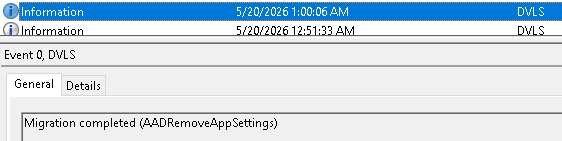
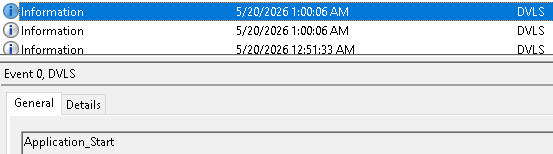
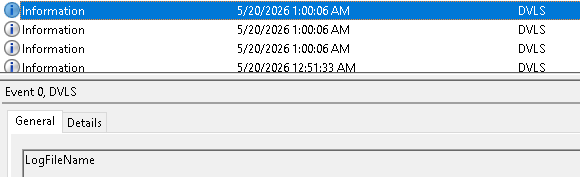
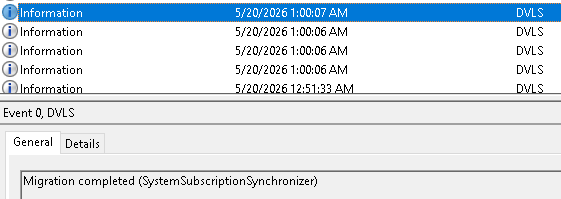
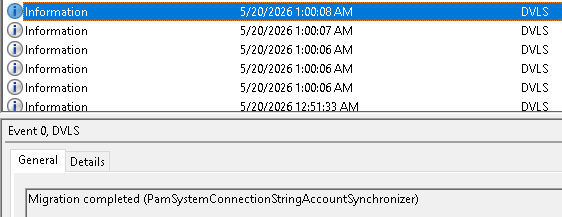
Is this behavior a known issue? Are there any configuration options to resolve this problem?
6b92274c-83f6-4e2a-ac5c-1d717111e03f.png
6ea67444-6943-4e35-b7b3-2653a60e38dc.png
ed986072-2378-4a81-904d-9e7c0df06635.png
32029fd9-fd69-4b4a-8ae2-3caf33a7ef46.png
05be88df-0af9-4cc9-bd5c-a07812769203.png
All Comments (2)
Hello Thomas,
Thank you for reaching to our forum, here are some practical steps to stabilize domain authentication and troubleshoot the issue.
Set a preferred domain controller (if was not set before)
Open Administration → Server settings → Authentication → Domains, select your domain in the list, and go to its Advanced settings. In the Preferred domain controller box, specify the fully qualified name or IP of the domain controller you want the server to query. The documentation explains that this option “forces queries to go to a known, reliable domain controller (DC)”. Using a preferred controller prevents Devolutions Server from picking another controller or falling back to the server’s local domain if a lookup fails.
Review the Domain users and user groups cache (if was not set before)
Devolutions Server can cache domain users and groups. You manage this cache from the Domains page via the Settings button. Within the Domain users and user group cache section, there is an Enable domain cache feature toggle and a Recurrence schedule that refreshes the cache at set intervals. If your environment is sensitive to network glitches or domain‑controller maintenance, consider disabling this cache or increasing the refresh interval. Disabling the cache prevents automatic refreshes that could mis‑identify the domain when connectivity is intermittent.
See related doc
Enable debug and scheduler logging
To see what happens at the moment of failure, increase the logging level. Go to Administration → Server settings → Logging, enable Log debug information, and specify a Scheduler log path. Ensure the scheduler service account has write permission to that folder, then restart the Devolutions Server scheduler service. The debug and scheduler logs will show whether a domain controller becomes unreachable or whether a cache refresh is triggering the problem.
Additional tips
- Verify network connectivity to your domain controllers and make sure any scheduled maintenance doesn’t overlap with the cache refresh. Adjust the refresh schedule or temporarily disable the cache when controllers are offline.
- If the domain cache becomes inconsistent, you can reset it from Administration → Server settings → Reset server cache. Resetting the domain cache clears cached data and reloads all user and group memberships from Active Directory.
- Keep an eye on the debug logs after making these changes; they should pinpoint whether the issue stems from a cache refresh, network hiccup, or another factor.
Implementing a preferred domain controller, adjusting or disabling the domain user‑cache refresh, and turning on detailed logs will help stabilize domain authentication and provide clarity on where the problem originates. Feel free to share the debug log excerpts if you need further assistance.
Best regards,
Michel Audi
I followed your suggestions and configured a prefered domain controller and also enabled the dubug log.
The "Domain users and user groups cache" feature doesn't exist in our Devolutions Server.
However, I hope the new setting resolves the issue, or at least that we get more details in the debug log. Thanks.