RDM 2026.1.2.2 Terminal syntax highlighting import/export

Hi.
Awesome that it was added and works.
I added two profiles, selected one as default. Works.
Now, I wanted to select second one for specific host and in host entry I can't see a way to select globally added profile. I can only make a custom one.
So, I exported profile I added globally to XML and tried to import in custom profile in host entry - "Unable to import the file aaaa.xml"
Why?
All Comments (2)
Hi @btojs,
If I understand correctly, you want to export a profile from your Settings and import it into a host entry? To do that, you need to export that profile's configurations from the editing window (see picture). After that, you will be able to import that file into your host entry's custom syntax highlighting screen. The export button that you see in the Settings under Session type>Terminal>Syntax Highlighting is for exporting the complete list of profiles instead of a single one.
I sincerely hope this helps.
Best regards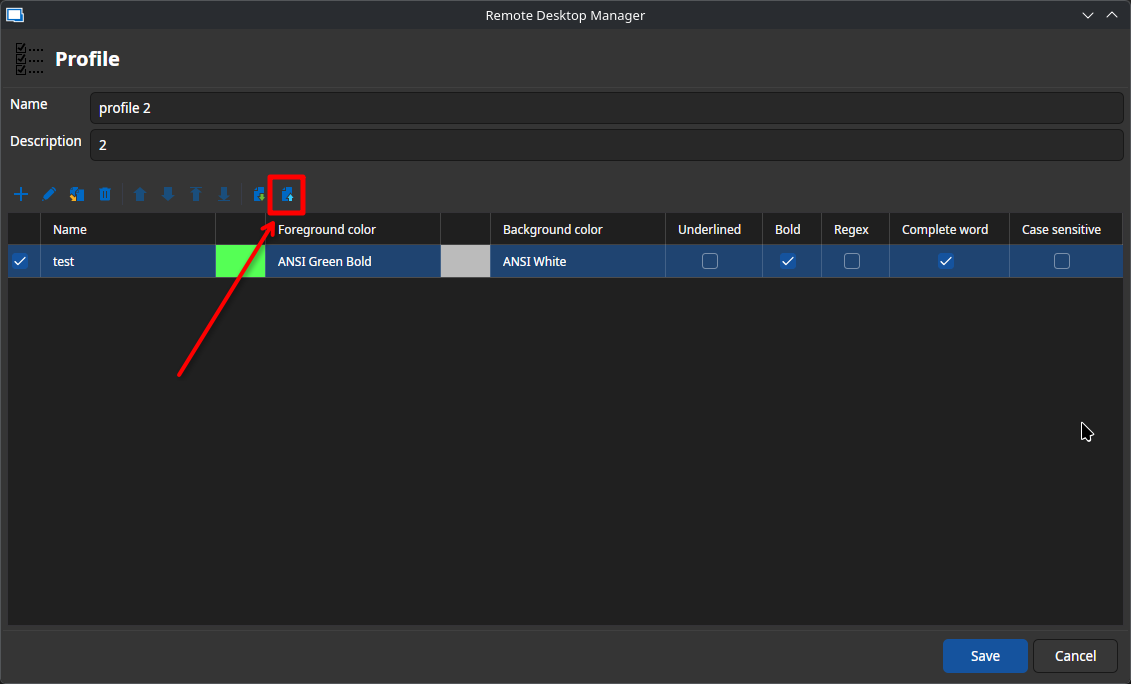
Nicolas Parr
syntax highlighting profile export.png
Hm.. That is intuitive. Maybe change label in global settings to Export ALL/Import ALL or global? Right now it look like it means to export selected one.
In profile too I think it should be Import/Export PROFILE. I tought it was Import/Export RULE.
Anyway - I hope that profiles added globally will be selectable in host entry in the future.