"Failed to start script" from UI - Schedules unaffected - Anyone else? How do you monitor it?
"Failed to start script" from UI - Schedules unaffected - Anyone else? How do you monitor it?

Product: PowerShell Universal
Version: 5.6.13
Hi everyone,
Running PSU on a linux docker image and occasionally seeing a “Failed to start script” error when trying to manually trigger scripts from the admin UI.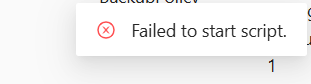
The strange behavior is that all scheduled jobs continue to run perfectly fine — no impact on automation whatsoever.
What makes this particularly tricky to monitor is that no job is ever created when this happens — so it doesn’t appear in:
- The Jobs list
- Failed job counts
- The notification bell (or
/api/v1/notification) - Any health check
The error only surfaces as a small toast message in the UI and then disappears.
A few questions for the community:
- Has anyone else encountered this where UI manual runs fail but schedules are unaffected?
- Did you identify the root cause?
- How are you monitoring or detecting this since it leaves no trace in the standard PSU observability tools?
Would love to hear how others are handling it.
Thanks
b4e484a74cc337f769f12c6f077ad69a4de62ca9.png
All Comments (1)
Hey, I also use a Docker setup and did not run into this problem yet.
About how to monitor jobs, maybe this helps you diagnose what’s going on.
docs.powershelluniversal.com
I would also recommend checking the container logs when you see this error. Often, there are clues as to what is going wrong.