Can two New-UDSelect dropdowns be set up so the second updates dynamically based on the first selection?
Can two New-UDSelect dropdowns be set up so the second updates dynamically based on the first selection?

Hi,
Is it possible to create two dropdown menus using New-UDSelect, where the second dropdown updates dynamically based on the selection made in the first one? For example, if the first dropdown includes options like Beginner, Intermediate, and Advanced, selecting Beginner would display only the corresponding beginner options in the second dropdown, selecting Intermediate would show only intermediate options, and selecting Advanced would display only advanced options.
All Comments (4)
Yes, that is possible.
With Sync-PSUElement in the -OnChange block and a New-UDDynamic around the second UDSelect that gets the currently selected value with Get-UD-Element. This helps if you have multiple elements that should change depending on the selected value.
You can also set the new options for the second UDSelect in the -OnChange block if this is a small change.
It seems there is a clear first and second step for your app. Take a look at the UDStepper, which might be the best fit for that case.
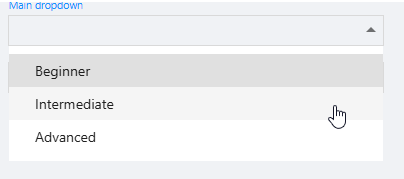
Hi, like dynamic wrote its easy to build, for example:
$dropdownLookup = @{
    value_option_1 = [ordered]@{
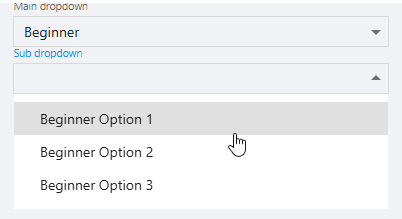
        "Beginner Option 1" = "beginner_value_1"
        "Beginner Option 2" = "beginner_value_2"
        "Beginner Option 3" = "beginner_value_3"
    }
    value_option_2 = [ordered]@{
        "Intermediate Option 1" = "intermediate_value_1"
        "Intermediate Option 2" = "intermediate_value_2"
        "Intermediate Option 3" = "intermediate_value_3"
    }
    value_option_3 = [ordered]@{
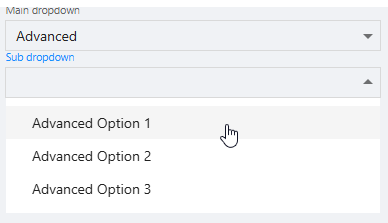
        "Advanced Option 1" = "advanced_value_1"
        "Advanced Option 2" = "advanced_value_2"
        "Advanced Option 3" = "advanced_value_3"
    }
}

New-UDSelect -Id "select_mainDropDown" -Label "Main dropdown" -Option {
    New-UDSelectOption -Name "Beginner" -Value "value_option_1"
    New-UDSelectOption -Name "Intermediate" -Value "value_option_2"
    New-UDSelectOption -Name "Advanced" -Value "value_option_3"
} -OnChange {
    Sync-UDElement -Id "dynamic_select_subDropdown"
}

New-UDDynamic -Id "dynamic_select_subDropdown" -Content {
    $mainDropDownElement = (Get-UDElement -Id "select_mainDropDown").Value
    if(-not $mainDropDownElement) {
        $disabled = $true
    } else {
        $disabled = $false
    }
    New-UDSelect -id "select_subDropDown" -Label "Sub dropdown" -Option {
        if($mainDropDownElement) {
            $dropdownLookup.$mainDropDownElement.GetEnumerator() | ForEach-Object {
                New-UDSelectOption -Name $_.Key -Value $_.Value
            }
        }
    } -Disabled:$disabled
}
5f05edda60c2045814bdd1df3dba17578eed99ef.png
a1f1bf937fd6be91a208bcb025026d5e9fc8faa9.png
d0590d634e86df4553b2667cfcef99e224873711.png
Thanks Ms-Marox, this has been really helpful. I also managed to getting working using the following:
New-UDApp -Content {
$ClassType = @("Select Role", "Beginner", "Intermediate","Advance")

$beginners = @("Select Role", "B1", "B2","B3")

$intermediates = @("Select Role", "I1", "I2", "I3")

$advanced = @("Select Role", "A1", "A2", "A3")

$cources = @("Select Class")


New-UDSelect -Label 'Class' -Id 'selectClass' -DefaultValue $Classtype\[0\] -Option {

    foreach ($class in $classtype) {

        New-UDSelectOption -Name $class -Value $class

    }

} -OnChange {

    if ($Eventdata -eq "Beginner") {

        $cources = $beginners

        Clear-UDElement -Id 'addElement1'

        Add-UDElement -ParentId 'addElement1' -Content {

            New-UDSelect -Label 'beginners' -Id 'selectbeginners' -DefaultValue $cources\[0\] -Option {

                foreach ($cource in $cources) {

                    New-UDSelectOption -Name $cource -Value $cource

                }

            } -OnChange {

                Show-UDSnackbar -Message $EventData

            }

        }

    } elseif ($Eventdata -eq "Intermediate") {

        $cources = $Intermediates

        Clear-UDElement -Id 'addElement1'

        Add-UDElement -ParentId 'addElement1' -Content {

            New-UDSelect -Label 'intermediates' -Id 'selectIntermediates' -DefaultValue $cources\[0\] -Option {

                foreach ($cource in $cources) {

                    New-UDSelectOption -Name $cource -Value $cource

                }

            } -OnChange {

                Show-UDSnackbar -Message $EventData

            }

        }

    }

    else {

        \# Remove-UDElement -Id 'removeElement1'

        $cources = $advanced

        Clear-UDElement -Id 'addElement1'

        Add-UDElement -ParentId 'addElement1' -Content {

            New-UDSelect -Label 'Advanced' -Id 'selectadvanced' -DefaultValue $cources\[0\] -Option {

                foreach ($cource in $cources) {

                    New-UDSelectOption -Name $cource -Value $cource

                }

            } -OnChange {

                Show-UDSnackbar -Message $EventData

            }

        }

    }

}


New-UDElement -Tag 'div' -Id 'addElement1' -Content {}

New-UDSelect -Label '$Floors' -Id 'selectFloors' -DefaultValue $Floors\[0\] -Option {

    foreach ($Floor in $Floors) {

        New-UDSelectOption -Name $Floor -Value $Floor

    }

} -OnChange {

    Show-UDSnackbar -Message $EventData

}
}
Thanks Dynamic, I managed to work out another way of doing this, but I going to try out yourself and Ms-Marox solution as well