PowerShell Universal - 2026.1.0
PowerShell Universal - 2026.1.0
PowerShell Universal has aligned with Devolutions’ version scheme. You can directly upgrade to 2026.1.x from previous versions.
Release Notes
Improvements
- Added support for Devolutions account login and PSU Developer License
- Add support for developer self-signed certificate in installer
- Added -HideMiniMap to New-UDCodeEditor
- Added -Id to Set-PSUSchedule
- Improved the New-UDTransferList visuals
- The PSU website can now be launched by the installer
Fixes
- Fixed a case-sensitivity issue with folders in scripts.ps1
- Fixed a database error that could occur when saving app pages
- Fixed an issue where /api/v1/schedule would not return all schedules
- Fixed an issue where logs were written to the console log in apps
- Fixed an issue where renaming an app page URL would cause the content of the page to be removed
- Fixed an issue where rows would stay expanded when paging in New-UDTable
- Fixed an issue where the git page could hang
- Fixed an issue where the installer would not respect the Start Service checkbox
- Fixed an issue with casing of API endpoint methods
- Fixed an issue with multiselect filters in New-UDTable
- Fixed an issue with number filters in New-UDTable
- Fixed an issue with string array parameters with a default value of $null in the job parameter window
- Fixed an issue with the agent leaking memory
- Fixed an issue with the v2 status API
- Fixed an issue with ValidateSetAttribute not repopulating the form in the Rerun Script button
Downloads
Adam Driscoll
PowerShell Expert and Developer at Devolutions
All Comments (24)

I didn’t do much troubleshooting yet, but upgrading from 5.6.13 to 2026.1.0 caused all of my apps to fail to start. Errors indicating New-UDApp didn’t exist.
@AnonymousUser Feel free to open a support case is you don’t find the cause.
Adam Driscoll
PowerShell Expert and Developer at Devolutions
Will do! I do see that the Agent memory leak is fixed. Thanks for that!
I tried upgrading, from 5.6.13, didn’t work at all.
First indication something was wrong was that it asked me which account to use for the service, I gave it the credentials and continued.
Then it said my account had not permissions to install the service, and gave me no other choice than to abort the upgrade and rollback. After that everythiing works in 5.6.13 again.
This has never happened before for me, I’m used to keep the servers upgraded to the last version. So something has changed here.
This is on a server running Server 2025 Datacenter 24H2, using the msi installer.
We are tracking that issue here: MSI - Check if service exists with service account · Issue #3587 · ironmansoftware/powershell-universal · GitHub
It has been outstanding with v5 upgrades, but I do wonder if something with a major version bump is causing this to fail.
Adam Driscoll
PowerShell Expert and Developer at Devolutions
Sounds right, this was my first upgrade since completely reinstalling to get to 5.6. I don’t really get though, is there a way to get around it? I did input the credentials for the service account and still it said it couldn’t install the service because of permisson problems (unfortunately I didn’t write down the exact error).
You could try to unselect Start Service so that the installer doesn’t actually try to do that. Once the install has completed, go to services.msc, set the credentials for the service account and attempt the run the service.
The downside here is that the install won’t rollback automatically. The good thing is that while 2026.1 is a major upgrade in number, it’s not in going to cause any issue to go back to 5.6.13. You’d need to uninstall 2026.1 and then install 5.6.13.
I don’t know why the credentials didn’t work while entered in the installer itself. I’ve actually seen that in previous versions for some customers and the services.msc trick seems to work for them.
Adam Driscoll
PowerShell Expert and Developer at Devolutions
I don’t know why the credentials didn’t work while entered in the installer itself
Could it be a question of which format is used? I’m using a domain account but I only entered the username, maybe it should be username@domain or domain\username?
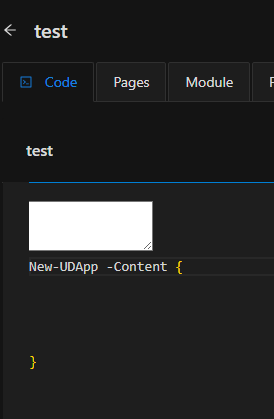
What is this new element about? All editors in the admin panel seem to have it.
6087a78dfe88e93eafa715474e48db32bd6fc909.png
I’ve never seen that. What browser are you using? Just a Chromium?
Adam Driscoll
PowerShell Expert and Developer at Devolutions
You could try to unselect Start Service so that the installer doesn’t actually try to do that. Once the install has completed, go to services.msc, set the credentials for the service account and attempt the run the service.
Tried this now. Unfortunately the service doesn’t start. I get the following in the event log, sounds like the problem is SQL permissions? Howerver the service account used to run PSU has the permissions in the database that it always had, it’s reader and writer.
Event log says thisApplication: Universal.Server.exe
CoreCLR Version: 9.0.1225.60609
.NET Version: 9.0.12
Description: The process was terminated due to an unhandled exception.
Exception Info: Microsoft.Data.SqlClient.SqlException (0x80131904): Cannot find the object “Settings” because it does not exist or you do not have permissions.
at Microsoft.Data.SqlClient.SqlConnection.OnError(SqlException exception, Boolean breakConnection, Action1 wrapCloseInAction) at Microsoft.Data.SqlClient.SqlInternalConnection.OnError(SqlException exception, Boolean breakConnection, Action1 wrapCloseInAction)
at Microsoft.Data.SqlClient.TdsParser.ThrowExceptionAndWarning(TdsParserStateObject stateObj, SqlCommand command, Boolean callerHasConnectionLock, Boolean asyncClose)
at Microsoft.Data.SqlClient.TdsParser.TryRun(RunBehavior runBehavior, SqlCommand cmdHandler, SqlDataReader dataStream, BulkCopySimpleResultSet bulkCopyHandler, TdsParserStateObject stateObj, Boolean& dataReady)
at Microsoft.Data.SqlClient.SqlCommand.RunExecuteNonQueryTds(String methodName, Boolean isAsync, Int32 timeout, Boolean asyncWrite)
at Microsoft.Data.SqlClient.SqlCommand.InternalExecuteNonQuery(TaskCompletionSource1 completion, Boolean sendToPipe, Int32 timeout, Boolean& usedCache, Boolean asyncWrite, Boolean inRetry, String methodName) at Microsoft.Data.SqlClient.SqlCommand.ExecuteNonQuery() at Microsoft.EntityFrameworkCore.Storage.RelationalCommand.ExecuteNonQuery(RelationalCommandParameterObject parameterObject) at Microsoft.EntityFrameworkCore.Migrations.MigrationCommand.ExecuteNonQuery(IRelationalConnection connection, IReadOnlyDictionary2 parameterValues)
at Microsoft.EntityFrameworkCore.Migrations.Internal.MigrationCommandExecutor.Execute(IReadOnlyList1 migrationCommands, IRelationalConnection connection, MigrationExecutionState executionState, Boolean beginTransaction, Boolean commitTransaction, Nullable1 isolationLevel)
at Microsoft.EntityFrameworkCore.Migrations.Internal.MigrationCommandExecutor.<>c.b__3_1(DbContext _, ValueTuple6 s) at Microsoft.EntityFrameworkCore.Storage.ExecutionStrategy.Execute[TState,TResult](TState state, Func3 operation, Func3 verifySucceeded) at Microsoft.EntityFrameworkCore.Migrations.Internal.MigrationCommandExecutor.ExecuteNonQuery(IReadOnlyList1 migrationCommands, IRelationalConnection connection, MigrationExecutionState executionState, Boolean commitTransaction, Nullable1 isolationLevel) at Microsoft.EntityFrameworkCore.Migrations.Internal.Migrator.MigrateImplementation(DbContext context, String targetMigration, MigrationExecutionState state, Boolean useTransaction) at Microsoft.EntityFrameworkCore.Migrations.Internal.Migrator.<>c.<Migrate>b__20_1(DbContext c, ValueTuple4 s)
at Microsoft.EntityFrameworkCore.Storage.ExecutionStrategy.<>c__DisplayClass28_02.<Execute>b__0(DbContext context, TState state) at Microsoft.EntityFrameworkCore.Storage.ExecutionStrategy.ExecuteImplementation[TState,TResult](Func3 operation, Func3 verifySucceeded, TState state) at Microsoft.EntityFrameworkCore.Storage.ExecutionStrategy.Execute[TState,TResult](TState state, Func3 operation, Func3 verifySucceeded) at Microsoft.EntityFrameworkCore.Migrations.Internal.Migrator.Migrate(String targetMigration) at Microsoft.EntityFrameworkCore.RelationalDatabaseFacadeExtensions.Migrate(DatabaseFacade databaseFacade) at PowerShellUniversal.SQL.DatabaseFeature.InitializeDatabase(IConfiguration configuration, ILogger logger) in D:\a\powershell-universal\powershell-universal\src\PowerShellUniversal.SQL\Plugin.cs:line 117 at Universal.Server.Services.SystemPluginService..ctor(IConfiguration configuration) in D:\a\powershell-universal\powershell-universal\src\Universal.Server\Services\SystemPluginService.cs:line 48 at Universal.Server.Startup.ConfigureServices(IServiceCollection services) in D:\a\powershell-universal\powershell-universal\src\Universal.Server\Startup.cs:line 75 at System.RuntimeMethodHandle.InvokeMethod(Object target, Void** arguments, Signature sig, Boolean isConstructor) at System.Reflection.MethodBaseInvoker.InvokeDirectByRefWithFewArgs(Object obj, Span1 copyOfArgs, BindingFlags invokeAttr)
at System.Reflection.MethodBaseInvoker.InvokeWithOneArg(Object obj, BindingFlags invokeAttr, Binder binder, Object parameters, CultureInfo culture)
at System.Reflection.RuntimeMethodInfo.Invoke(Object obj, BindingFlags invokeAttr, Binder binder, Object parameters, CultureInfo culture)
at Microsoft.AspNetCore.Hosting.ConfigureServicesBuilder.InvokeCore(Object instance, IServiceCollection services)
at Microsoft.AspNetCore.Hosting.GenericWebHostBuilder.UseStartup(Type startupType, HostBuilderContext context, IServiceCollection services, Object instance)
at Microsoft.AspNetCore.Hosting.GenericWebHostBuilder.<>c__DisplayClass7_0.b__0(HostBuilderContext context, IServiceCollection services)
at Microsoft.Extensions.Hosting.HostBuilder.InitializeServiceProvider()
at Microsoft.Extensions.Hosting.HostBuilder.Build()
at Universal.Server.Program.Main(String args) in D:\a\powershell-universal\powershell-universal\src\Universal.Server\Program.cs:line 41
ClientConnectionId:81e3f977-9e59-4014-9607-73a66264b039
Error Number:1088,State:13,Class:16
edit: Don’t know if it’s relevant, but my connection string in appsettings.json looks like this:
“Server=[obfuscated server name];Database=PSU;Integrated Security=true;TrustServerCertificate=true;”
Yes, Chromium. A new browser profile has removed the element.
If you have some time, please email support. I’d like to schedule some time to look.
Adam Driscoll
PowerShell Expert and Developer at Devolutions
Just adding to the thread, I updated today (I use an automated method via the MSI), running as a service, none of the above issues seen for me & no other problems so far
Edit: I did see an issue which was breaking for one of my New-UDTables had to upgrade to 2026.1.1 to fix it.
none of the above issues seen
Wondering what could be the difference. I bet either it’s something to do with running the service using a domain account or authenticating against database using integrated logon.
I’ll file an issue tomorrow and include all my info there!
Can you share your automated process for updating?
I attempted updating and had the same issues dbytes and Dynamic are reporting. Didnt spend much time looking into it because our sever is used in production so Im back on 5.6.13 after uninstalling 2026.1 and reinstalling 5.6.13
we use the msi installer and run on windows server 2019 if it helps. Using Sqlite for the database
Essentially have a script that does the following.
Input parameter for the version number, defaults to “latest”
if latest, it gets it from:
$Version = (Invoke-WebRequest https://imsreleases.blob.core.windows.net/universal/production/v5-version.txt).Content
(Which is the same method as in the PSU module)
It then checks to see if the session is elevated, and throws if not.
it downloads the MSI:
Invoke-WebRequest "https://imsreleases.blob.core.windows.net/universal/production/$version/PowerShellUniversal.$Version.msi" -OutFile $Msi
Lastly I set the args for the installer, and use thread job to decouple the installer from the PSU job:
$InstallerArgs = "/I $Msi /q /norestart /L*V `"$Temp`PSU.msi.log.txt`""

    Import-Module "C:\Program Files\PowerShell\7\Modules\ThreadJob\ThreadJob.psd1" -ErrorAction Stop

    $Job = Start-ThreadJob -ScriptBlock {
        Stop-Service -Name "PowershellUniversal" -Confirm:$False
        Start-Sleep -Seconds 20
        Start-Process msiexec.exe -ArgumentList $Using:InstallerArgs -Wait -NoNewWindow
    }
That way it wont report back as a failure, or break anything in the current execution when it kills the service.
I’m on server 2019 too, sql DB tho, running the service with a domain joined service account
On my side, every Apps not running under the Integrated environment, I got the error indicating New-UDApp didn’t exist.
Can confirm Integrated works. Adam did send me reply that they found the issue and will be releasing an update soon.
I’m not sure who else is running their installations on Linux in Docker, but I’ve had issues upgrading with the following error:
PSU    | [07:16:07 INF] Universal.Server.Services.SystemPluginService Using database connection string: Data Source=/root/.PowerShellUniversal/psu.db
PSU    | [07:16:08 FTL]  Fatal error starting PowerShell Universal.
PSU    | System.TypeInitializationException: The type initializer for 'Devolutions.Cryptography.Native' threw an exception.
PSU    | ---> System.DllNotFoundException: Unable to load shared library 'DevolutionsCrypto' or one of its dependencies. In order to help diagnose loading problems, consider using a tool like strace. If you're using glibc, consider setting the LD_DEBUG environment variable:
PSU    | /home/Universal/DevolutionsCrypto.so: cannot open shared object file: No such file or directory
PSU    | /lib/x86_64-linux-gnu/libc.so.6: version `GLIBC_2.34' not found (required by /home/Universal/libDevolutionsCrypto.so)
PSU    | libDevolutionsCrypto.so: cannot open shared object file: No such file or directory
PSU    | /home/Universal/DevolutionsCrypto: cannot open shared object file: No such file or directory
PSU    | /home/Universal/libDevolutionsCrypto: cannot open shared object file: No such file or directory
PSU    |
PSU    |    at Devolutions.Cryptography.Native.VersionSizeNative()
PSU    |    at Devolutions.Cryptography.Native.VersionSizeNative()
PSU    |    at Devolutions.Cryptography.Utils.Version()
PSU    |    at Devolutions.Cryptography.Native..cctor()
PSU    |    --- End of inner exception stack trace ---
PSU    |    at Devolutions.Cryptography.Native.GenerateKeyPairSizeNative()
PSU    |    at Devolutions.Cryptography.Native.GenerateKeyPairSizeNative()
PSU    |    at Devolutions.Cryptography.Managed.GenerateKeyPair()
PSU    |    at PowerShellUniversal.DevolutionsAuthenticationMethod.AddAuthentication(AuthenticationBuilder builder, IConfiguration configuration) in D:\a\powershell-universal\powershell-universal\src\PowerShellUniversal.Authentication\DevolutionsAuthenticationMethod.cs:line 33
PSU    |    at Universal.Server.Startup.ConfigureServices(IServiceCollection services) in D:\a\powershell-universal\powershell-universal\src\Universal.Server\Startup.cs:line 462
PSU    |    at System.RuntimeMethodHandle.InvokeMethod(Object target, Void** arguments, Signature sig, Boolean isConstructor)
PSU    |    at System.Reflection.MethodBaseInvoker.InvokeDirectByRefWithFewArgs(Object obj, Span`1 copyOfArgs, BindingFlags invokeAttr)
PSU    |    at System.Reflection.MethodBaseInvoker.InvokeWithOneArg(Object obj, BindingFlags invokeAttr, Binder binder, Object[] parameters, CultureInfo culture)
PSU    |    at System.Reflection.RuntimeMethodInfo.Invoke(Object obj, BindingFlags invokeAttr, Binder binder, Object[] parameters, CultureInfo culture)
PSU    |    at Microsoft.AspNetCore.Hosting.ConfigureServicesBuilder.InvokeCore(Object instance, IServiceCollection services)
PSU    |    at Microsoft.AspNetCore.Hosting.GenericWebHostBuilder.UseStartup(Type startupType, HostBuilderContext context, IServiceCollection services, Object instance)
PSU    |    at Microsoft.Extensions.Hosting.HostBuilder.InitializeServiceProvider()
PSU    |    at Microsoft.Extensions.Hosting.HostBuilder.Build()
PSU    |    at Universal.Server.Program.Main(String[] args) in D:\a\powershell-universal\powershell-universal\src\Universal.Server\Program.cs:line 41
PSU    | Unhandled exception. System.TypeInitializationException: The type initializer for 'Devolutions.Cryptography.Native' threw an exception.
PSU    | ---> System.DllNotFoundException: Unable to load shared library 'DevolutionsCrypto' or one of its dependencies. In order to help diagnose loading problems, consider using a tool like strace. If you're using glibc, consider setting the LD_DEBUG environment variable:
PSU    | /home/Universal/DevolutionsCrypto.so: cannot open shared object file: No such file or directory
PSU    | /lib/x86_64-linux-gnu/libc.so.6: version `GLIBC_2.34' not found (required by /home/Universal/libDevolutionsCrypto.so)
PSU    | libDevolutionsCrypto.so: cannot open shared object file: No such file or directory
PSU    | /home/Universal/DevolutionsCrypto: cannot open shared object file: No such file or directory
PSU    | /home/Universal/libDevolutionsCrypto: cannot open shared object file: No such file or directory
PSU    |
PSU    |    at Devolutions.Cryptography.Native.VersionSizeNative()
PSU    |    at Devolutions.Cryptography.Native.VersionSizeNative()
PSU    |    at Devolutions.Cryptography.Utils.Version()
PSU    |    at Devolutions.Cryptography.Native..cctor()
PSU    |    --- End of inner exception stack trace ---
PSU    |    at Devolutions.Cryptography.Native.GenerateKeyPairSizeNative()
PSU    |    at Devolutions.Cryptography.Native.GenerateKeyPairSizeNative()
PSU    |    at Devolutions.Cryptography.Managed.GenerateKeyPair()
PSU    |    at PowerShellUniversal.DevolutionsAuthenticationMethod.AddAuthentication(AuthenticationBuilder builder, IConfiguration configuration) in D:\a\powershell-universal\powershell-universal\src\PowerShellUniversal.Authentication\DevolutionsAuthenticationMethod.cs:line 33
PSU    |    at Universal.Server.Startup.ConfigureServices(IServiceCollection services) in D:\a\powershell-universal\powershell-universal\src\Universal.Server\Startup.cs:line 462
PSU    |    at System.RuntimeMethodHandle.InvokeMethod(Object target, Void** arguments, Signature sig, Boolean isConstructor)
PSU    |    at System.Reflection.MethodBaseInvoker.InvokeDirectByRefWithFewArgs(Object obj, Span`1 copyOfArgs, BindingFlags invokeAttr)
PSU    |    at System.Reflection.MethodBaseInvoker.InvokeWithOneArg(Object obj, BindingFlags invokeAttr, Binder binder, Object[] parameters, CultureInfo culture)
PSU    |    at System.Reflection.RuntimeMethodInfo.Invoke(Object obj, BindingFlags invokeAttr, Binder binder, Object[] parameters, CultureInfo culture)
PSU    |    at Microsoft.AspNetCore.Hosting.ConfigureServicesBuilder.InvokeCore(Object instance, IServiceCollection services)
PSU    |    at Microsoft.AspNetCore.Hosting.GenericWebHostBuilder.UseStartup(Type startupType, HostBuilderContext context, IServiceCollection services, Object instance)
PSU    |    at Microsoft.Extensions.Hosting.HostBuilder.InitializeServiceProvider()
PSU    |    at Microsoft.Extensions.Hosting.HostBuilder.Build()
PSU    |    at Universal.Server.Program.Main(String[] args) in D:\a\powershell-universal\powershell-universal\src\Universal.Server\Program.cs:line 41
PSU exited with code 139 (restarting)
I’ve even tried with a fresh installation and still get the same result. This is upgrading from ironmansoftware/universal:5.6.13-ubuntu-20.04 to devolutions/powershell-universal:2026.1.0-ubuntu-20.04. Even running devolutions/powershell-universal:2026.1.0-ubuntu-20.04 as a new installation without my data seems to have the same results. Every other version update I’ve done has been smooth sailing.
I found a solution to be able to use the “Powershell 7” environment.
Copy the folder “C:\Program Files (x86)\Universal\Modules\Devolutions.PowerShellUniversal” to “C:\Program Files (x86)\Universal\Hosts\7.5\Modules” and restart your App.
yep - the same - docker image is broken