Setting page content dynamically

Product: PowerShell Universal
Version: 5.6.1
I have some elements in UDPage
I created a switch (udiconbutton in app bar)
When clicked some of the elements are changed in the app
I define it in very more/less this way:
$session:csv_element_content = {
CSV ELEMENTS...
}
$session:group_element_content = {
GROUP ELEMENTS...
}
New-UDElement -Id ‘csv_element’ -Tag ‘div’ -Content $session:csv_element_content
--------------------------------------------------------
udiconbutton is pressed ->
if ($page:group_open) {
Set-UDElement -Id 'csv_element' -Content $session:group_element_content
}
else {
Set-UDElement -Id 'csv_element' -Content $session:csv_element_content

}
And surprisingly its working (most of the times)
But sometimes after few mode switch (or even after page reload), some of the elements attributes (styles mostly i guess) are broken:
Proper look: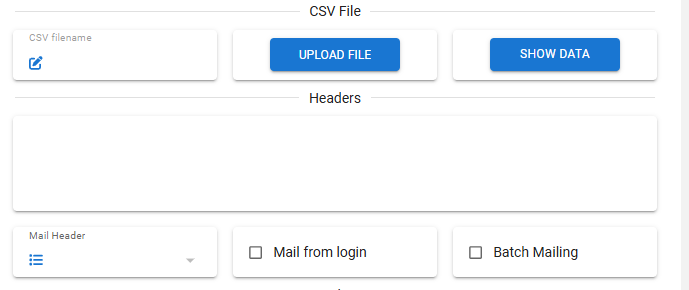
Broken look:
y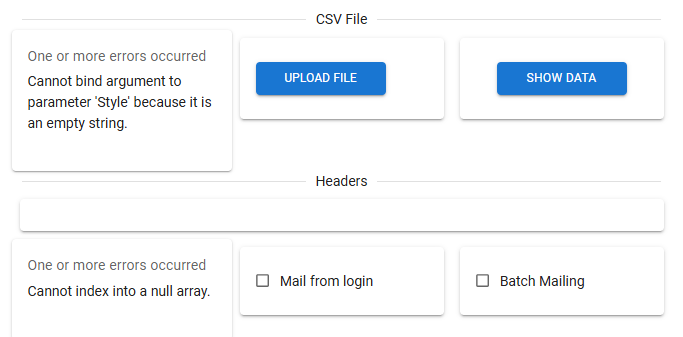
Styles and arrays are defined as page scope variables.
I cannot track it why its not applied sometimes.
There is no errors in the logs.
Its not consistent - but after few tries it fill eventually fail.
So how to debug it, fix it, or maybe there is better way to achieve this kind of content witch mechanism ?
66a48ddda18167df1b95a7f8767da90b9c7d8bb8.png
41e58d93dd37ff307731ba6161a36617ef77cce8.png
All Comments (1)
As always - i resolved issue before anyone has commented
I had to to copy those styles definition variables to both $session:csv_element_content and $session:group_element_content script blocks
Now i can switch it no matter how many and how fast and it looks ok
But the question is still valid. Why it behave this way (it reads those style for some time but after some time it breaks) and how to properly a void doubling those style definition…