Getting username of the user initiating a script

Product: PowerShell Universal
Version: 5.6.6
Hi all
Is it possible to access the username of the user that is initiating a script? I had a look at the Variables document but didn’t see this specifically. In this scenario I’d like to automatically capture this information when a user runs a script, and output it in the script output. I know how to access the account which initiated a script job but if possible I’d like to capture the data earlier within the script itself as the script produces an output log to a third party system.
Thanks
Recommended Answer
This one is a little tricky, but you can get it
When you run a script there is a variable thats injected into the environment $UAJob
This represents the Job that is running in PSU - $UAJob.Id is the reference number of the job and part of the url and other properties are there as well
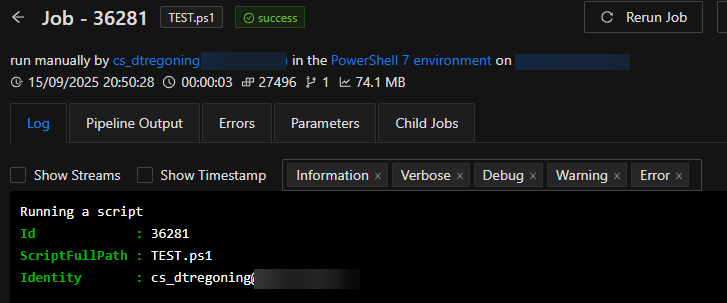
eg a script with this block will get you the user that initiated the script from PSU
"Running a script"
$uajob | Select-Object -Property id, ScriptFullPath, Identity | fl *
The bottom of this page has a super table that I reference all the time
docs.powershelluniversal.com
bfbfdffa5278799bb970f16a15329122d44ba275.png
All Comments (2)
This one is a little tricky, but you can get it
When you run a script there is a variable thats injected into the environment $UAJob
This represents the Job that is running in PSU - $UAJob.Id is the reference number of the job and part of the url and other properties are there as well
eg a script with this block will get you the user that initiated the script from PSU
"Running a script"
$uajob | Select-Object -Property id, ScriptFullPath, Identity | fl *
The bottom of this page has a super table that I reference all the time
docs.powershelluniversal.com
bfbfdffa5278799bb970f16a15329122d44ba275.png
Thank you very much that’s exactly what I needed