PowerShell Universal - 5.6.7
PowerShell Universal - 5.6.7
Release Notes
Features
Bug Fixes
- Fixed general issues with pages in the admin console like word wrapping in job logs, persistent settings, and UI glitches.
- Resolved an issue with app pages not updating properly after editing them
- Fixed job performance and load balancing issues
- Fixed issues with script documentation and triggers
- Implemented support for wildcards in Get-PSUCache to improve efficiency
- Fixed an issue with variables from modules not being available in runspaces
Downloads
Adam Driscoll
PowerShell Expert and Developer at Devolutions
All Comments (12)
does this fix the -autoinclude?
I still get pages auto included even if I set it to $false.
Basically each page that gets newly created has the -autoinclude switch.
If I set it to $false, the page still appears twice in the menu, because I manually “get” it in the order I want.
I just updated, issue is still present.
-AutoInclude is a switch. Are you just removing it or setting it like: -AutoInclude:$false? I can try it in a sec. I didn’t realize it was a problem.
Adam Driscoll
PowerShell Expert and Developer at Devolutions
I use it like
New-UDPage -Url “/page1” -Name “page1” -Content {
} -AutoInclude $false -Title “Page1” [-other options]
So no colon : in there.
But that is how the web editor suggests it.
Tried with : no dice
No luck with
$NAI=@{ AutoInclude = $false}
New-UDPage -Url “/page1” -Name “page1” -Content {
} @NAI -Title “Page1”
either.
I already “complained” about that here
What I noticed, sry, short on time, can’t go into detail. After the upgrade from 5.5.0 the menu on the admin page did no longer work. I had to clear the browser cache first. The invocation of scripts no longer works. It tells me to set permissive security model, but I have that set in appsettings.json. I found an entry in settings.ps ApiSecurityModel = “Medium” That does not correspond to a menu item in the Settings page. And the doc says: strict, integrated, permissive but no …

I’ve noticed that saving a page edited in web, takes a long time. or at least it takes a long time for the animation of the save button to finish, but the actual page is refreshed and updated quick.
Didnt see it in the changelog but just tested the authentication issues again, and still cant get access to scripts on 5.6.7 with the following permissions:
home/view
automation/view
automation.scripts/view
automation.jobs/view
automation.jobs/read
automation.scripts.FolderA\Script1.ps1/*
automation.scripts.Script2.ps1/view
I can get into the admin page, but getting “Not Authorized” when clicking on scripts from the menu
Not seeing this behavior. I’m only trying a simple app so maybe I’m not understanding how to recreate it. App only includes one page manually and that page is not auto-included.
# Only includes one page but auto includes the other.
New-UDApp -Pages @(
    Get-UDPage -Name "Test1234"
)
# No auto include
New-UDPage -Url "/test123" -Name "Test1234" -Content {
'Hello, world!!~!!!!!'
}# Auto included
New-UDPage -Url "/test2" -Name "Test" -Content {
'Hello, world!'
} -AutoInclude
Only the 2 pages are listed in the nav.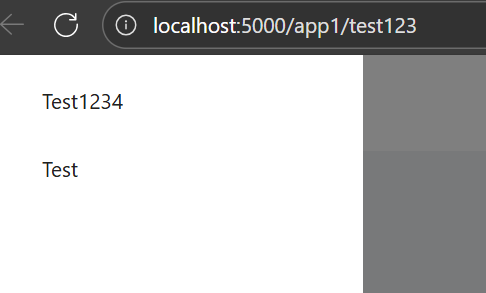
Adam Driscoll
PowerShell Expert and Developer at Devolutions
8e274736e88d7fd10ef8dc5e554d2446fc32f516.png
I can reproduce this and the issue is still open. That said, I do see the issue and this will be fixed in 5.6.8.
Adam Driscoll
PowerShell Expert and Developer at Devolutions
Thanks.
I first experienced it in 5.6.0.
should it be fixed now in 5.6.8?
Because I still see the issue.
It looks like Adam was replying to someone else when he mentioned being fixed in 5.6.8. For your issue, you advised that you’re setting it as “-AutoInclude $false”. This is incorrect syntax for a switch parameter. Have a look at a sample I put together; you can run it to see the results as commented.
To summarize; if you don’t want to include a switch in a command, simply omit it from your command. Alternatively, you need to use the syntax of -SwitchName:$false to include it as false.
function test {
    param(
        [Parameter(Mandatory=$false)][switch]$testSwitch
    )

    if ($testSwitch) {
        Write-Information -MessageData "Switch activated!" -InformationAction Continue
    } else {
        Write-Information -MessageData "Switch not activated!" -InformationAction Continue
    }
}

test # not activated
test -testSwitch # activated
test -testSwitch:$false # not activated
test -testSwitch $false # error due to incorrect syntaxThank you.
You are right, my Syntax was wrong.
But meanwhile I have tried with the correct syntax and as well with splatting or just omitting the switch.
Thing is:
When creating a new page, it comes with the Auto include parameter by default.
And whatever I try, I can’t get rid of the auto-included page in the menu.
Geeze, could it be that the “duplicate menu issue due to autoinclude switch” as well has to do with JS caching?