Remove-PSUSchedule does not work...?

Product: PowerShell Universal
Version: 1.4.6
Hi,
We utilize New-PSUSchedule in one of our workflows.
As sometimes - especially during testing / development - I have to run the workflow multiple times, it creates a lot of identical schedules.
In order to prevent this I put in the workflow a step to delete similarly named schedules. however the Remove-PSUSchedule commandlet does not seem to work.
To test this, I wrote a small function, and I can confirm deleting does not happen.
function Delete-PSUScheduleMatches {
    [CmdletBinding(SupportsShouldProcess=$true, ConfirmImpact='High')]
    param(
        [Parameter(Mandatory=$false)]
        [string]$ComputerName = 'localhost',

        [Parameter(Mandatory=$true)]
        [string]$AppToken,

        [Parameter(Mandatory=$true)]
        [string]$ScheduleNamePattern
    )

    Write-Verbose "Attempting to delete schedules matching '$ScheduleNamePattern' on $ComputerName."

    try {
        # Get the schedules that match the pattern
        # The 'Where-Object' filters the *full* objects before piping
        # to Remove-PSUSchedule.
        $schedulesToDelete = Get-PSUSchedule -ComputerName $ComputerName -AppToken $AppToken `
                                | Where-Object { $_.Name -like $ScheduleNamePattern }

        if ($null -ne $schedulesToDelete) {
            Write-Verbose "Found $($schedulesToDelete.Count) schedule(s) matching '$ScheduleNamePattern'."

            foreach ($schedule in $schedulesToDelete) {
                if ($PSCmdlet.ShouldProcess("Schedule '$($schedule.Name)' (ID: $($schedule.Id))", "Delete schedule")) {
                    Write-Verbose "Deleting schedule: $($schedule.Name) (ID: $($schedule.Id))"
                    # Explicitly pass the ID of the schedule to Remove-PSUSchedule for direct deletion.
                    # This avoids potential issues with full object pipeline binding if the cmdlet doesn't support it directly.
                    Remove-PSUSchedule -Id $schedule.Id -Verbose -ComputerName $ComputerName -AppToken $AppToken -TrustCertificate
                }
            }
        } else {
            Write-Warning "No schedules found matching '$ScheduleNamePattern' on $ComputerName."
        }
    }
    catch {
        Write-Error "An error occurred during schedule deletion: $($_.Exception.Message)"
        Write-Error "Error details: $($_.Exception | Format-List -Force | Out-String)"
    }
    finally {
        Write-Verbose "Verifying remaining schedules matching '$ScheduleNamePattern'."
        # Re-fetch and output the schedules to confirm deletion status
        Get-PSUSchedule -ComputerName $ComputerName -AppToken $AppToken `
                        | Where-Object { $_.Name -like $ScheduleNamePattern } | Select-Object Name, Id
    }
}

# Example Usage (Uncomment to run)
# Replace "YOUR_APP_TOKEN_HERE" with your actual PowerShell Universal App Token
# Delete-PSUScheduleMatches -AppToken "YOUR_APP_TOKEN_HERE" -ScheduleNamePattern "*gandalf*" -Confirm:$false
results in:
PS C:\Users\admin-fsemti> Delete-PSUScheduleMatches -AppToken $AppToken -ScheduleNamePattern "*gandalf*"
VERBOSE: Using computer name from parameter.
VERBOSE: Computer name does not contain a scheme. Assuming HTTP and port 5000.
VERBOSE: Using App Token from parameter.
VERBOSE: Using App Token for authentication.
VERBOSE: $PSUTrustCertificate:
VERBOSE: Using gRPC-Web.
VERBOSE: Using insecure channel call credentials.
VERBOSE: Using computer name from parameter.
VERBOSE: Computer name does not contain a scheme. Assuming HTTP and port 5000.
VERBOSE: Using App Token from parameter.
VERBOSE: Using App Token for authentication.
VERBOSE: $PSUTrustCertificate:
VERBOSE: Using gRPC-Web.
VERBOSE: Using insecure channel call credentials.
VERBOSE: Using computer name from parameter.
VERBOSE: Computer name does not contain a scheme. Assuming HTTP and port 5000.
VERBOSE: Using App Token from parameter.
VERBOSE: Using App Token for authentication.
VERBOSE: $PSUTrustCertificate:
VERBOSE: Using gRPC-Web.
VERBOSE: Using insecure channel call credentials.
VERBOSE: Using computer name from parameter.
VERBOSE: Computer name does not contain a scheme. Assuming HTTP and port 5000.
VERBOSE: Using App Token from parameter.
VERBOSE: Using App Token for authentication.
VERBOSE: $PSUTrustCertificate:
VERBOSE: Using gRPC-Web.
VERBOSE: Using insecure channel call credentials.
VERBOSE: Using computer name from parameter.
VERBOSE: Computer name does not contain a scheme. Assuming HTTP and port 5000.
VERBOSE: Using App Token from parameter.
VERBOSE: Using App Token for authentication.
VERBOSE: $PSUTrustCertificate:
VERBOSE: Using gRPC-Web.
VERBOSE: Using insecure channel call credentials.
VERBOSE: Using computer name from parameter.
VERBOSE: Computer name does not contain a scheme. Assuming HTTP and port 5000.
VERBOSE: Using App Token from parameter.
VERBOSE: Using App Token for authentication.
VERBOSE: $PSUTrustCertificate:
VERBOSE: Using gRPC-Web.
VERBOSE: Using insecure channel call credentials.

Name                   Id
----                   --
121733-Gandalf-TheGrey 32
121733-Gandalf-TheGrey 33
121733-Gandalf-TheGrey 34
121733-Gandalf-TheGrey 35
121733-Gandalf-TheGrey 36
121733-Gandalf-TheGrey 37


PS C:\Users\admin-fsemti>
Am I missing something?
Thank you,
F.
All Comments (2)
Let me note: the help for the command is a bit confusing too…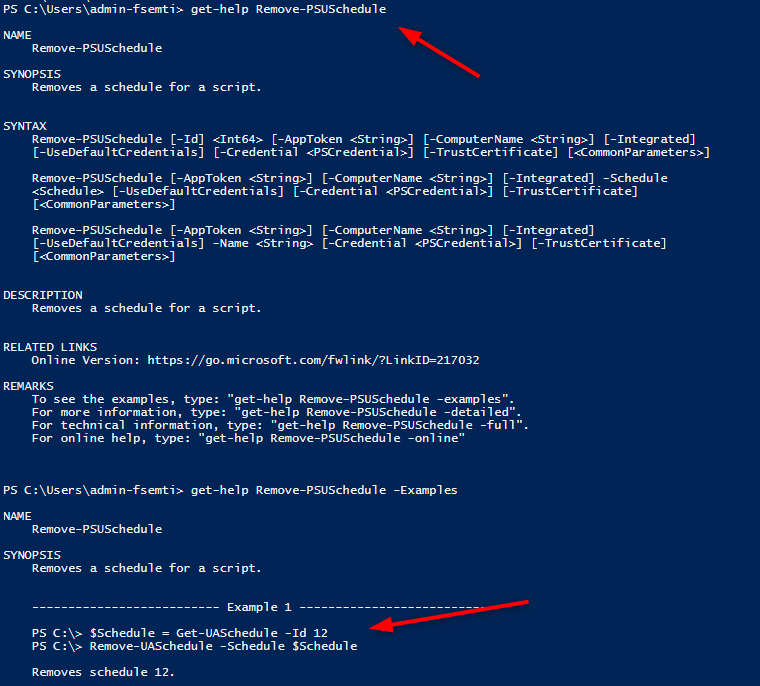
is Remove-UASchedule still a command…?
be16d270016d84308d6e15ffee7e845041ccba95.png
Remove-UASchedule
I think the example is just simply wrong - maybe a left over from legacy alias that no longer exists?
In your example code you’re using the ID, have you tried it by using Get-PSUSchedule and passing that object into Remove-PSUSchedule -Schedule ?