Missing Parameters Tab in Run Script

Version 5.6.2 Development Environment – Missing Parameters Tab in Run Script
We are in the process of setting up our PowerShell Universal (PSU) environment on version 5.6.2, but have run into a couple of issues.
Setup Overview
We are using a source control strategy that is not directly connected to PSU.
- We work in Azure DevOps with many different repositories.
- Each repository contains certain scripts and modules.
- These modules are pushed through a pipeline to the folder PSU monitors for its configuration files.
- After running Reload Configuration, the files appear in PSU as expected.
- Every module repo contains its own
.universalfolder with corresponding files, which are adjusted before pushing.
This setup works fine for deploying scripts and modules into PSU, but there is one problem.
Issue
When we use Run Script in PSU, the Parameters tab does not show up — even though the script should have parameters defined.
Script File Content
This is what is currently in the Script.ps1 file:
New-PSUScript -Module "ModuleName" -Command "ScriptName" -Description "Description" -Environment "Windows PowerShell 5.1" -Credential "PSUCredential_Default"
This is a visual at the file repo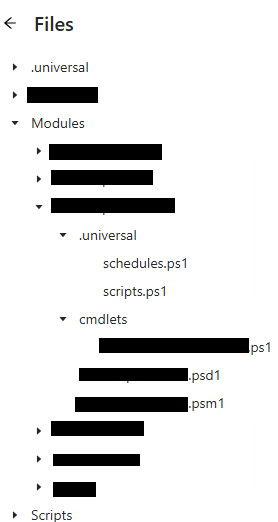
b21df0a8c71489dd92ea8a20a448b646f92e85fb.png