Role names are missing from the $Roles variable

Product: PowerShell Universal
Version: 5.6.1
Hello! After upgrading to 5.6.1, there are no more role names in the $Roles variable (only SSIDs). In previous versions, in addition to the SSIDs, there were also role names. It seems to me that something is broken. We are using an installation on IIS.
Recommended Answer
Fixed in 5.6.6. All works fine, thanx!
All Comments (16)
While I see several issues with 5.6.1, this one I can’t confirm.
A made an app page that shows me all relevant variables and ENV and script vars.
$Roles is populated for me as it was before.
How do you assign roles?
I guess that would be related.
We use SAML2 and I have a script under security/roles for each role that checks the claims and returns true or false.
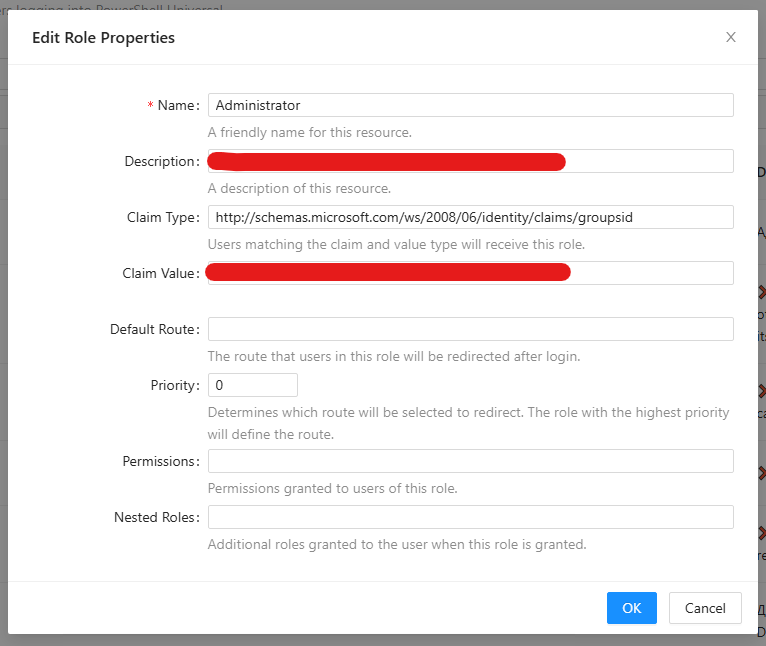
Before update all work fine
5110b53d5db43f4199a5b05921def14409e0c782.png
Understood.
Didi you check what actually is in your claims data?
I noticed that I have
http://schemas.microsoft.com/ws/2008/06/identity/claims/groupsconfigured in AZURE, not groupsid.
If you create an app page like that, you could check for any logged on user.
New-UDPage -Url "/page1" -Name "page1" -Content {

    $columns=@(
        New-UDTableColumn -Property Name
        New-UDTableColumn -Property Value
    )

    $var=@()
    $var+=@{name="User"; value=$User}
    $var+=@{name="Roles"; value=$Roles -join ","}
    $var+=@{name="RemoteIpAddress"; value=$RemoteIpAddress}
    $var+=@{name="RemotePort"; value=$RemotePort}

    $var+=@{name="PSUComputerName"; value=$PSUComputerName}

    $var+=@{name="$($ClaimsPrincipal.identity)"; value=($ClaimsPrincipal.identity.name)}

    foreach($item in $ClaimsPrincipal.claims) {
        $var+=@{name="$( ($item.type -split "claims")[-1] )"; value="$($item.value)" }
    }

    New-UDTable -Data $var -Columns $columns -Title "logged on user account claims"
}Hello! Thank you for your reply and willingness to help. I would like to point out the following:
- This method of assigning roles works completely in both PU3 and PU4 (tested on 4.4.1). On them I see both group SSIDs and role names in Powershell Universal. On version 5 only SSIDs remain.
- This method is specified in the documentation: https://docs.powershelluniversal.com/security/authorization
For example, with Windows authentication, if you wanted to map a group to a role, you could configure it such that the group SID maps to the administrator role.

Copy
New-PSURole -Name Administrator -ClaimType 'http://schemas.microsoft.com/ws/2008/06/identity/claims/groupsid' -ClaimValue 'S-123-123-123'
Mapping roles to claims in this manner is faster than Policy scripts because it does not require PowerShell to be run when the user is logging in.
- We have authorization on the portal itself (i.e. if I go to %portalname%/admin, the required role is assigned). The role is not forwarded inside the dashboard\application only.
It seems to me that this is still a bug in version 5. I tried to install 5.6.0 - the problem is still there.
The problem is also present in version 5.5.4.
Problem still exist on 5.6.2
Adam Driscoll
PowerShell Expert and Developer at Devolutions
Yes, it looks very similar
Problem still exist on 5.6.4
Fixed in 5.6.6. All works fine, thanx!
We just upgraded to v5.6.7 and we’re experiencing this issue. The contents of the $Roles variable is SIDs. We are mapping on-prem AD claims. Roles are not mapping to SIDs so in our App page when using “if ($Roles -contains “Role Name“)” it’s not working (i.e., card is not appearing on the page).
I just tried in v5.6.6 and we’re seeing the same issue. We are having to do “if ($Roles -contains “”)” to get it to work, but this defeats the purpose of defining a role.
Try empty page with:
New-UDTypography -Text "roles: $($Roles -join ', ')"
What will the result be? Just "roles: ", a list of claims, or what?
New-UDTypography -Text "roles: $($Roles -join ', ')"
Here’s a snippet of what I get.
42104a9ed9ca404f5e2a1f57da60364973fc97cc.png
Judging by what I see in the image, everything works as expected. Both the role name (Administrator, Test) and the SID list.
In my opinion, everything works perfectly.
My previous screenshot only shows a small subset of the roles that are output by the code you provided. It’s actually a very long list of SIDs. Where are all the SIDs coming from?
In addition to the long list of SIDs, $Roles only contains the following named roles. I can’t figure out why the latter two still appear.
- Administrators (this one does exist and my account in PSU is a member of it.
- PSU-ADAccountUnlockTool - ROLE DOES NOT EXIST
- Test - ROLE DOES NOT EXIST
Controlling component visibility is not working for the following reason:
I created a role with the following values:
- Name - “AD Unlock Tool Access”
- Claim Type - http://schemas.microsoft.com/ws/2008/06/identity/claims/groupsid
- Claim Value - S-1-5-21-1000589339-1611067580-1395766070-97068
When I run the new-udtypography you provided, “AD Unlock Tool Access” does not appear in the list of roles for my account.
When I use the if statement in the code below, the card does not appear. When I change “AD Unlock Tool Access” to the SID of the AD group (i.e., the Claim Value) in the if statement then the card is becomes visible. I confirmed that my user account is a member of the AD group with that SID.
Additionally, using role names in the if statement worked in PSU v2, but it stopped working when we upgrade to v5.6.6 and v5.6.7.
if ($Roles -contains 'AD Unlock Tool Access') {
   New-UDCard -Header (
      New-UDCardHeader -Title 'AD Unlock Tool' -SubHeader 'This tool allows you to unlock AD accounts.'
   ) -Body (
      New-UDCardBody -Content {
         New-UDButton -Style @{'color' = 'white'; 'background-color' = '#2e8b57'; 'margin-left' = '0'} -Text 'Open' -OnClick {
            Invoke-UDRedirect -Url 'ADAccountUnlock' -OpenInNewWindow
         }
      }
   )
}