Unable to install PSU on Domain Controller

Hello Everyone,
i am new to PSU - i have AD Domain and i am trying to install PSU on AD Domain server but i am getting this error - any suggestion ? thank you so much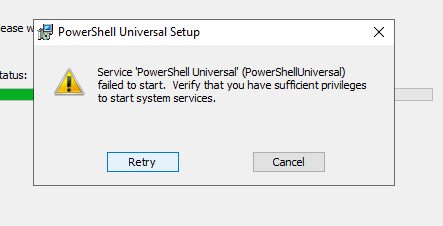
d5019f774e34bd93170378cbfa10abb2aeca7d85.png
All Comments (4)
You can check the PSU logs in %ProgramData%\PowerShellUniversal. You can also check the event viewer to see why the service didn’t start.
All that said, I wouldn’t advise any type of application install on a domain controller.
Adam Driscoll
PowerShell Expert and Software Architect at Devolutions
Thank you for your response
If I make a standalone PSU server, how can I connect AD to it ?
Appreciate your time
Regards,
Hi,
depends on what do you want to do with aour AD.
If you want to use Windows Authentication to login to PSU:
docs.powershelluniversal.com
docs.powershelluniversal.com
Or if you want to use cmdlets use the -Server parameter
# for example Get-ADComputer
$Username = "<Your username here>"
$Pw = "Your password here" | ConvertTo-Securestring -AsPlainText -Force
$Creds = New-Object System.Management.Automation.PSCredential($Username, $Pw)

Get-ADComputer -Server "<you domain controller ip or hostname>" -Identity "fancy computername here" -Credential $Creds
Thank you so much
Working just perfect now