Cannot Connect to Azure in Automation Job script

Product: PowerShell Universal
Version: 5.5.1
Hey PSU folks,
I’m having an issue connecting to Azure, using the Az module, from within automated job scripts. When I run the below directly in VSCode it connects without issue. However, when I have this inside a job script, it fails with
Entry point was not found. Could not find tenant id for provided tenant domain ‘x-x-x-x-x’. Please ensure that the provided service principal ‘x-x-x-x-x’ is found in the provided tenant domain.
$plainTextPassword = "<Service Principal Secret>"
$securePassword = ConvertTo-SecureString $plainTextPassword -AsPlainText -Force
$username = "<Service Principal Client Id>"
$creds_Azure = New-Object System.Management.Automation.PSCredential ($username, $securePassword)

$tenantId =  '<Tenant Id>'
Connect-AzAccount -TenantId $tenantId -Credential $creds_Azure -ServicePrincipal -ErrorAction Stop
In 2023 I updated PSU to the then latest version, and I had this same issue in Can no longer connect to Azure with Connect-AzAccount - PowerShell Universal / Universal Dashboard - Ironman Software Forums
At that time, I was able to roll back to the previous version of PSU, but 5.5.1 is the first version installed in this environment, so no previously working version to roll back to.
I did update to the latest version of 5.5.5, hoping it would fix things, but I still have the same problem. I also tried updating the Az module from 13.4.0 to the latest 14.2.0, but no go.
Found I also had this more recently in Connect-AzAccount no longer working after 5.2.0 upgrade - PowerShell Universal - Ironman Software Forums where the solution was an update to PSU.
Any ideas?
Thanks,
Rob
Recommended Answer
Unfortunately, downgrading the Az.Accounts module to 4.1.0, broke other things. When I run Get-AzVM I now get the error
The ‘Get-AzVM’ command was found in the module ‘Az.Compute’, but the module could not be loaded.
So, I run Import-Module Az.Compute and get this error
This module requires Az.Accounts version 5.0.2. An earlier version is imported in the current PowerShell session. … This error could indicate that multiple incompatible versions of the Azure PowerShell cmdlets are installed on your system.
Now I’m getting into module versioning hell…LOL. I couldn’t find which Az parent module comes with Az.Accounts 4.1.0 but looking back at a couple of different PSU environments we have I found Azure things working with the parent Az versions 12 and 13.
I found this MSFT page talking about the Az module versions and lifecycle: Azure PowerShell support lifecycle | Microsoft Learn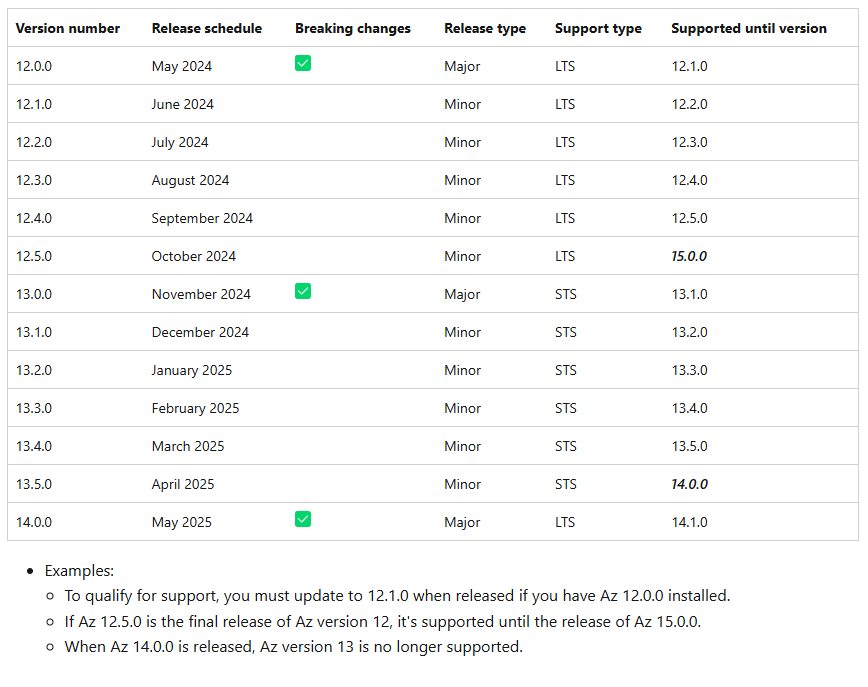
Chart here shows 12.5.0 was the last LTS version, prior to 14.0.0 as LTS, and is supported until 15.0.0. It seems the Az module 14.x is not playing well with PSU 5.x versions, at least that’s what I’m seeing. I decided to downgrade the Az module to version 12.5.0. Uninstalled all Az and Az.* modules from my server, then installed Az version 12.5.0.
Everything was working in VSCode, but in PSU jobs I was not able to connect again. I noticed that Az 12.5.0 comes with Az.Accounts 5.1.1. I uninstalled Az.Accounts 5.1.1, then installed Az.Accounts 4.1.0. Now everything is working, both in VSCode and in PSU
The combo that did it was to uninstall all Az and Az.* modules, install Az 12.5.0, uninstall Az.Accounts 5.1.1, then install Az.Accounts 4.1.0.
Marking as resolved, as I found a work around. However, I think the actual fix to using the latest Az module 14.x, and all its updated submodules, with PSU will come later as an update to PSU.
BR,
Rob
6127d89b8f3035218c99a95f537a3bbf608b7f99.png
All Comments (5)
Hi, did you install the az.account module via psu or directly on the server?
We also ran into this problem while trying to install the module directly on to the server.
Since we installed it via PSU itself it works fine.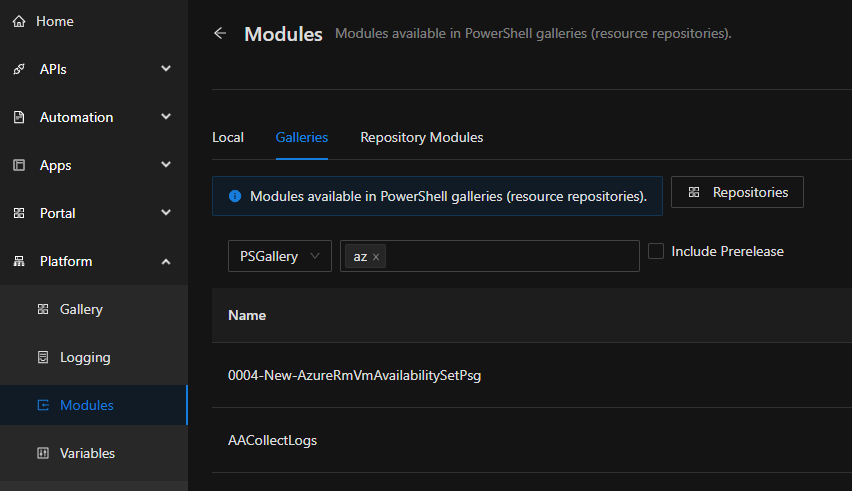

95d070e32177ee7d497dccf1371d601a49a63dd4.png
3f3e865ab7d9ea504616ff33f378e3c2551f21b4.png
Hey @ms1,
Interesting, I didn’t realize we could install modules that way. When I browse to Platform > Modules > Galleries and search for Az module, I see that Az v 14.0.0 shows installed, but Az.Accounts is showing v 5.1.1 and it’s not installed. Checking in PoSh 7 I see Az.Accounts v 5.1.0 installed.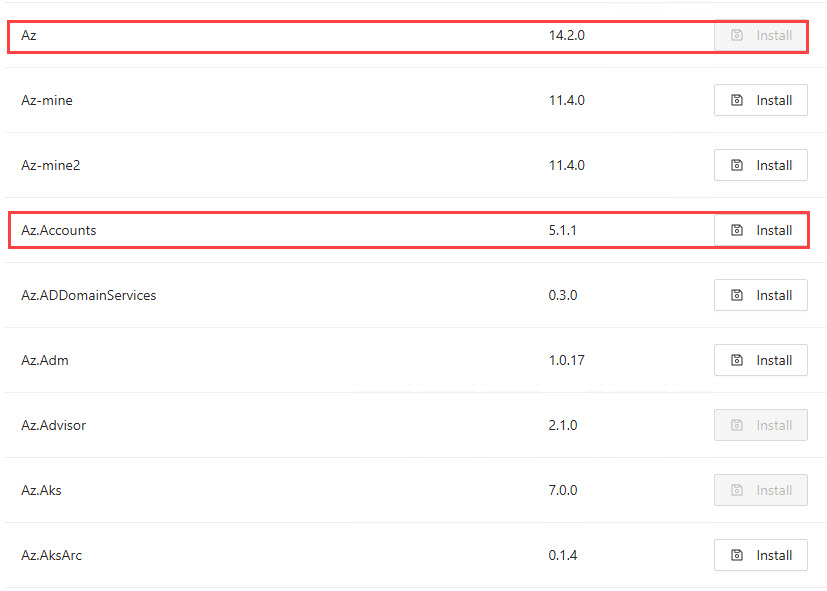
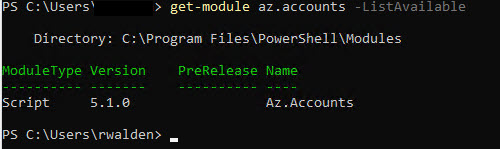
I went ahead and clicked Install on Az.Accounts v 5.1.1, but it didn’t fix things. Rebooted just in case and still no go.
Reviewing the Modules docs Modules | PowerShell Universal, I see a table on the bottom of validated versions for some modules. Here Az.Accounts is listed for v 4.1.0, in PSU v 5.5.2.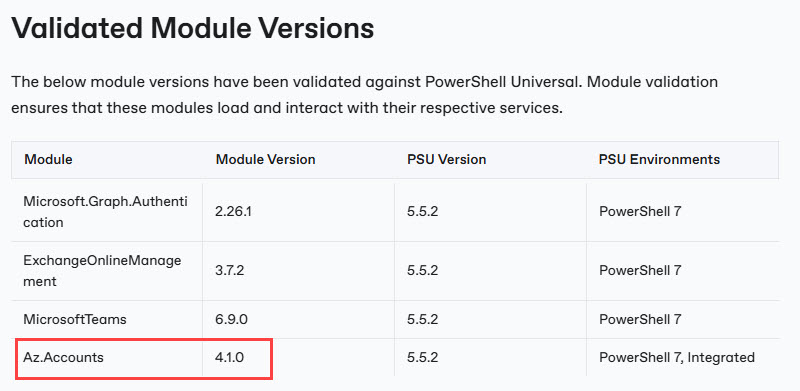
Using PoSh 7 I uninstalled Az.Accounts v 5.1.0 and installed v 4.1.0. Now it works
Now the issue is when I use PSU Platform > Modules > Galleries to install a module, such as Az.Accounts, how do I uninstall it? There’s an Install button, but no Update or Uninstall button. Browsing to Platform > Modules > Local I can see the working 4.1.0 version, but I also see the 5.1.1 version I installed though PSU.
Searching Win PoSh and PoSh 7 for Az.Accounts 5.1.1 I don’t find it to uninstall it.
Once a module is installed using Platform > Modules > Galleries, how do you manage it (update/uninstall)?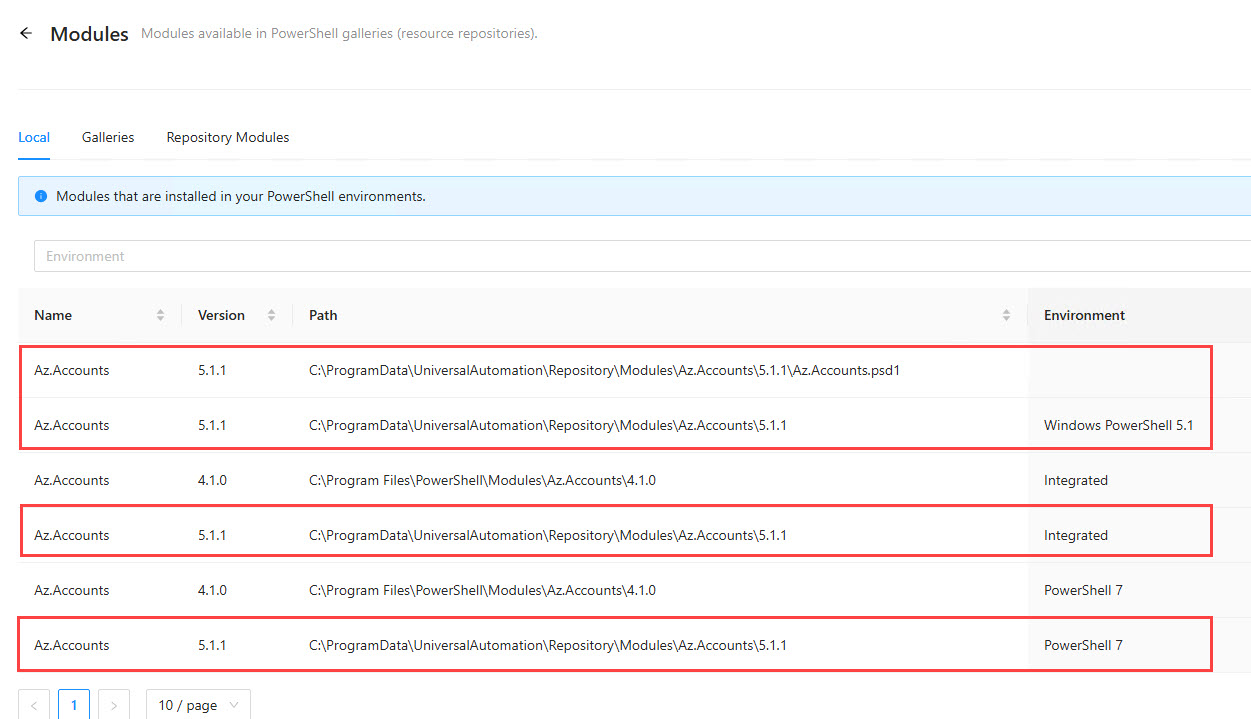
Thanks,
Rob
42789e92409ee1a76204de3acdf641f1c361e65b.jpeg
0945cf88cd5e8cfbacbddd5387ac3a26329366e2.jpeg
245b2d59a2260ac40c152ac8b40c80027481b5d3.jpeg
6d034d2a803867dae773e8091ec37599e94c9e29.jpeg
We came across that “problem” too.
When a newer version, for example Az.Accounts, is published you can install it side by side and when importing the module the newer version gets selected.
After some tests we manually delete the older ones.
Cool…that makes sense…Thanks
Unfortunately, downgrading the Az.Accounts module to 4.1.0, broke other things. When I run Get-AzVM I now get the error
The ‘Get-AzVM’ command was found in the module ‘Az.Compute’, but the module could not be loaded.
So, I run Import-Module Az.Compute and get this error
This module requires Az.Accounts version 5.0.2. An earlier version is imported in the current PowerShell session. … This error could indicate that multiple incompatible versions of the Azure PowerShell cmdlets are installed on your system.
Now I’m getting into module versioning hell…LOL. I couldn’t find which Az parent module comes with Az.Accounts 4.1.0 but looking back at a couple of different PSU environments we have I found Azure things working with the parent Az versions 12 and 13.
I found this MSFT page talking about the Az module versions and lifecycle: Azure PowerShell support lifecycle | Microsoft Learn
Chart here shows 12.5.0 was the last LTS version, prior to 14.0.0 as LTS, and is supported until 15.0.0. It seems the Az module 14.x is not playing well with PSU 5.x versions, at least that’s what I’m seeing. I decided to downgrade the Az module to version 12.5.0. Uninstalled all Az and Az.* modules from my server, then installed Az version 12.5.0.
Everything was working in VSCode, but in PSU jobs I was not able to connect again. I noticed that Az 12.5.0 comes with Az.Accounts 5.1.1. I uninstalled Az.Accounts 5.1.1, then installed Az.Accounts 4.1.0. Now everything is working, both in VSCode and in PSU
The combo that did it was to uninstall all Az and Az.* modules, install Az 12.5.0, uninstall Az.Accounts 5.1.1, then install Az.Accounts 4.1.0.
Marking as resolved, as I found a work around. However, I think the actual fix to using the latest Az module 14.x, and all its updated submodules, with PSU will come later as an update to PSU.
BR,
Rob
6127d89b8f3035218c99a95f537a3bbf608b7f99.png