Roles & Permissions for Individual access to Apps

Product: PowerShell Universal
Version: 5.5.4
Hello !
I have multiple Apps and I wanted to create dedicated Roles to assign read access to users.
I would like my users to only have access to these apps and nothing more in Powershell Universal.
I created a first dedicated Role without nested roles included :
Then I created permissions :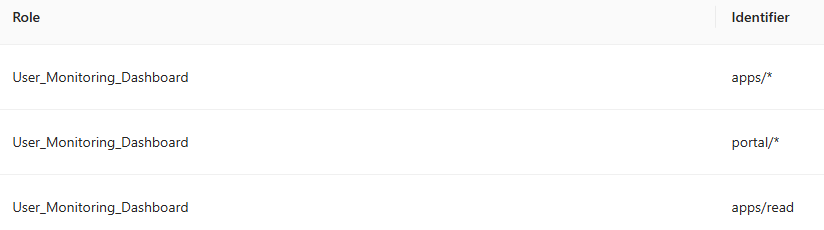
(for the test I even add All permission on apps/*)Then I added the Role to my Identity :
And configure permission on the App :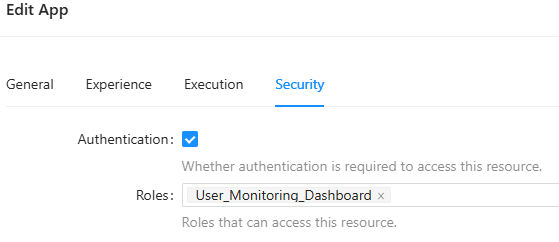
But it doesn’t work my user can access the portal, see the App ressource, but when I click on it
I have a page with this error:
Then I’m directly redirected to unauthorized page.
Do you know what am I doing wrong here?
I tried mutliple things like add nested role User; add all permissions for this role; etc… But nothing works ^^
Thanks for your help!
6da36cf4af6f4ffd1ecb8e2cac519022fd115460.png
b03467f05770bfbe4cd4355ad8c2d892d42fc0f6.png
6e0bfef864bb20dbaffaefe5357d155b6450ec89.png
d7682ec12aae4e272ffe4afdca2ca8fbc06530ca.png
5a8e83216664c2efb8cc29992bbb2c7a03d6e3d9.png
Recommended Answer
Minified React Error 31 indicates an issue with the rendering within the app itself - do you see that error from another account?
Regarding access, you shouldn’t need to give the role any permissions in order to allow them access to those apps. Once you create the role, you can leave the permissions empty, then simply add the role to that security tab on the app (which you have already done). Can you test with no permissions applied? I’m currently using this exact method to give users access ONLY to that app, where they also receive access to the Portal for a method to access the app in question.
Just for some QOL for them, I also configured the Default Route in the role definition as well.
All Comments (2)
Minified React Error 31 indicates an issue with the rendering within the app itself - do you see that error from another account?
Regarding access, you shouldn’t need to give the role any permissions in order to allow them access to those apps. Once you create the role, you can leave the permissions empty, then simply add the role to that security tab on the app (which you have already done). Can you test with no permissions applied? I’m currently using this exact method to give users access ONLY to that app, where they also receive access to the Portal for a method to access the app in question.
Just for some QOL for them, I also configured the Default Route in the role definition as well.
Hey @AnonymousUser !
Thanks for your reply
That got me on the right track ^^
I forgot I defined authorization per pages too; so since the beginning my user had the good access to the apps but none of its pages
By adding this role to the pages everything is fine now; and indeed I removed all permissions on that role
Thanks again for your help !
