UDButton not rendering in UDDataGrid

Product: PowerShell Universal
Version: 5.5.4
I’ve been messing around with Apps in Powershell Universal and have run into a problem.
I’m trying to make a dynamic report page showing the process of scripts (Job Pipeline output has been formatted with a function of mine to all follow the same format Output and Report)
This has been working swimmingly, but then I decided to make a DataGrid showing all jobs of a script sorted by starttime, in these rows I want to include a button to show the specific report of that job.
I’ve done this in another part of the app and that works but, for some reason, it won’t work here.
The structure goes as follows:
UDCard (Card containing last run info per script)
UDStack (To posistion the text and buttons under each other)
UDTypography x2 (text)
UD Button (Open Modal with all jobs)
UDModal
UDDataGrid
New-UDDataGrid -LoadRows {
    $scriptObject = Get-PSUScript -Name $scriptName
    $data = get-psujob -Script $scriptObject
    $data | Out-UDDataGridData -Context $EventData -TotalRows $data.Length
} -Columns @(
    New-UDDataGridColumn -Field Id -Title 'Id' -Width 100
    New-UDDataGridColumn -Field StartTime -Title 'Started' -Width 250
    New-UDDataGridColumn -Field Status -Title 'Status' -Width 150
    New-UDDataGridColumn -Title "View" -Width 150 -Render {
        New-UDButton -Text "Show Report" -OnClick {
            showReportDetails -id $EventData.Id -scriptName $scriptName
        }
    }
) -Pagination -PageSize 10 -DefaultSortColumn 'StartTime' -DefaultSortDirection 'desc'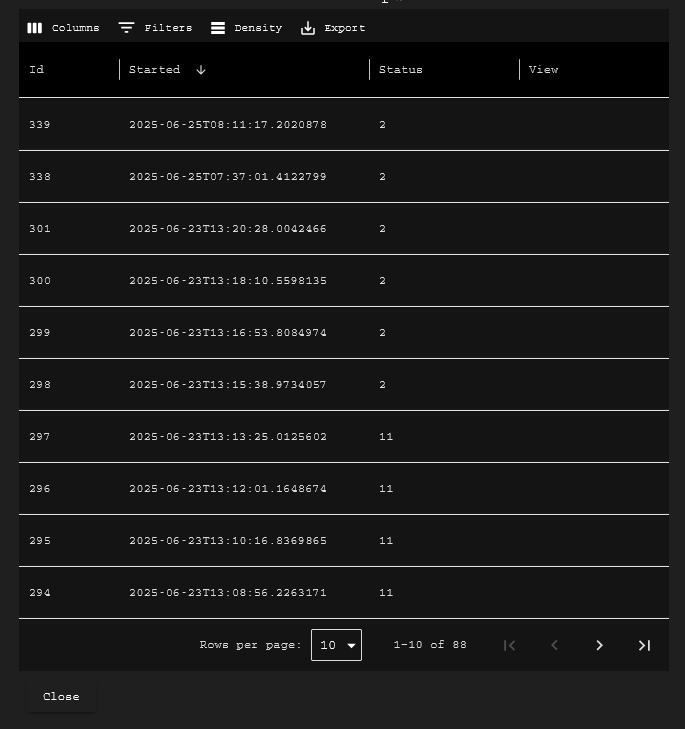
97d76b5953be15bd9a8504ff2eeedcad263112b6.png
Recommended Answer
So, after some more tinkering with the script, I figured out that the data grid isn’t a big fan of more keys and values than it’s expecting.
Loading the data and performing a select-object on the variable to only include ID, StartTime and Status was the solution to have the button show up.
Hope this helps
All Comments (1)
So, after some more tinkering with the script, I figured out that the data grid isn’t a big fan of more keys and values than it’s expecting.
Loading the data and performing a select-object on the variable to only include ID, StartTime and Status was the solution to have the button show up.
Hope this helps