Script duplication / Upgrade issues

Product: PowerShell Universal
Version: 5.5.3 / 5.5.4
Good Morning,
We are currently running version 5.5.3. we have two issues:
- Yesterday I upgraded it to 5.5.4
- According to my MSI logs the installation was successful but the console for PSU was just stuck at loading.

- I now rolled back to
5.5.3, and it is operating. But I am concerned, what went wrong? How to prevent it ?
The other issue: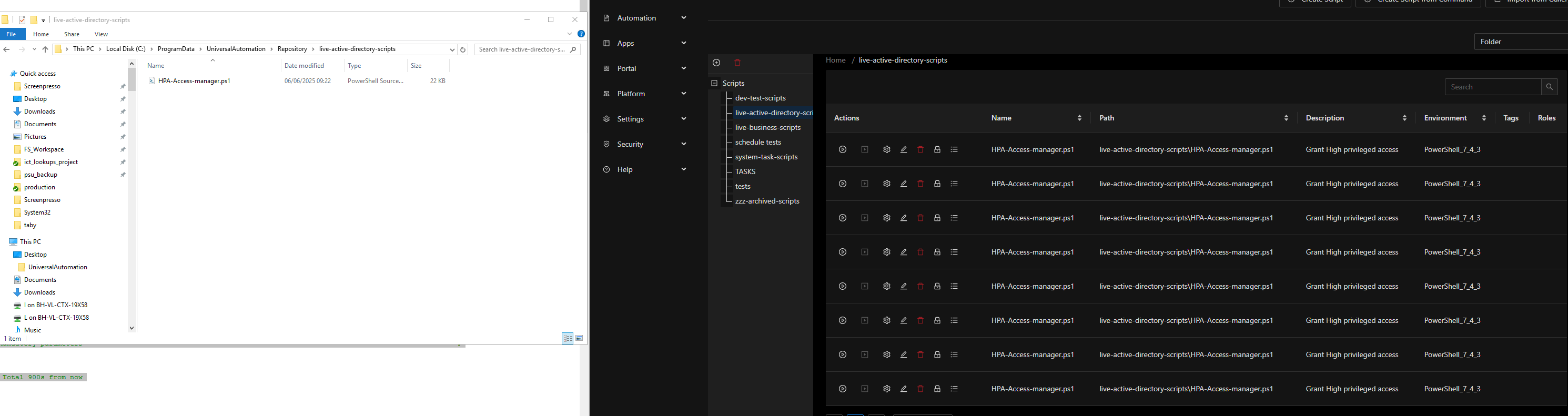
- it seems most script folder shows duplicates of the scripts
- i.e. the one on the screenshot has one script physically on the file system, but shows the same script 8x on the PSU
- (this is happening across all the folders, with all the scripts, so you can see how problematic is this)
Is there any way to prevent / reverse this?
Thanks,
Fabrice
006fee0d87276fc9d22c8de6040c48b6d1d760d2.png
445ad4c94962960b3d0edf89541aaaf549d55089.png
All Comments (7)
Typically, the spinning is a result of the server failing to start fully. You should check the system logs for Failed to Start PowerShell Universal.
As for the scripts duplicating, take a look in your scripts.ps1 in the universal folder to see if there are duplicate entries.
Adam Driscoll
PowerShell Expert and Developer at Devolutions
I am seeing a very large number of duplicates in my scripts as well. I cleared them out yesterday, restarted, and scripts.ps1 didnt have duplicates but there were still several scripts duplicated in the GUI.
Just looked again today, and we have a very large number of duplicates in scripts.ps1 again. I think I worked with you on a similar issue sometime last year on an earlier version but the duplication stopped.
also.. Just upgraded from 5.5.3 to 5.5.4
Support email sent.. I included files form our environment so I didn’t want to open straight to Github
I’ve open an issue to track this here: [5.5.4] Script Duplication · Issue #4847 · ironmansoftware/powershell-universal · GitHub
Do either of you have the Disable Auto Reload setting set in settings.ps1? I ask because in v5.6, I was seeing the file system watcher cause some weird behavior. Not duplication, but some inconsistencies in our integration tests. That said, I did not see this in 5.5.4, so it may be unrelated.
Adam Driscoll
PowerShell Expert and Developer at Devolutions
We did not, but I just set it and will monitor
Sorry for the late reply.
We currently run two instances. Both is on 5.5.4
- The “DEV” (which had these issues) I have rebuilt from scratch, and it is for now does not have duplicates (this was the one I initially wrote about).
the settings.ps1:
cat C:\ProgramData\UniversalAutomation\Repository\.universal\settings.ps1
$Parameters = @{
        EnhancedAppTokenSecurity = $true
        ApiSecurityModel = "Medium"
}
Set-PSUSetting @Parameters- The “PROD” instance shows duplicates, and I see this in the settings:
PS C:\Users\admin-FSemti> cat C:\ProgramData\UniversalAutomation\Repository\.universal\settings.ps1
$Parameters = @{
        DefaultEnvironment = "Windows PowerShell 5.1"
        SessionTimeout = 0
        EnhancedAppTokenSecurity = $true
        ApiSecurityModel = "Medium"
        DefaultRunOn = "INFR-VL-RRX-01"
}
Set-PSUSetting @Parameters
Not sure if any of these related to the duplication?
On the “PROD”: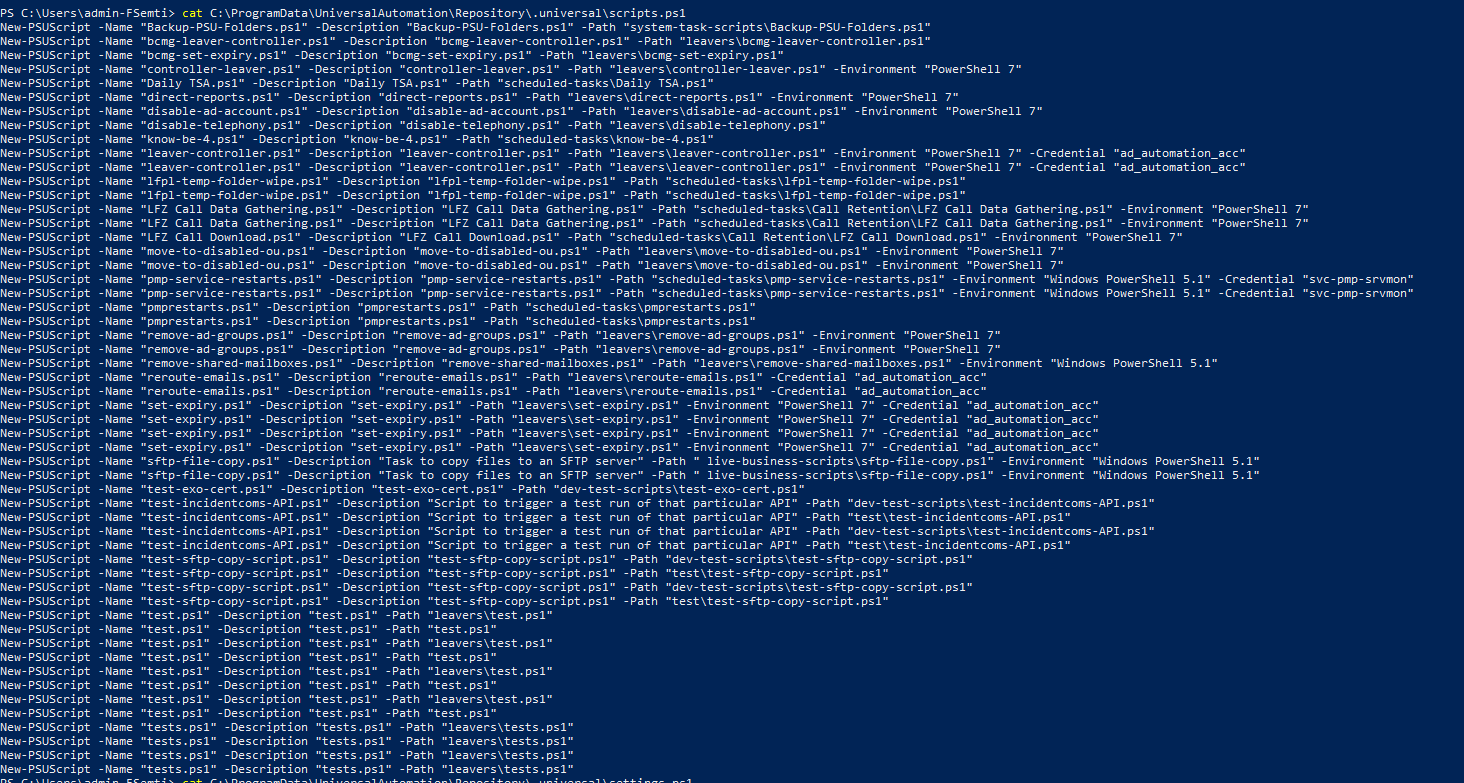
This is in contrast with what the “repository” actually contains (no duplicates)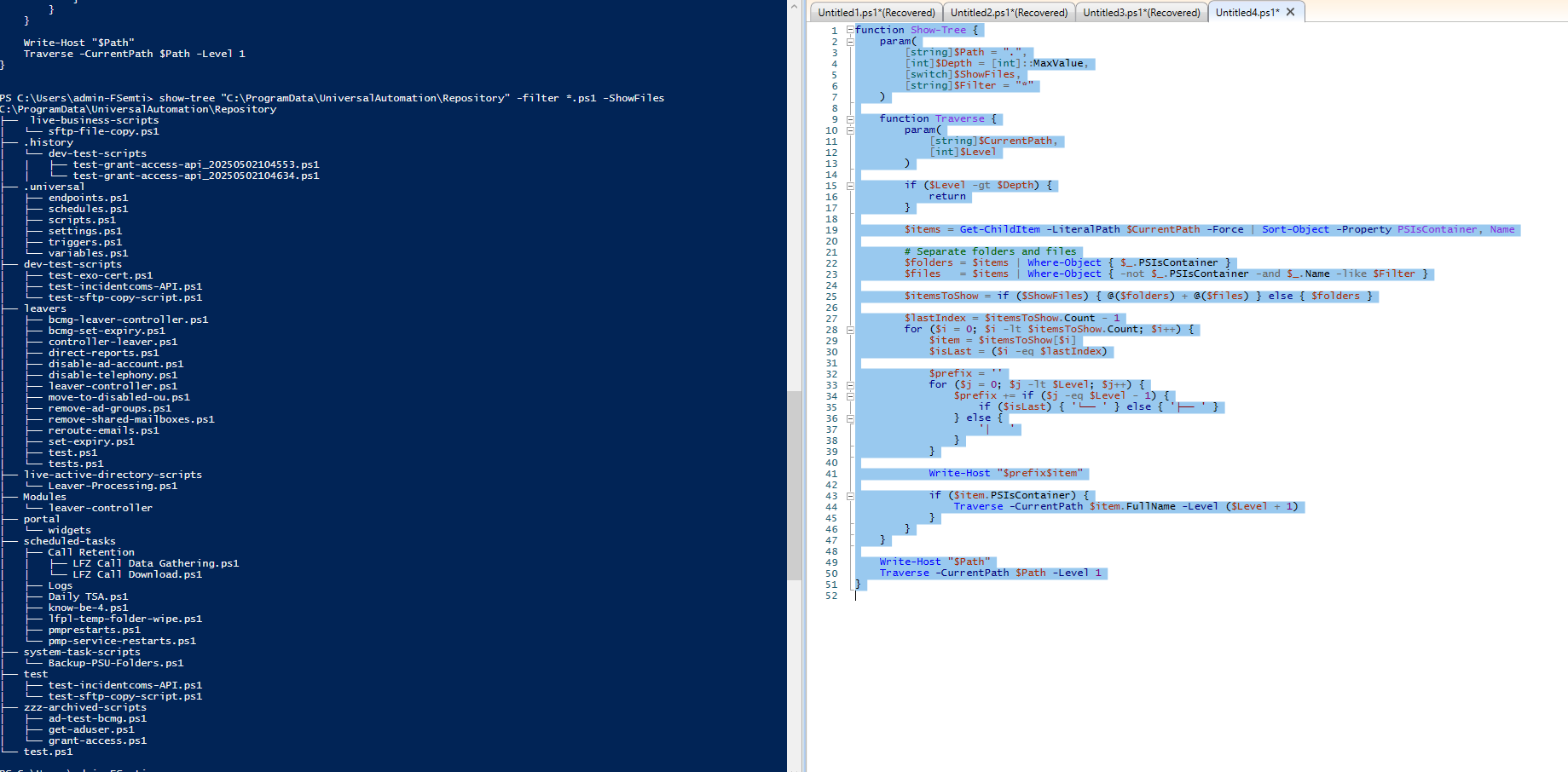
02ac6af7f5ca8d3ec1c0790669a80f220b6e16cb.png
4c442272b25cceb119385dbe74877820d5687230.png
I know the card is already closed and I had updated it there, but turning Disable Auto Reload on, stopping the service, and cleaning up the duplicates in the scripts.ps1 file, did fix the issue for 5.5.4.
Yep, that done it.
Thanks for the input all.