New-UDTable error when data is empty
I have a couple of app pages where I need the table to be empty at first load and then it gets filled after a button is clicked. This was working fine but after upgrading to 5.4.3 I get an error. Even after clicking the button to load data, it stays in this error state.
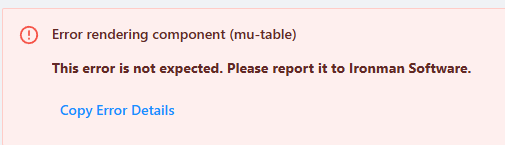
Error rendering component (mu-table)
TypeError: undefined is not iterable (cannot read property Symbol(Symbol.iterator))
Product: PowerShell Universal
Version: 5.4.3
23a4b1b22aa7924b01eb9e923fe337c24c33e1d2.png
All Comments (4)
Initially i’m setting the data to @() this is what gives the error on page load.
I’m able to get the page somewhat working if I set the data to something on page load such as this:
$DummyData = @(
                            @{ Random = Get-Random }
                            @{ Random = Get-Random }
                            @{ Random = Get-Random }
                        )
After doing that I can then pass it Data=@() using Set-UDElement and that works fine. But the other problem I have is when using the approach to load this “dummy” data, it limits the number of rows the table will display. it seems stuck to number of rows that the initial dummy data had.
I do it like this to create an empty table, it updates the columns on the fly.
I hope the code snippets I cut out of a longer code still make sense.
First I create my “empty” data and store it in a file.
(you can use a page scope variable as well, I had other reasons for a file…data is pretty huge)
@{empty="empty"} | export-csv -noty -enc utf8 "..\tmp\$connectionid"
This is how I build my table
New-UDTable -Id "table" -loaddata   {

    $data=import-csv  "..\tmp\$connectionid"
    $columns=($data[0].psobject.properties ).name

    Set-UDElement -id "table" -Properties @{
        columns=@($columns | %{New-UDTableColumn -Property $_  })
    }

    $tdc=$Data.count


    $Data = $Data | Select-Object -First $EventData.PageSize -Skip ($EventData.Page * $EventData.PageSize)
    $data| Out-UDTableData -Page $EventData.Page -TotalCount $tdc -Properties $columns

} -Columns @(
    New-UDTableColumn -Property "empty"
)
} -ShowPagination   -PageSize 20 -dense
And in some other code I create my data and store it in the file.
Then I sync the table.
    $ret.results | export-csv -noty -enc utf8  "..\tmp\$connectionid"
Sync-UDElement -id "table" -Waitthank you I will take a look at this. but setting the data=@() before the upgrade was working fine and it only now is broken after upgrading. so it still seems like a bug to me.

Ive had the same toom think its this one: PSUTable Error on No Data · Issue #4561 · ironmansoftware/powershell-universal · GitHub
fix will be in 5.5.0