Assistance With React Primitive Types

Hello everyone, I am running into an issue with creating a Calculated Property on an Object and then viewing the value of that property in my dashboard with Get-UDElement. Here is the code,
Creating Calculated Property (Get-DHCPScopes.ps1)
#'Selection' property value.  Will be incremented based on the number of printers returned Get
$i = @{value = 0}

#Obtain all DHCP Scopes on DHCP Server.
$Object = Get-DhcpServerv4Scope -ComputerName 'DHCP Server' | Select-Object *, @{ Name = 'SelectionId'; Expression = { (value = $i.value++) }

#Return
$Object
Dashboard Code
New-UDDashboard -Theme $Theme -Title 'IP Management' -Content {
    #Initial loading of all DHCP scopes off of GSCU-DHCP1.
    $DHCPScopes = Invoke-PSUScript 'Get-DHCPScopes.ps1' -Integrated -Wait
    New-UDCard -Title "Test Title" -TitleAlignment Center -ClassName "card-layer0" -Content {
        New-UDRow -Columns {
            New-UDColumn -LargeSize 2 -Content {
                New-UDCard -Title 'Test Placement' -TitleAlignment Center -ClassName "card-layer1" -Content {
                    New-UDRadioGroup -Id 'ScopeSelection' -Content {
                        $DHCPScopes | Foreach-Object {
                            New-UDRadio -Label $_.SelectionId -Value $_.SelectionId
                        }
                    } -OnChange {
                        Sync-UDElement -Id 'ScopeStatistics'
                    }
                }
            }

            New-UDColumn -LargeSize 6 -Content {
                New-UDCard -Title 'Test Statistics' -TitleAlignment Center -ClassName "card-layer1" -Content {
                    New-UDDynamic -Id 'ScopeStatistics' -Content {
                        (Get-UDElement -Id 'ScopeSelection').Value

                    }
                }
            }
        }
    }
}
Error
Error rendering component (dynamic)
TypeError: Cannot create property ‘__version’ on number ‘0’
All I have been able to figure out is that this has something to do with Primitive Data, but I am not sure how to resolve this. Any insight would be greatly appreciated. Thank you!
Product: PowerShell Universal
Version: 4.5.3
All Comments (2)
Hey hey, I tried to test this on my system here but struck an issue at this line
$Object = Get-DhcpServerv4Scope -ComputerName 'DHCP Server' | Select-Object *, @{ Name = 'SelectionId'; Expression = { (value = $i.value++) }
First issue was a missing close brace on the end
$Object = Get-DhcpServerv4Scope -ComputerName 'DHCP Server' | Select-Object *, @{ Name = 'SelectionId'; Expression = { (value = $i.value++) } }
When I try this new one I get a selectionId Attribute on the objects, but it is empty as this scriptblock doesn’t return a value to the Select to set the value
... Expression = { (value = $i.value++) }
Expression = { (value = $i.value++) }
If I remove the value = and adjust it so it returns the $i.value and then increments I get a number in the data
$Object = Get-DhcpServerv4Scope -ComputerName ‘DHCP Server’ | Select-Object *, @{ Name = ‘SelectionId’; Expression = { $i.value; $i.value++ } }
The app then renders me a page that has a radio list of 1->327 and but clicking them seeing your error too.
If I change the pattern to use a variable can get it to read and show - thats a common pattern in the examples too
New-UDCard -Title "Test Title" -TitleAlignment Center -ClassName "card-layer0" -Content {
        New-UDRow -Columns {
            New-UDColumn -LargeSize 2 -Content {
                New-UDCard -Title 'Test Placement' -TitleAlignment Center -ClassName "card-layer1" -Content {
                    New-UDRadioGroup -Id 'ScopeSelection' -Content {
                        $DHCPScopes | Foreach-Object {
                            New-UDRadio -Label $_.SelectionId -Value $_.SelectionId
                        }
                    } -OnChange {
                        $Page:SelectedScope = $EventData
                        Sync-UDElement -Id 'ScopeStatistics'
                    }
                }
            }

            New-UDColumn -LargeSize 6 -Content {
                New-UDCard -Title 'Test Statistics' -TitleAlignment Center -ClassName "card-layer1" -Content {
                    New-UDDynamic -Id 'ScopeStatistics' -Content {
                        New-UDTypography $Page:SelectedScope
                    }
                }
            }
        }
    }
As an alternate I removed the additional property and used scopeid instead to see a list of scopes and the id shows in the card too - we have a dashboard of DHCP Scopes, etc and use ScopeID as the selector as its unique for us and then thing we then feed into subsequent pages/calls - that may not work for you though if you need an index
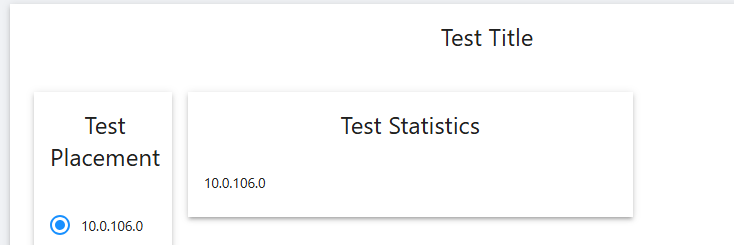
Hope it helps
120e104e0f83c9d62fb07e09e575bde531198576.png
987c906afb131834b398f8f9489e60cf5d7007e0.png
6f5acf6d9a2afc2e637389340ffa8559193227e4.png
37dfbc2c1f994bd0b38d2960cf05da1f24048dd2.png
Morning @AnonymousUser
Thank you for your help on this! I was considering using Scope ID to be the selector, but I wanted something a bit more user friendly because I don’t always remember our IP spaces per our locations. I was able to get the code to work though as I needed to do this,
$Value = (Get-UDElement -Id 'ScopeSelection').Value
$Value then was holding the value stored in SelectionId. Kind of weird I needed to do this, but it corrected the issue and I was able to display SelectionId within the dashboard.