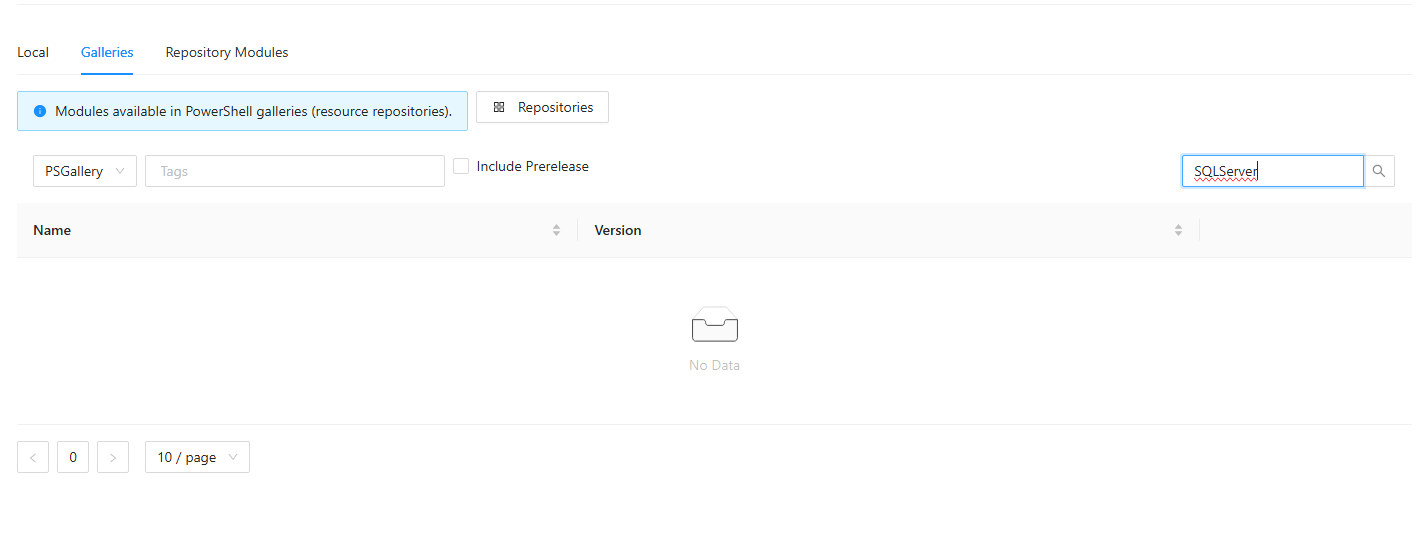
Gallery doesn't load and displays "No Data"

Product: PowerShell Universal
Version: 5.4.2
Hey All!
I have a brand new install of Powershell Universal Server on Window Server 2019 Standard Evaluation, with default settings (System account, SQLlite DB, etc). In my network there is a proxy server (http://proxyurl.local:8081 without a user), which I’ve configured in the settings. However for some reason I don’t have access to the PSGallery modules. I searched for “SQLServer”, it loads and then just shows “no data”. In the system log I can see the following. Any idea why this is the case?2025-03-18 15:15:36.060 +01:00 [ERR][Universal.Server.Services.ModuleService] Error while searching for module System.Management.Automation.CmdletInvocationException: Name parameter must be provided, unless Tag or Type parameters are used. ---> System.Management.Automation.PSInvalidOperationException: Name parameter must be provided, unless Tag or Type parameters are used. at System.Management.Automation.MshCommandRuntime.ThrowTerminatingError(ErrorRecord errorRecord) --- End of inner exception stack trace --- at System.Management.Automation.Runspaces.AsyncResult.EndInvoke() at System.Management.Automation.PowerShell.EndInvoke(IAsyncResult asyncResult) at System.Threading.Tasks.TaskFactory1.FromAsyncCoreLogic(IAsyncResult iar, Func2 endFunction, Action1 endAction, Task1 promise, Boolean requiresSynchronization) --- End of stack trace from previous location --- at Universal.Server.Services.ModuleService.FindModule(String repository, String searchText, Boolean prerelease, IEnumerable1 tags) in D:\a\universal\universal\src\Universal.Server\Services\ModuleService.cs:line 52
2025-03-18 15:15:36.065 +01:00 [ERR][Universal.Server.Services.ModuleService] Error while searching for module
System.Management.Automation.CmdletInvocationException: Name parameter must be provided, unless Tag or Type parameters are used.
—> System.Management.Automation.PSInvalidOperationException: Name parameter must be provided, unless Tag or Type parameters are used.
at System.Management.Automation.MshCommandRuntime.ThrowTerminatingError(ErrorRecord errorRecord)
— End of inner exception stack trace —
at System.Management.Automation.Runspaces.AsyncResult.EndInvoke()
at System.Management.Automation.PowerShell.EndInvoke(IAsyncResult asyncResult)
at System.Threading.Tasks.TaskFactory1.FromAsyncCoreLogic(IAsyncResult iar, Func2 endFunction, Action1 endAction, Task1 promise, Boolean requiresSynchronization)
— End of stack trace from previous location —
at Universal.Server.Services.ModuleService.FindModule(String repository, String searchText, Boolean prerelease, IEnumerable1 tags) in D:\a\universal\universal\src\Universal.Server\Services\ModuleService.cs:line 52 2025-03-18 15:15:37.879 +01:00 [ERR][Universal.Server.Services.ModuleService] Error while searching for module System.Management.Automation.CmdletInvocationException: Name parameter must be provided, unless Tag or Type parameters are used. ---> System.Management.Automation.PSInvalidOperationException: Name parameter must be provided, unless Tag or Type parameters are used. at System.Management.Automation.MshCommandRuntime.ThrowTerminatingError(ErrorRecord errorRecord) --- End of inner exception stack trace --- at System.Management.Automation.Runspaces.AsyncResult.EndInvoke() at System.Management.Automation.PowerShell.EndInvoke(IAsyncResult asyncResult) at System.Threading.Tasks.TaskFactory1.FromAsyncCoreLogic(IAsyncResult iar, Func2 endFunction, Action1 endAction, Task1 promise, Boolean requiresSynchronization) --- End of stack trace from previous location --- at Universal.Server.Services.ModuleService.FindModule(String repository, String searchText, Boolean prerelease, IEnumerable1 tags) in D:\a\universal\universal\src\Universal.Server\Services\ModuleService.cs:line 52
`
cbbe58aa8b9d7bca91daef6d4ae5862ab5d6d4eb.png
All Comments (3)
I have to imagine PSU isn’t using the proxy properly. I tried this locally and it loads properly.
That said, I do see the error you posted from the system logs. Do you have any other errors visible in the logs?
Adam Driscoll
PowerShell Expert and Software Architect at Devolutions
1c6f62b81654dc446446afefd868db324b2bd354.png
Hey Adam,
impressively quick reply! I set log level to debug, restarted the service and retried searching like above.
2025-03-18 18:33:53.967 +01:00 [DBG][Microsoft.AspNetCore.Authorization.DefaultAuthorizationService] Authorization was successful.
2025-03-18 18:33:54.173 +01:00 [ERR][Universal.Server.Services.ModuleService] Error while searching for module
System.Management.Automation.CmdletInvocationException: Name parameter must be provided, unless Tag or Type parameters are used.
 ---> System.Management.Automation.PSInvalidOperationException: Name parameter must be provided, unless Tag or Type parameters are used.
   at System.Management.Automation.MshCommandRuntime.ThrowTerminatingError(ErrorRecord errorRecord)
   --- End of inner exception stack trace ---
   at System.Management.Automation.Runspaces.AsyncResult.EndInvoke()
   at System.Management.Automation.PowerShell.EndInvoke(IAsyncResult asyncResult)
   at System.Threading.Tasks.TaskFactory`1.FromAsyncCoreLogic(IAsyncResult iar, Func`2 endFunction, Action`1 endAction, Task`1 promise, Boolean requiresSynchronization)
--- End of stack trace from previous location ---
   at Universal.Server.Services.ModuleService.FindModule(String repository, String searchText, Boolean prerelease, IEnumerable`1 tags) in D:\a\universal\universal\src\Universal.Server\Services\ModuleService.cs:line 52
2025-03-18 18:33:54.197 +01:00 [ERR][Universal.Server.Services.ModuleService] Error while searching for module
System.Management.Automation.CmdletInvocationException: Name parameter must be provided, unless Tag or Type parameters are used.
 ---> System.Management.Automation.PSInvalidOperationException: Name parameter must be provided, unless Tag or Type parameters are used.
   at System.Management.Automation.MshCommandRuntime.ThrowTerminatingError(ErrorRecord errorRecord)
   --- End of inner exception stack trace ---
   at System.Management.Automation.Runspaces.AsyncResult.EndInvoke()
   at System.Management.Automation.PowerShell.EndInvoke(IAsyncResult asyncResult)
   at System.Threading.Tasks.TaskFactory`1.FromAsyncCoreLogic(IAsyncResult iar, Func`2 endFunction, Action`1 endAction, Task`1 promise, Boolean requiresSynchronization)
--- End of stack trace from previous location ---
   at Universal.Server.Services.ModuleService.FindModule(String repository, String searchText, Boolean prerelease, IEnumerable`1 tags) in D:\a\universal\universal\src\Universal.Server\Services\ModuleService.cs:line 52
2025-03-18 18:33:54.423 +01:00 [INF][] Generating new session state from startup script.
2025-03-18 18:33:54.453 +01:00 [INF][] Serializing base app.
2025-03-18 18:33:55.167 +01:00 [INF][] Starting scheduler.
2025-03-18 18:33:55.272 +01:00 [INF][] Dashboard configuration complete.
2025-03-18 18:33:55.324 +01:00 [DBG][PowerShellUniversal.Automation.JobService] Triggers require an Automation license.
2025-03-18 18:33:57.864 +01:00 [DBG][Microsoft.AspNetCore.Routing.Tree.TreeRouter] Request successfully matched the route with name 'null' and template '/admin/platform/modules'
2025-03-18 18:33:57.866 +01:00 [DBG][Microsoft.AspNetCore.Authorization.DefaultAuthorizationService] Authorization was successful.
2025-03-18 18:33:57.870 +01:00 [DBG][PowerShellUniversal.Services.IAuthMethodCache] Windows authentication is not enabled.
Further up the log I see these “errors”
    Schedule polling interval: 00:00:15
2025-03-18 18:33:33.986 +01:00 [INF] Application started. Hosting environment: Production; Content root path: C:\Program Files (x86)\Universal\
2025-03-18 18:33:33.992 +01:00 [INF] Server indev:8588:71f5d2b3 successfully announced in 1,6434 ms
2025-03-18 18:33:33.995 +01:00 [INF] Server indev:8588:71f5d2b3 is starting the registered dispatchers: ServerWatchdog, ServerJobCancellationWatcher, Worker, DelayedJobScheduler, RecurringJobScheduler...
2025-03-18 18:33:34.017 +01:00 [INF][UniversalAutomation.Services.UniversalConfigurationService] Reading configuration for Tag
2025-03-18 18:33:34.030 +01:00 [INF][Microsoft.AspNetCore.Hosting.Diagnostics] Request starting HTTP/1.1 GET http://localhost:5000/ - null null
2025-03-18 18:33:34.053 +01:00 [INF][UniversalAutomation.Services.UniversalConfigurationService] Reading configuration for Variable
2025-03-18 18:33:34.093 +01:00 [INF][UniversalAutomation.Services.UniversalConfigurationService] Reading configuration for Translation
2025-03-18 18:33:34.117 +01:00 [INF][UniversalAutomation.Services.UniversalConfigurationService] Reading configuration for Settings
2025-03-18 18:33:34.461 +01:00 [INF][Microsoft.AspNetCore.Mvc.Infrastructure.RedirectResultExecutor] Executing RedirectResult, redirecting to /admin.
2025-03-18 18:33:34.466 +01:00 [INF][Microsoft.AspNetCore.Hosting.Diagnostics] Request finished HTTP/1.1 GET http://localhost:5000/ - 302 0 null 437.5687ms
2025-03-18 18:33:34.471 +01:00 [INF][Microsoft.AspNetCore.Hosting.Diagnostics] Request starting HTTP/1.1 GET http://localhost:5000/admin - null null
2025-03-18 18:33:34.506 +01:00 [INF][Microsoft.AspNetCore.Routing.EndpointMiddleware] Executing endpoint '/_Host'
2025-03-18 18:33:34.520 +01:00 [INF][Microsoft.AspNetCore.Mvc.RazorPages.Infrastructure.PageActionInvoker] Route matched with {page = "/_Host", action = "", controller = ""}. Executing page /_Host
2025-03-18 18:33:34.533 +01:00 [INF][Microsoft.AspNetCore.Mvc.RazorPages.Infrastructure.PageActionInvoker] Executing an implicit handler method - ModelState is "Valid"
2025-03-18 18:33:34.534 +01:00 [INF][Microsoft.AspNetCore.Mvc.RazorPages.Infrastructure.PageActionInvoker] Executed an implicit handler method, returned result Microsoft.AspNetCore.Mvc.RazorPages.PageResult.
2025-03-18 18:33:34.864 +01:00 [INF][Microsoft.AspNetCore.Mvc.RazorPages.Infrastructure.PageActionInvoker] Executed page /_Host in 336.5146ms
2025-03-18 18:33:34.865 +01:00 [INF][Microsoft.AspNetCore.Routing.EndpointMiddleware] Executed endpoint '/_Host'
2025-03-18 18:33:34.870 +01:00 [INF][Microsoft.AspNetCore.Hosting.Diagnostics] Request finished HTTP/1.1 GET http://localhost:5000/admin - 200 null text/html; charset=utf-8 398.3082ms
2025-03-18 18:33:34.876 +01:00 [INF][Microsoft.AspNetCore.Hosting.Diagnostics] Request starting HTTP/1.1 GET http://localhost:5000/_framework/blazor.server.js - null null
2025-03-18 18:33:35.164 +01:00 [INF][Microsoft.AspNetCore.Routing.EndpointMiddleware] Executing endpoint 'Blazor static files'
2025-03-18 18:33:35.169 +01:00 [INF][Microsoft.AspNetCore.StaticFiles.StaticFileMiddleware] The file /_framework/blazor.server.js was not modified
2025-03-18 18:33:35.187 +01:00 [INF][Microsoft.AspNetCore.Routing.EndpointMiddleware] Executed endpoint 'Blazor static files'
2025-03-18 18:33:35.188 +01:00 [INF][Microsoft.AspNetCore.Hosting.Diagnostics] Request finished HTTP/1.1 GET http://localhost:5000/_framework/blazor.server.js - 304 null text/javascript 311.2447ms
2025-03-18 18:33:36.011 +01:00 [INF][Microsoft.AspNetCore.Hosting.Diagnostics] Request starting HTTP/1.1 GET http://localhost:5000/_blazor/initializers - null null
2025-03-18 18:33:36.022 +01:00 [INF][Microsoft.AspNetCore.Routing.EndpointMiddleware] Executing endpoint 'Blazor initializers'
2025-03-18 18:33:36.028 +01:00 [INF][Microsoft.AspNetCore.Routing.EndpointMiddleware] Executed endpoint 'Blazor initializers'
2025-03-18 18:33:36.029 +01:00 [INF][Microsoft.AspNetCore.Hosting.Diagnostics] Request finished HTTP/1.1 GET http://localhost:5000/_blazor/initializers - 200 null application/json; charset=utf-8 17.8934ms
2025-03-18 18:33:36.605 +01:00 [INF][Microsoft.AspNetCore.Hosting.Diagnostics] Request starting HTTP/1.1 POST http://localhost:5000/_blazor/negotiate?negotiateVersion=1 - null 0
2025-03-18 18:33:36.613 +01:00 [INF][Microsoft.AspNetCore.Cors.Infrastructure.CorsService] CORS policy execution failed.
2025-03-18 18:33:36.613 +01:00 [INF][Microsoft.AspNetCore.Cors.Infrastructure.CorsService] Request origin http://localhost:5000 does not have permission to access the resource.
2025-03-18 18:33:36.620 +01:00 [INF][Microsoft.AspNetCore.Routing.EndpointMiddleware] Executing endpoint '/_blazor/negotiate'
2025-03-18 18:33:36.633 +01:00 [INF][Microsoft.AspNetCore.Routing.EndpointMiddleware] Executed endpoint '/_blazor/negotiate'
2025-03-18 18:33:36.633 +01:00 [INF][Microsoft.AspNetCore.Hosting.Diagnostics] Request finished HTTP/1.1 POST http://localhost:5000/_blazor/negotiate?negotiateVersion=1 - 200 null application/json 28.533ms
2025-03-18 18:33:36.739 +01:00 [INF][Microsoft.AspNetCore.Hosting.Diagnostics] Request starting HTTP/1.1 GET http://localhost:5000/_blazor?id=hcdUPTheLRHiKhpBR3iFpA - null null
2025-03-18 18:33:36.743 +01:00 [INF][Microsoft.AspNetCore.Cors.Infrastructure.CorsService] CORS policy execution failed.
2025-03-18 18:33:36.743 +01:00 [INF][Microsoft.AspNetCore.Cors.Infrastructure.CorsService] Request origin http://localhost:5000 does not have permission to access the resource.
2025-03-18 18:33:36.748 +01:00 [INF][Microsoft.AspNetCore.Routing.EndpointMiddleware] Executing endpoint '/_blazor'
2025-03-18 18:33:38.295 +01:00 [INF][PowerShellUniversal.IEndpointDocService] Caching endpoint documentation
2025-03-18 18:33:38.426 +01:00 [INF][UniversalAutomation.Services.UniversalConfigurationService] Reading configuration for PowerShellMiddlewareI’m having the same issue. I can find packages locally (Find-PSResource) but it doesn’t appear to work in the WebUI. My error message is the same.
I’m behind a corporate proxy, have it set in the settings. I also tried setting the system proxy but still no luck.
Error Message2025-06-17 12:23:31.954 -05:00 [ERR][Universal.Server.Services.ModuleService] Error while searching for module
System.Management.Automation.CmdletInvocationException: Name parameter must be provided, unless Tag or Type parameters are used.
 ---> System.Management.Automation.PSInvalidOperationException: Name parameter must be provided, unless Tag or Type parameters are used.
   at System.Management.Automation.MshCommandRuntime.ThrowTerminatingError(ErrorRecord errorRecord)
   --- End of inner exception stack trace ---
   at System.Management.Automation.Runspaces.AsyncResult.EndInvoke()
   at System.Management.Automation.PowerShell.EndInvoke(IAsyncResult asyncResult)
   at System.Threading.Tasks.TaskFactory`1.FromAsyncCoreLogic(IAsyncResult iar, Func`2 endFunction, Action`1 endAction, Task`1 promise, Boolean requiresSynchronization)
--- End of stack trace from previous location ---
   at Universal.Server.Services.ModuleService.FindModule(String repository, String searchText, Boolean prerelease, IEnumerable`1 tags) in D:\a\universal\universal\src\Universal.Server\Services\ModuleService.cs:line 58