Error connecting to Teams-Module (Connect-MicrosoftTeams)

Hello,
when I try to connect to the Teams-Powershell, I get the following error:
[3/17/2025 10:46:45 AM] [Error] [App-Test] Method not found: ‘Void Microsoft.Identity.Client.ITokenCache.Deserialize(Byte)’.
It connects with a certificate against an app. The same with “Connect-MgGraph” and “Connect-ExchangeOnline” is working. In an interactive Powershell-Session with the same settings it works, too.
All Comments (9)
I tried to connect with access tokens as listed under:
learn.microsoft.com
But in the last step (Connect-MicrosoftTeams -AccessTokens) I get the same error.
Can you share the version of PSU and the teams module? It’s likely an assembly conflict. What environment are you attempting to run this in?
Adam Driscoll
PowerShell Expert and Software Architect at Devolutions
Hello adam,
PSU version is 5.4.1, the teams module is the newest one (6.9.0).
I tried to set the app to both Powershell 5.1 and Powershell 7.
I’m using it fine in v5.4.1, although I have made a note to run it in PS 5.1 because I couldn’t get it to work in PS 7;
I’m connecting with certificate thumbprint using module version 6.6.0
<#
.DESCRIPTION
    Returns the members and owners of selected teams and channels within Teams.

.NOTES
    Created: 15/01/2025
    Reviewed: 03/02/2025

    Requires Powershell 5 the Teams module won't run under Powershell 7

.CHANGELOG

#>

Connect-MicrosoftTeams -Certificate $Thumbprint -TenantId xxxxxxxxxxxx.onmicrosoft.com -ApplicationId cda8c2xx-xxxxxxx-xxxxxxx-xxxx
c5546f7a445084614d7cbb388d99a8c8584cd6f9.png
Thank you - I’ve tried to explicitely install version 6.6.0 now and checked to use Powershell 5.1 environment again.
The rest of my code is the same as yours - but still the same error.
But: I don’t know what has changed on my server - I can’t install modules anymore. It says:
"WARNING: Source Location ‘https://www.powershellgallery.com/api/v2/package/MicrosoftTeams/6.9.0’ is not valid.
PackageManagement\Install-Package : Package ‘MicrosoftTeams’ failed to download.
Tried different solutions (explicitely calling TLS 1.2, trusting the repository and so on, there are many hints on the internet), but can’t get it work at the moment.
Connections to MS Graph and Exchange Online still work, but perhaps the error is corresponding to that..
I had that same error also at some point, but I forget what I did to resolve it.
From memory - and this may be wrong - but I think I had to manually install NuGet and trust the PSGallery repository.
Okay, I got it working now.
Yes, I had to install it manually, but the path is also important. First I installed to C:\Windows\System32\WindowsPowershell… (getting the error above), now I installed to C:\Program Files\WindowsPowershell… (both are listed as module path).
I’m sorry for the confusion and thank you for your help!
How are you guys doing this?
I created an app registration and have the following API permissions on it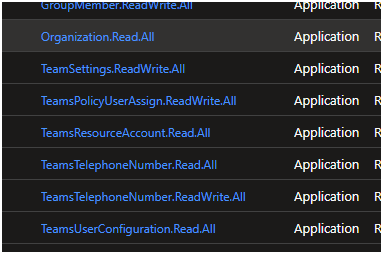
I created a certificate for authentication and connected to teams using
Connect-MicrosoftTeams -TenantId $TenantId -Certificate $Cert -ApplicationId $applicationId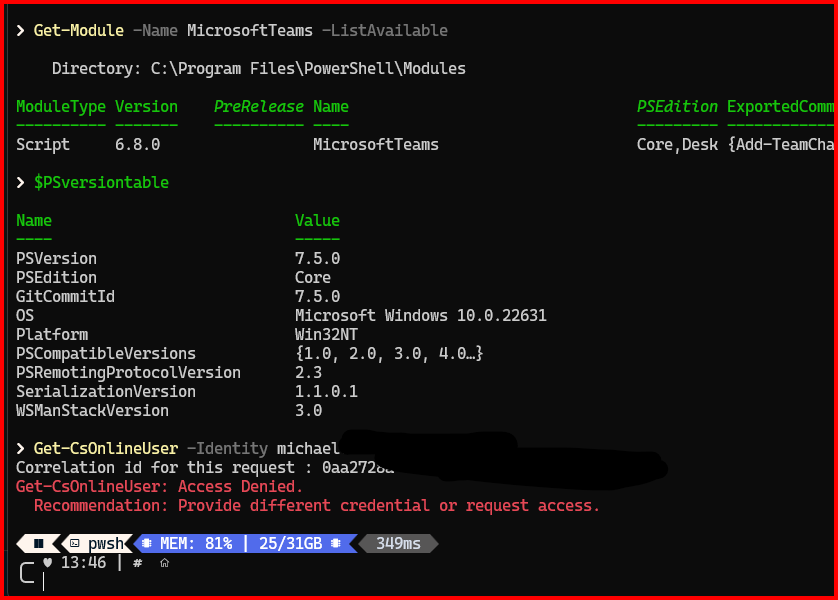
Thanks for any help
eeea37f77a5c89cf2c33de31c7642fa0543e24f8.png
41bf1e99355fd4856c9b1b316bf1b95eef778e44.png
learn.microsoft.com
The app needs an entra role as well (point 5 at the bottom). I’ve added “Teams Telephony Administrator” (because that fits my needs) to get it work.