Automatic Archiving

Product: PowerShell Universal
Version: 5.3.2
I’m in the process of moving some scripts from Jenkins into PSU that run on a schedule, some of them run very often but don’t necessarily do anything so to avoid flooding the job list I want to prune those that aren’t actually performing any actions… in Jenkins I used a plugin that would delete runs based on a regex in the script output. In PSU I’ve implemented the following snippet in the bottom of my script:
if ($actionCount -eq 0 -and $UAJob.Schedule)
{
    # Archieve job
    $jobId = $UAJob.Id
    $apiToken = Get-PSUAppToken -Identity "JobArchiver" -Integrated
    Write-Host "Archiving job: $jobId .."
    $response = Invoke-RestMethod -Uri "https://psu/api/v1/job/archive/$jobId" -Method "DELETE" -Headers @{
        Authorization="Bearer $($apiToken.Token)"
    }
}
It works but it’s a bit much to have to put in every script, so I have a couple of questions.
- Is there a better way of achieving what I want or would it be possible to add something to PSU so a script can mark its own job to be archived on completion?
- How do I limit the permissions of the app token identity, currently I have it set to Operator but I’m unsure how to only give access to archive jobs. The documentation mentions permissions like “automation/*” but I’ve only been able to find a couple of spefic “sub permissions” like read and execute.
All Comments (4)
For your first question, do you look for something like this: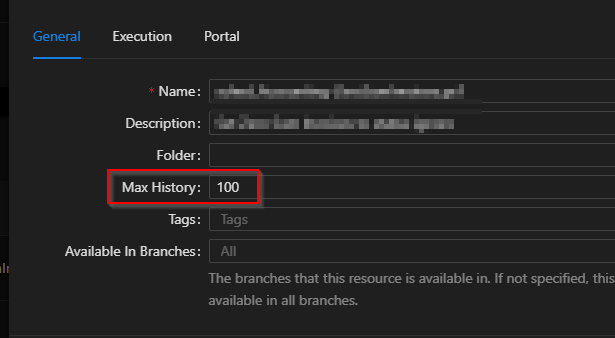
This can be configured for each script and the groom job should cleanup the jobs
2485cab32c694a34925d4dd397c96563b122fd84.png
Thank you for your reply! It’s not exactly what I’m looking for, I only want to cleanup the jobs that I consider spam, as an example say I have a script that monitors an object for changes, if there are no changes the jobs aren’t interesting and I would like to remove them so it’s easier to find the jobs where something actually happened.
If there is no better solution I’m considering putting my cleaning logic into a trigger, then at least I don’t have to include the logic in every script, just have to make sure they output something I can check in the trigger.
You could consider extrapolating that out into a function within a local module, then just running it at the end (passing relevant params of course) of the scripts you want to run this for.