Problem accessing ClaimsPrincipal.Identity.Name in http endpoint
Problem accessing ClaimsPrincipal.Identity.Name in http endpoint

I’m trying to retrieve the identity of the user who is accessing my endpoint. The endpoint is permissioned with a token and is working fine. However, in the endpoint code when I try to access ClaimsPrincipal.Identity.Name it is empty. If I change the endpoint to instead return ClaimsPrincipal object, I’m able to access all of the objects inside ClaimsPrincipal including Identity.Name. Why am I not able to do so from within the endpoint code?
All Comments (28)
You should be able to use the $User variable to get the username without using the $ClaimsPrinciple object.
That said, I have no idea why it would be different between returning the value and accessing it internally.
Adam Driscoll
PowerShell Expert and Software Architect at Devolutions
The $User variable works in Apps but not http endpoints. I tried to use $User in the endpoint code but it is empty.
I’m using version 5.0.15 could this be a bug?
I just tried this on 5.3 and I guess I didn’t realize the variables were different. We need to get this fixed. Can you try $UserName? I also had a null $user but $username worked.
Adam Driscoll
PowerShell Expert and Software Architect at Devolutions
Good news $UserName is working.
So to recap $User works for web apps and $UserName is working for endpoints.
Thank you!
Actually it looks like $UserName works for both endpoints and web apps while $User seems to only work for web apps but null for endpoints. And as stated before the ClaimsPrincipal object is not usable within the code in the endpoint. Not an issue for me at the moment since all I am currently looking for is the user’s name but this could be a problem for other cases where it may be neccessary to retrieve roles or other items associated with the user.
This issue is cropping up again for me but this time in the Code for a new role i’m trying to setup. I know the code is being executed at login because if I uncomment return $true it works and I get the role assigned. But when I try to retrieve the username it is always NULL. All i’m trying to do is to retrieve the username and then pass it to a function which will confirm group memberships.
param(
[Security.ClaimsPrincipal]$User
)

#return $true

$Usern = $User.Identity.Name
}I had a similar issue a while ago, $user just didn’t work and I thought it was a feature of the software that it wasn’t available in endpoints. I only found out via this thread sometimes later that the variable is $username in endpoints.
Anyway, I worked around it by passing the AppToken to the endpoint as a parameter ($user could also be leveraged) and checking roles against the AppToken and endpoint before executing.
Yes I also discovered that $UserName works in endpoints but the problem I’m having now is that I need the user data within the role code not the endpoint code. I’ve tried $UserName, $User, $ClaimsPrincipal.Identity.name and all are NULL. And even the $User parameter which is included in the default skeleton code for a role is NULL. I have no way to know who the user is while executing the code for a role which prevents me from properly returning true or false for the given user for the role.
Are you accepting a $User parameter in your role script? Can you share the code?
Adam Driscoll
PowerShell Expert and Software Architect at Devolutions
yes code is posted two comments above. Using the default code when you initially edit the code for a new role. the $User parameter is NULL
param(
[Security.ClaimsPrincipal]$User
)

#return $true

$Usern = $User.Identity.NameThis I cannot reproduce. What type of authentication are you using? Can you try adding logging?
    param(
        [Security.ClaimsPrincipal]$User
    )
    Write-Host $User.Identity.Name
    <#
  Policies should return $true or $false to determine whether the user has the particular
  claim that require them for that role.
#>

    $false
It’ll show on the log tab.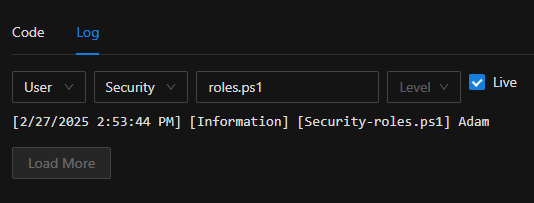
Adam Driscoll
PowerShell Expert and Software Architect at Devolutions
e2fff039a4dae84909e14f067b19fdbda0e77c1b.png
Ok I did that and as you can see it is NULL. nothing in the write statement and the next line i’m simply replacing some characters in the UserName and as you can see I get an error because it is NULL.
param(

[Security.ClaimsPrincipal]$User

)

Write-Host $User.Identity.Name

$Usern = $User.Identity.Name

$Usern = $Usern.Replace("@xxxx.com","")
6f78c0b177c1688431ec5ec8ae3e546bc8dc857e.png
What type of authentication are you using?
Adam Driscoll
PowerShell Expert and Software Architect at Devolutions
SAML with OKTA
Can you check what claims are applied to the user on login? You can click the View Claim Information button on the roles page. I’m curious if the name claim mapping isn’t working for some reason.
Adam Driscoll
PowerShell Expert and Software Architect at Devolutions
At the moment i have the local admin logged in and also my regular user account which does not have roles assigned by default and relying on the code for the roles. User and Reader return true so it has those capabilities and able to access web pages that I have locked down to those roles. This is what I see when viewing Claim info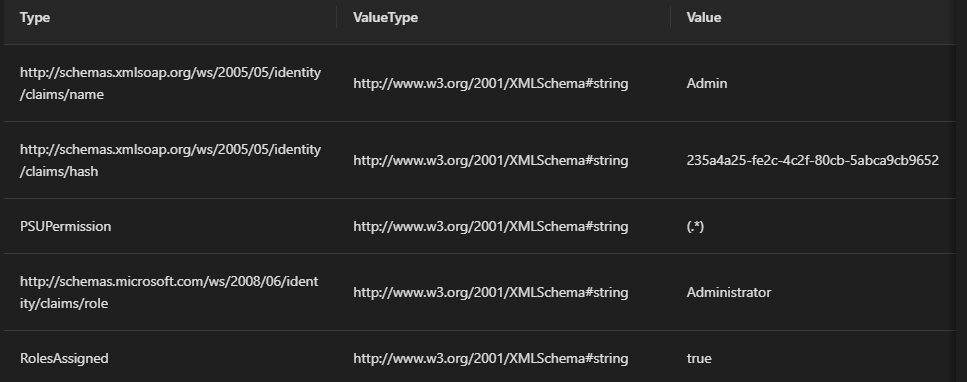
ae43edb6cee93248603f23e664dec36b4a53b954.png
You’ll need to login with your SAML account in order to see the claims provided by it. You could try assigning the admin role directly just to test what is returned.
Adam Driscoll
PowerShell Expert and Software Architect at Devolutions
Here is the claim info when I set administrator to return true so my normal saml account can see the roles details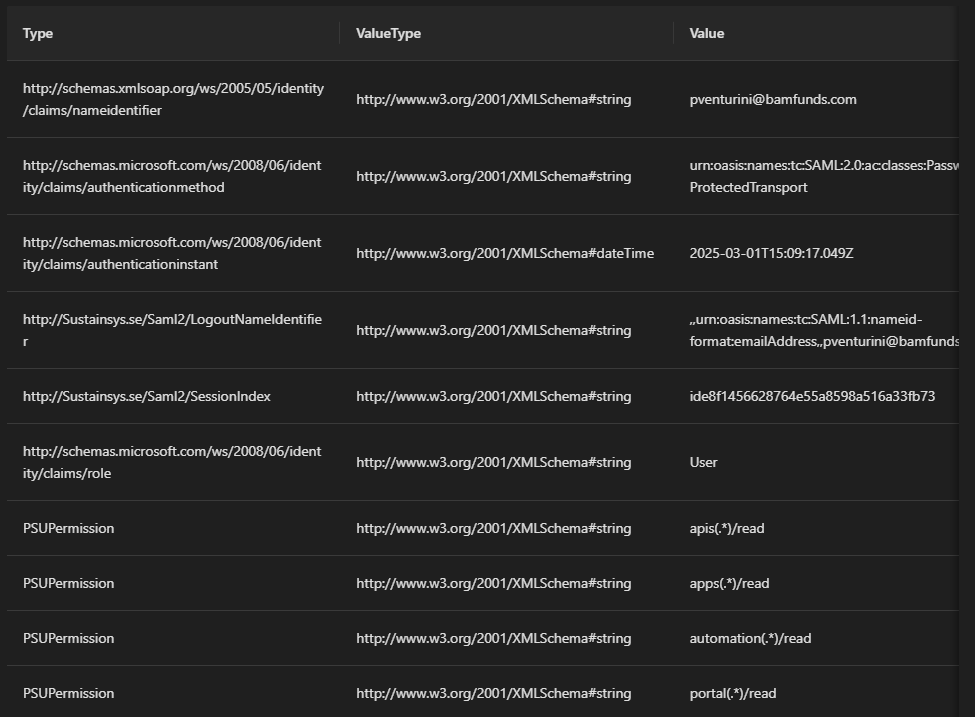
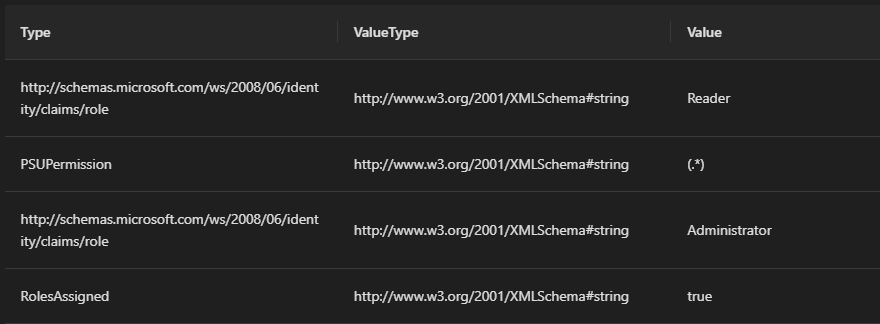
c166646deab2e1347a0370c11197ea03c1c47331.png
f6ef797086d61c8d4d899b165879e010e95088a9.png
so is this a bug or just something wrong on my end?
It looks like the issue here is your name claim type is different than what PSU is exepecting:
nameidentifier vs name
I’m seeing this info in the claim table. It’s the first row in each screenshot.
Your SAML provider should provide a way to change this. That said, we should also have a way to configure this in PSU. I’ve seen this happen with Okta as well.
Adam Driscoll
PowerShell Expert and Software Architect at Devolutions
Hi are you saying that Okta could return the user account with “name” instead of “nameidentifier”? I can look into that but clearly the issue is that at the time of executing the code for a role the $User variable is null but once authentication is complete with the code of an App page it is properly populated. To me this seems like a bug on the Puniversal side.
My workaround for now is to simply execute the function to check for role memberships at the beginning of the App pages which is not idea but it works the same way.
I see the issue. It does look like PSU is attempting to retrieve the username out of nameidentifier if username is null.
            if (string.IsNullOrEmpty(username))
            {
                claimType = ClaimTypes.NameIdentifier;
                username = principal.FindFirstValue(claimType);
            }
This value is used later on for the session but is not used for the authorization scripts. This could be fixed.
In the meantime, you could retrieve the nameidentifier claim from the claim list rather than the identity directly.
$UserName = ($User.Identity.Claims | Where-Object Value -eq 'http://schemas.xmlsoap.org/ws/2005/05/identity/claims/nameidentifier').Value
Adam Driscoll
PowerShell Expert and Software Architect at Devolutions
Thanks Adam. When I try this I’m still getting Usern as NULL.
$Usern = ($User.Identity.Claims | Where-Object Value -EQ 'http://schemas.xmlsoap.org/ws/2005/05/identity/claims/nameidentifier').Value
I’m also not getting any output in the log for some reason. the write-output and write-error statements never show up in the log. here’s the full code i’m using. The error I do see in the log is when I run the replace on a NULL variable.
     param(
        [Security.ClaimsPrincipal]$User
    )

    if ([string]::IsNullOrEmpty($User)) {
        Write-Error "null"
    }
    else {
        Write-Output "not null"
    }

    $Usern = ($User.Identity.Claims | Where-Object Value -EQ 'http://schemas.xmlsoap.org/ws/2005/05/identity/claims/nameidentifier').Value
$Usern = $Usern.Replace("@xxxx.com", "")This is all I see in the log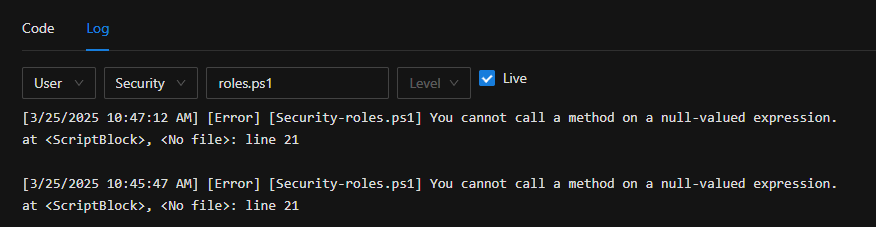
79d0a8f0081251079777c0fa6458714109fce7f2.png
Sorry. This should have been:
$Usern = ($User.Identity.Claims | Where-Object Type -EQ 'http://schemas.xmlsoap.org/ws/2005/05/identity/claims/nameidentifier').Value
Can you try that?
Adam Driscoll
PowerShell Expert and Software Architect at Devolutions
tried it but still getting Usern is NULL