PSU "Password Expired" Loop on Linux

Product: PowerShell Universal
Version: 5.0.0
Hello,
I have installed PSU on Linux approx. 90 Days ago.
As I wanted to login today, I got the message, that my password has expired (Admin-Account).
I changed the password, did login again and again: Your password has expired.
I already tried --reset-admin-account, but that didnt work with the service.
I did try to stop the service, than manually run Univsersal.Server script with --rest-admin-password, then I could login, but without any data and as soon as I restarted the service, I had the loop again.
Any guesses?
Thanks!
All Comments (4)
After Updating to 5.21 I am now not even able to login with my credentials
Using the ENV Variables for DefaultAdminName and DefaultAdminPassword doesnt work.
Using the ENV Variable ResetAdminAccount = true is also not working.
Any help?
I have located an issue with PSU not setting the password last reset time when updating the password. It will change the password but still think that it is expired. This has been resolved and will be in our next release.
As for recovering from this, I would recommend updating the value manually. Can you let me know what database type you are using? I can provide steps to resolve this.
Do note, in version 5.3, we are releasing a new command in psucli to reset the admin password directly and it will update the password last set value. I’ll give the nightly build a test once it finishes, and you may be able to use that tool as well.
Adam Driscoll
PowerShell Expert and Software Architect at Devolutions
Hi Adam,
thanks a lot for your answer!
I am using the SQLite Database.
Can you inform me as soon as you tested the nightly build?
It looks like there are database changes that prevent the 5.3 tool from working on the 5.2 database.
That said, you can use DB Browser for SQLite to resolve this for now.
Stop the PSU process
Download the browser from here: https://sqlitebrowser.org/dl/
Open the database file
Browse the identity table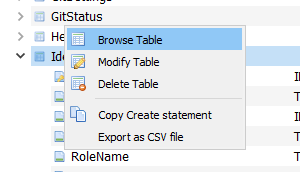
Set or clear the passwordlastset column.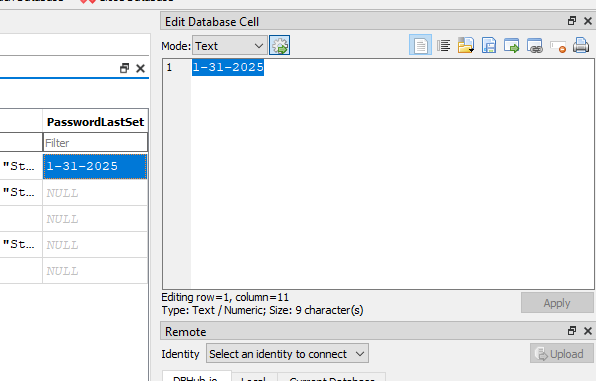
Writes changes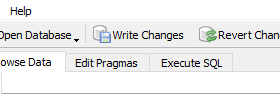
Close the browser and start PSU
Adam Driscoll
PowerShell Expert and Software Architect at Devolutions
61e137232d907be7f79d42b5cff34a9e1b8aed75.png
060f00fa2a0b7edaae26968399885cf30413583a.png
ebe09d14302a874f24bd01d602d5e498aae95b69.png