Database over 1.8 GB - how to shrink?

Product: PowerShell Universal
Version: 5.2.1
I can’t imagine why the database is so big.
We don’t do so much with PSU, it is a rather small installation.
Just one computer and and 4 Apps.
Any ideas how to “shrink” it?
All Comments (2)
You’ll probably want to identify what is table is so large. You can try the support tools.
http://localhost:5000/admin/support/database
Use the database tool to query the database. I suspsect it is either the LogEntry, Job, JobOutput, or JobPipelineOutput tables
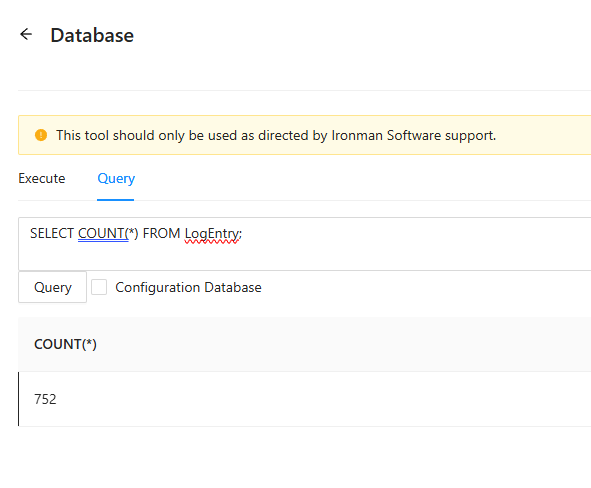
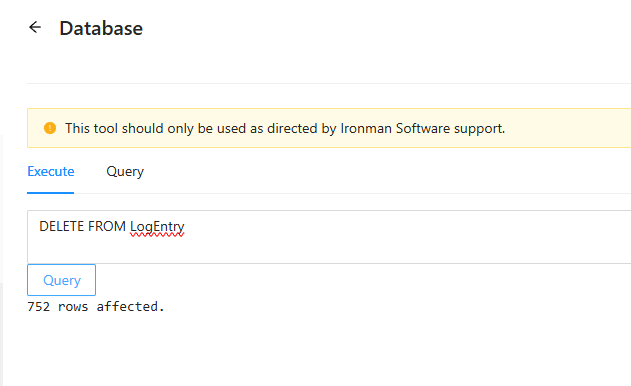
If you want to clear out any of these tables, you can use the execute tab.
I would also like to know if you have errors related to the groom job in your environment. There is a health check for it. All of these tables should be periodically groomed to avoid this situation.
Adam Driscoll
PowerShell Expert and Software Architect at Devolutions