Linux installation, repository folder wrong due to variable
Linux installation, repository folder wrong due to variable
Product: PowerShell Universal
Version: 5.1.2
Just FYI:
Out of fun I did an installation on Linux, using the install-PSUServer cmdlet.
The appsettings.linux.json file uses %HOME% to determine the repository/assets/log path.
So I ended up with a /%HOME%/.PowershellUniversal folder.
The %HOME% did not get expanded.
Trying $HOME instead did not work either.
Replacing the variable with a static path (/var/local) worked nicely.
Anything else seems to work.
Happy New Year!

Recommended Answer
Dear deroppi,
Thank you for your patience as we worked to analyze the issue reported regarding the %HOME% variable not expanding in appsettings.linux.json.
We have identified this behavior as a bug and have officially submitted it to our development team for review and resolution. You can track the progress and updates regarding this issue at the following GitHub URL: Linux Installation: %HOME% Variable Not Expanding in appsettings.linux.json During install-PSUServer · Issue #4189 · ironmansoftware/powershell-universal · GitHub.
Please feel free to check the provided URL regularly for updates from the development team. Should you have further questions or need clarification, do not hesitate to reach out.
We appreciate your understanding and continued support.
Best regards,
All Comments (6)
Dear deroppi,
Thank you very much for contacting Ironman Software!
My name is Ruben Tapia, a support engineer in charge of request #11889. While we review the details provided, please remember that you can add additional information by replying to this email.
Regarding the behavior you observed where the %HOME% variable in the appsettings.linux.json file did not expand, and substituting $HOME also did not work, it seems the environment variables might not be resolving correctly in this context.
To assist further, could you please provide the following details?
- When did this issue start? Was it right after installation or during configuration?
- PowerShell Universal Version:
- Additional Logs: If available, from
/var/local/.PowershellUniversalor any relevant location.
Suggestions to troubleshoot:
- Environment Variable Check: Confirm if
%HOME%and$HOMEare defined in the shell where theinstall-PSUServercmdlet is executed. You can check this withecho $HOMEorenv | grep HOME. - Configuration Path: Consider defining the full static path directly in
appsettings.linux.jsonfor repository/assets/log until the variable resolution is debugged further. - Permissions: Ensure the directory path
/var/local/.PowershellUniversalhas appropriate read/write permissions for the PSU service account.
If these steps don’t resolve the issue, please share a screenshot or relevant log excerpts for further investigation.
We appreciate your patience.
Best regards,
Hi Ruben,
Happy New Year!
When did this issue start?
During installation.
I had a bash open. From there I opened a pwsh with sudo.
- Inside pwsh I did a Install-Module universal, and then a Install-PSUServer -LatestVersion.
- PowerShell Universal Version: 5.1.2
- Additional Logs: the logs, if any, have been in the /%HOME% folder…and are unfortunately gone.
- Environment Variable Check: I did that and $HOME was defined in bash and in pwsh as well.
- Configuration Path: That’s what I did.
- Permissions: Checked. That wasn’t the issue.
I will try to replicate the issue in another VM tomorrow.
Already tried.
Fresh Linux VM.
Installed pwsh.
Installed universal module
Installed PSU server via cmdlet
Result:
A /%HOME% folder in /
The log inside that folder does not really help.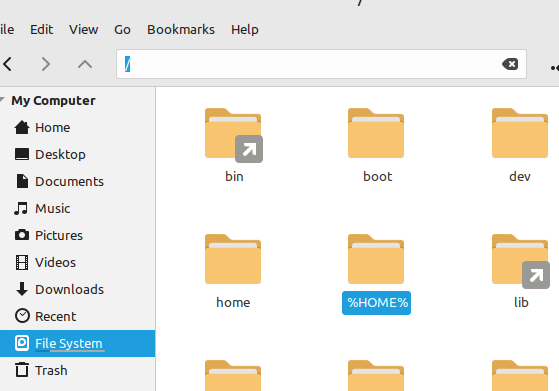
Log:
2025-01-01 17:52:06.529 +01:00 [INF] Creating key {1c5a6e2f-a051-4c02-9e7e-d3e8aa2792c5} with creation date 2025-01-01 16:52:06Z, activation date 2025-01-01 16:52:06Z, and expiration date 2025-04-01 16:52:06Z.
2025-01-01 17:52:06.559 +01:00 [WRN] No XML encryptor configured. Key {1c5a6e2f-a051-4c02-9e7e-d3e8aa2792c5} may be persisted to storage in unencrypted form.
2025-01-01 17:52:06.702 +01:00 [INF] Starting PowerShell Universal...
2025-01-01 17:52:06.928 +01:00 [INF] PowerShell Universal Version: 5.1.2
2025-01-01 17:52:06.929 +01:00 [INF] OS Version: Unix 6.1.0.28
2025-01-01 17:52:06.929 +01:00 [INF] OS Architecture: x64
2025-01-01 17:52:06.929 +01:00 [INF] Process Architecture: x64
2025-01-01 17:52:06.929 +01:00 [INF] Node Name: LMDE
2025-01-01 17:52:06.929 +01:00 [INF] Running startup complete.
2025-01-01 17:52:06.942 +01:00 [INF] Starting PowerShell Universal...
2025-01-01 17:52:06.969 +01:00 [INF] Starting management service...
2025-01-01 17:52:07.393 +01:00 [INF] RPC services being provided by UniversalAutomation.IPublicSecretManagerService: 1
2025-01-01 17:52:07.406 +01:00 [INF] Loading app tokens...
2025-01-01 17:52:07.408 +01:00 [INF] RPC services being provided by PowerShellUniversal.IdentityClient: 6
2025-01-01 17:52:07.419 +01:00 [INF] RPC services being provided by PowerShellUniversal.JobDataService: 12
2025-01-01 17:52:07.424 +01:00 [INF] RPC services being provided by PowerShellUniversal.CacheService: 5
2025-01-01 17:52:07.425 +01:00 [WRN] Type cannot be serialized; ignoring: PowerShellUniversal.AuthenticationMethod
2025-01-01 17:52:07.426 +01:00 [WRN] Signature not recognized for PowerShellUniversal.IPublicClient.NewAuthenticationMethod; method will not be bound
2025-01-01 17:52:07.426 +01:00 [WRN] Type cannot be serialized; ignoring: PowerShellUniversal.Translation
2025-01-01 17:52:07.426 +01:00 [WRN] Signature not recognized for PowerShellUniversal.IPublicClient.NewTranslation; method will not be bound
2025-01-01 17:52:07.426 +01:00 [WRN] Signature not recognized for PowerShellUniversal.IPublicClient.SyncComponent; method will not be bound
2025-01-01 17:52:07.444 +01:00 [INF] Loading app assets...
2025-01-01 17:52:07.447 +01:00 [INF] RPC services being provided by PowerShellUniversal.PublicClient: 31
2025-01-01 17:52:07.453 +01:00 [INF] RPC services being provided by PowerShellUniversal.ComputerClient: 5
2025-01-01 17:52:07.455 +01:00 [INF] Initializing database...
2025-01-01 17:52:07.456 +01:00 [WRN] Type cannot be serialized; ignoring: PowerShellUniversal.EndpointProfile
2025-01-01 17:52:07.457 +01:00 [WRN] Signature not recognized for PowerShellUniversal.IStatsService.TrackEndpoint; method will not be bound
2025-01-01 17:52:07.457 +01:00 [WRN] Type cannot be serialized; ignoring: PowerShellUniversal.EndpointProfile
2025-01-01 17:52:07.457 +01:00 [WRN] Signature not recognized for PowerShellUniversal.IStatsService.EndTrackEndpoint; method will not be bound
2025-01-01 17:52:07.458 +01:00 [INF] RPC services being provided by PowerShellUniversal.StatsService: 4
2025-01-01 17:52:07.467 +01:00 [INF] RPC services being provided by Universal.Server.Services.DashboardGrpcClient: 7
2025-01-01 17:52:07.469 +01:00 [WRN] Type cannot be serialized; ignoring: System.IDisposable
2025-01-01 17:52:07.469 +01:00 [WRN] Signature not recognized for PowerShellUniversal.IConfigurationSystemWatcher.Pause; method will not be bound
2025-01-01 17:52:07.469 +01:00 [WRN] Signature not recognized for PowerShellUniversal.IConfigurationSystemWatcher.CheckSum; method will not be bound
2025-01-01 17:52:07.471 +01:00 [INF] RPC services being provided by Universal.Server.Services.Configuration.ConfigurationSystemWatcher: 2
2025-01-01 17:52:07.482 +01:00 [INF] RPC services being provided by Universal.Server.Services.Configuration.PortalComponentService: 5
2025-01-01 17:52:07.486 +01:00 [INF] RPC services being provided by Universal.Server.Services.Configuration.PortalPageService: 5
2025-01-01 17:52:07.489 +01:00 [INF] RPC services being provided by Universal.Server.Services.Automation.JobInvokerService: 2
2025-01-01 17:52:07.496 +01:00 [INF] RPC services being provided by Universal.Server.Services.Authentication.AppTokenClient: 6
2025-01-01 17:52:07.501 +01:00 [INF] RPC services being provided by UniversalAutomation.Services.ComputerGroupService: 5
2025-01-01 17:52:07.505 +01:00 [INF] RPC services being provided by UniversalAutomation.Services.EndpointDocumentationService: 5
2025-01-01 17:52:07.509 +01:00 [INF] RPC services being provided by UniversalAutomation.Services.EndpointService: 5
2025-01-01 17:52:07.513 +01:00 [INF] RPC services being provided by UniversalAutomation.Services.EnvironmentConfigService: 5
2025-01-01 17:52:07.518 +01:00 [INF] RPC services being provided by UniversalAutomation.Services.EventHubService: 5
2025-01-01 17:52:07.522 +01:00 [INF] RPC services being provided by UniversalAutomation.Services.FolderService: 5
2025-01-01 17:52:07.526 +01:00 [INF] RPC services being provided by UniversalAutomation.Services.HealthCheckConfigService: 5
2025-01-01 17:52:07.530 +01:00 [INF] RPC services being provided by UniversalAutomation.Services.ModuleConfigService: 5
2025-01-01 17:52:07.535 +01:00 [INF] RPC services being provided by UniversalAutomation.Services.PublishedFolderCommand: 5
2025-01-01 17:52:07.539 +01:00 [INF] RPC services being provided by UniversalAutomation.Services.RoleService: 5
2025-01-01 17:52:07.543 +01:00 [INF] RPC services being provided by UniversalAutomation.Services.ScriptService: 5
2025-01-01 17:52:07.547 +01:00 [INF] RPC services being provided by UniversalAutomation.Services.TagService: 5
2025-01-01 17:52:07.551 +01:00 [INF] RPC services being provided by UniversalAutomation.Services.TerminalService: 5
2025-01-01 17:52:07.555 +01:00 [INF] RPC services being provided by UniversalAutomation.Services.TriggerService: 5
2025-01-01 17:52:07.560 +01:00 [INF] RPC services being provided by UniversalAutomation.Services.VariableService: 5
2025-01-01 17:52:07.565 +01:00 [INF] RPC services being provided by PowerShellUniversal.IGitSettingsService: 4
2025-01-01 17:52:07.583 +01:00 [INF] Loading configuration files...
2025-01-01 17:52:07.632 +01:00 [INF] RPC services being provided by UniversalAutomation.IPublicGitService: 3
2025-01-01 17:52:07.634 +01:00 [INF] RPC services being provided by UniversalAutomation.IPublicApiService: 1
2025-01-01 17:52:07.641 +01:00 [INF] RPC services being provided by UniversalAutomation.IPublicGitSyncService: 5
2025-01-01 17:52:07.646 +01:00 [INF] RPC services being provided by PowerShellUniversal.IBrandingService: 1
2025-01-01 17:52:07.714 +01:00 [WRN][Microsoft.AspNetCore.StaticFiles.StaticFileMiddleware] The WebRootPath was not found: /wwwroot. Static files may be unavailable.
2025-01-01 17:52:07.746 +01:00 [WRN][Microsoft.AspNetCore.Server.Kestrel] HTTP/2 is not enabled for [::]:5000. The endpoint is configured to use HTTP/1.1 and HTTP/2, but TLS is not enabled. HTTP/2 requires TLS application protocol negotiation. Connections to this endpoint will use HTTP/1.1.
2025-01-01 17:52:07.749 +01:00 [INF][Microsoft.Hosting.Lifetime] Now listening on: http://[::]:5000
2025-01-01 17:52:07.754 +01:00 [INF][Hangfire.BackgroundJobServer] Starting Hangfire Server using job storage: 'In-Memory Storage'
2025-01-01 17:52:07.756 +01:00 [INF][Hangfire.BackgroundJobServer] Using the following options for Hangfire Server:
    Worker count: 100
    Listening queues: 'default', 'lmde'
    Shutdown timeout: 00:00:00.5000000
    Schedule polling interval: 00:00:15
2025-01-01 17:52:07.790 +01:00 [INF][Microsoft.Hosting.Lifetime] Application started. Press Ctrl+C to shut down.
2025-01-01 17:52:07.790 +01:00 [INF][Microsoft.Hosting.Lifetime] Hosting environment: Production
2025-01-01 17:52:07.791 +01:00 [INF][Microsoft.Hosting.Lifetime] Content root path: /
2025-01-01 17:52:07.803 +01:00 [INF][Hangfire.Server.BackgroundServerProcess] Server 3914e95f-669b-407e-b219-cbd9909e5fbe successfully announced in 10.6859 ms
2025-01-01 17:52:07.815 +01:00 [INF][Hangfire.Server.BackgroundServerProcess] Server 3914e95f-669b-407e-b219-cbd9909e5fbe is starting the registered dispatchers: ServerWatchdog, ServerJobCancellationWatcher, Worker, DelayedJobScheduler, RecurringJobScheduler...
2025-01-01 17:52:08.315 +01:00 [INF][Hangfire.Server.BackgroundServerProcess] Server 3914e95f-669b-407e-b219-cbd9909e5fbe all the dispatchers started
2025-01-01 17:52:09.442 +01:00 [INF][] Creating services.
2025-01-01 17:52:09.476 +01:00 [INF][] Generating initial session state.
2025-01-01 17:52:09.485 +01:00 [INF][UniversalAutomation.StartupService] Configuring authentication methods...
2025-01-01 17:52:09.485 +01:00 [INF][] Adding built in variables.
2025-01-01 17:52:09.507 +01:00 [INF][] Creating runspace factory.
2025-01-01 17:52:09.669 +01:00 [INF][UniversalAutomation.StartupService] Synchronizing with git...
2025-01-01 17:52:09.679 +01:00 [INF][UniversalAutomation.StartupService] Running git sync, if configured.
2025-01-01 17:52:09.685 +01:00 [INF][UniversalAutomation.StartupService] Logging enabled at level Debug
2025-01-01 17:52:09.688 +01:00 [INF][UniversalAutomation.StartupService] Scheduling git sync service.
2025-01-01 17:52:09.688 +01:00 [INF][UniversalAutomation.StartupService] Scheduling background jobs...
2025-01-01 17:52:09.718 +01:00 [INF][UniversalAutomation.StartupService] Starting security service...
2025-01-01 17:52:09.733 +01:00 [INF][UniversalAutomation.StartupService] Starting security proxy.
2025-01-01 17:52:09.781 +01:00 [INF][UniversalAutomation.StartupService] Startup complete.
2025-01-01 17:52:10.725 +01:00 [INF][] Running app startup script.
2025-01-01 17:52:11.938 +01:00 [INF][UniversalAutomation.HeartBeatService] Starting heartbeat job.
2025-01-01 17:52:12.005 +01:00 [INF][UniversalAutomation.HeartBeatService] Finished heartbeat job.
2025-01-01 17:52:12.009 +01:00 [INF][PowerShellUniversal.HealthCheckService] Running health check: Memory Utilization
2025-01-01 17:52:12.053 +01:00 [INF][PowerShellUniversal.HealthCheckService] Running health check: Disk Space
2025-01-01 17:52:12.060 +01:00 [INF][PowerShellUniversal.HealthCheckService] Running health check: PSScriptAnalyzer
2025-01-01 17:52:12.082 +01:00 [INF][PowerShellUniversal.HealthCheckService] Running health check: Conflicting Module
2025-01-01 17:52:12.097 +01:00 [INF][PowerShellUniversal.HealthCheckService] Running health check: Missing Environment
2025-01-01 17:52:12.121 +01:00 [INF][UniversalAutomation.JobProcessManager] Starting module discovery using Process.
2025-01-01 17:52:12.128 +01:00 [ERR][Universal.Server.Services.ModuleService] Error discovering modules
System.ComponentModel.Win32Exception (13): An error occurred trying to start process '/usr/share/PowerShellUniversal/Server/Universal.Agent' with working directory '%HOME%/.PowerShellUniversal/Repository'. Permission denied
   at System.Diagnostics.Process.ForkAndExecProcess(ProcessStartInfo startInfo, String resolvedFilename, String[] argv, String[] envp, String cwd, Boolean setCredentials, UInt32 userId, UInt32 groupId, UInt32[] groups, Int32& stdinFd, Int32& stdoutFd, Int32& stderrFd, Boolean usesTerminal, Boolean throwOnNoExec)
   at System.Diagnostics.Process.StartCore(ProcessStartInfo startInfo)
   at UniversalAutomation.JobProcessManager.StartProcessAsCurrentUser(String powerShellPath, String commandLine, Variable credential, Action`1 onAgentOutput, Dictionary`2 environmentVariables) in C:\actions-runner\_work\universal\universal\src\Universal.Server\Services\Automation\JobProcessManager.cs:line 509
   at UniversalAutomation.JobProcessManager.StartModuleDiscovery(ExecutionEnvironment environment) in C:\actions-runner\_work\universal\universal\src\Universal.Server\Services\Automation\JobProcessManager.cs:line 378
   at Universal.Server.Services.ModuleService.Discover(ExecutionEnvironment environment, Boolean wait) in C:\actions-runner\_work\universal\universal\src\Universal.Server\Services\ModuleService.cs:line 395
2025-01-01 17:52:11.958 +01:00 [INF][] Generating new session state from startup script.
2025-01-01 17:52:12.327 +01:00 [INF][] Serializing base app.
2025-01-01 17:52:12.802 +01:00 [INF][] Starting scheduler.
2025-01-01 17:52:12.870 +01:00 [INF][] Dashboard configuration complete.
2025-01-01 17:53:16.921 +01:00 [INF][UniversalAutomation.HeartBeatService] Starting heartbeat job.
2025-01-01 17:53:16.998 +01:00 [INF][UniversalAutomation.HeartBeatService] Finished heartbeat job.
2025-01-01 17:54:21.929 +01:00 [INF][UniversalAutomation.HeartBeatService] Starting heartbeat job.
2025-01-01 17:54:21.999 +01:00 [INF][UniversalAutomation.HeartBeatService] Finished heartbeat job.
2025-01-01 17:55:26.924 +01:00 [INF][UniversalAutomation.HeartBeatService] Starting heartbeat job.
2025-01-01 17:55:27.016 +01:00 [INF][UniversalAutomation.HeartBeatService] Finished heartbeat job.
2025-01-01 17:56:31.926 +01:00 [INF][UniversalAutomation.HeartBeatService] Starting heartbeat job.
2025-01-01 17:56:31.971 +01:00 [INF][UniversalAutomation.HeartBeatService] Finished heartbeat job.
2025-01-01 17:57:36.923 +01:00 [INF][UniversalAutomation.HeartBeatService] Starting heartbeat job.
2025-01-01 17:57:37.150 +01:00 [INF][UniversalAutomation.HeartBeatService] Finished heartbeat job.
2025-01-01 17:58:41.925 +01:00 [INF][UniversalAutomation.HeartBeatService] Starting heartbeat job.
2025-01-01 17:58:42.008 +01:00 [INF][UniversalAutomation.HeartBeatService] Finished heartbeat job.
2025-01-01 17:59:47.652 +01:00 [INF][UniversalAutomation.HeartBeatService] Starting heartbeat job.
2025-01-01 17:59:47.694 +01:00 [INF][UniversalAutomation.HeartBeatService] Finished heartbeat job.
2025-01-01 18:00:51.926 +01:00 [INF][UniversalAutomation.HeartBeatService] Starting heartbeat job.
2025-01-01 18:00:51.975 +01:00 [INF][UniversalAutomation.HeartBeatService] Finished heartbeat job.
d881cddb358e713db40bcedf0b720e07451e763a.png
@AnonymousUser - This is a bug. Can you please open an issue for it in the tracker?
Adam Driscoll
PowerShell Expert and Software Architect at Devolutions
Sure, I will share here the link.
Thanks Adam!
Dear deroppi,
Thank you for your patience as we worked to analyze the issue reported regarding the %HOME% variable not expanding in appsettings.linux.json.
We have identified this behavior as a bug and have officially submitted it to our development team for review and resolution. You can track the progress and updates regarding this issue at the following GitHub URL: Linux Installation: %HOME% Variable Not Expanding in appsettings.linux.json During install-PSUServer · Issue #4189 · ironmansoftware/powershell-universal · GitHub.
Please feel free to check the provided URL regularly for updates from the development team. Should you have further questions or need clarification, do not hesitate to reach out.
We appreciate your understanding and continued support.
Best regards,