Struggling with navigating to a pages from an Apps

Product: PowerShell Universal
Version: 5.0.15
I have trying to figure out something i think should be pretty basic. I want to create an apps that will act as a dashboard and creates pages that act as standalone application “apps kinda” Like for reports etc.
But i cannot get it to work. each time i try to navigate to the pages it says Page Not found. Here is my code so far, i tried a lot of different codes and spent days on the Docs for V5. Any help would be appreciated.
$Nav = New-UDList -Content {
    New-UDListItem -Label "Home" -OnClick { Invoke-UDRedirect '/home' } -Icon (New-UDIcon -Icon Home -Size 1x)
    New-UDListItem -Label "Settings" -OnClick { Invoke-UDRedirect '/settings' } -Icon (New-UDIcon -Icon Cog -Size 1x)
    New-UDListItem -Label "Pages" -OnClick { Invoke-UDRedirect '/test' } -Icon (New-UDIcon -Icon Cog -Size 1x)
    New-UDListItem -Label "Page DisplayName" -OnClick {Invoke-UDRedirect 'test'}
    }


New-UDDashboard -Title 'Navigation' -Pages @(
    New-UDPage -Name 'Home' -Content {
        New-UDTypography -Text 'Home'
    } -NavigationLayout 'permanent'
    New-UDPage -Name 'Settings' -Content {
        New-UDTypography -Text 'Settings'
    } -NavigationLayout 'permanent'
) -Navigation $Nav


$Pages += New-UDPage -Name 'test' -url '/test' -Content {

}
New-UDApp -Pages $Pages -Title 'test'Recommended Answer
OH - Instead of New-UDPage, if the page exists, use Get-UDPage with -Name. So, your $Pages becomes:
$Pages = @(
Get-UDPage -Name "test"
Get-UDPage -Name "test2"
)
Then your New-UDApp should work.
You can use it in combination too, so you can then do
$Pages += New-UDPage -Name "newTestPage" -url "/newTestPage" -Content { "Hello, World!" }
Let me know if that works!
All Comments (10)
You’re return 2 apps from the file and it’s using the first, which doesn’t have a test page. You can also avoid Invoke-UDRedirect if you use -Href because it just does local redirect.
Try this.
$Nav = New-UDList -Content {
    New-UDListItem -Label "Test1" -Href '/test'  -Icon (New-UDIcon -Icon Cog -Size 1x)
    New-UDListItem -Label "Test2" -Href '/test2'  -Icon (New-UDIcon -Icon Cog -Size 1x)
    New-UDListItem -Label "Test3" -Href '/test3'  -Icon (New-UDIcon -Icon Cog -Size 1x)
}

$Pages = @()

$Pages += New-UDPage -Name 'test' -url '/test' -Content {

}

$Pages += New-UDPage -Name 'test2' -url '/test2' -Content {

}

$Pages += New-UDPage -Name 'test3' -url '/test3' -Content {

}

New-UDApp -Title 'Navigation' -Pages $Pages -Navigation $Nav -NavigationLayout permanent
Adam Driscoll
PowerShell Expert and Developer at Devolutions
Thanks. it’s pretty clean code and easy to understand.
Just want to make sure i understand how this works. The code for the pages, does it need to be in the CODE section of the apps?
My goal would be to store the code in the page i created in "/pages/test.ps1 inside the apps and just use the apps to navigate to it. But even now any code i put in the pages does not show up in the apps when i use it and navigate to the test button i created.
Correct me if I’m wrong, Adam!
You can define the code for each page inside its own pagename.ps1 file with its own URL using the GUI. The pages are then programmatically separate and accessible from within their own page code. Then, at the end, you can do something programmatically similar to:
#testpage1.ps1
New-UDPage -Name "testpage1" -Url "/testpage1" -Content {
  "Welcome to test page 1!"
}

#testpage2.ps1
New-UDPage -Name "testpage2" -Url "/testpage2" -Content {
  "Welcome to test page 2!"
}

#testpageN.ps1
New-UDPage -Name "testpageN" -Url "/testpageN" -Content {
  "Welcome to test page N!"
}

#app.ps1
New-UDApp -Pages @(
  Get-UDPage -Name "testpage1.ps1"
  Get-UDPage -Name "testpage2.ps1"
  Get-UDPage -Name "testpageN.ps1"
)
If you head to the Pages section within the App’s code, it will allow you to define these pages and ensure they are in the correct location from right in the GUI. Then, you can adjust the pages’ code accordingly from within their respective code editors.
Please let me know if that’s what you mean - it seems almost like you are looking at dynamically creating pages, which is a different question entirely that I can attempt to address as well.
Hope this helps!
ZG
Hey Thanks for the answer. I am not trying to dynamically creating them. I am just trying to put the code in a page.ps1 that will generate some report i code. But to access it i want to navigate to it using the dashboard i create in the apps.
The dashboard app is like the hub that i can link the pages i created.
Simple redirection but everything i try fail.
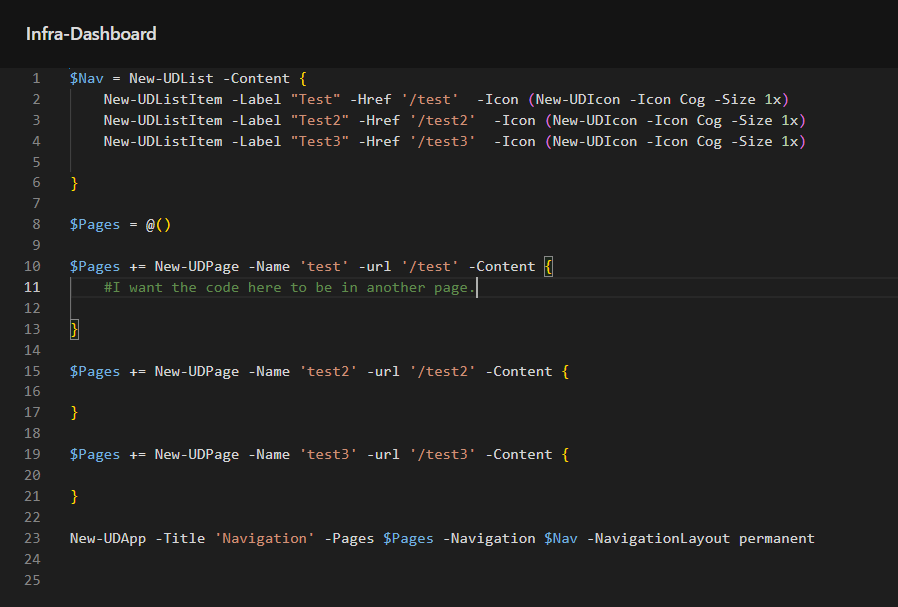
Maybe this will help
b6949a92a89c2835e5f6b2b4a52e595c48f9aa85.png
Can you head here?
The Pages tab is in that same Edit Code page. You can then use the GUI to add the pages with those params: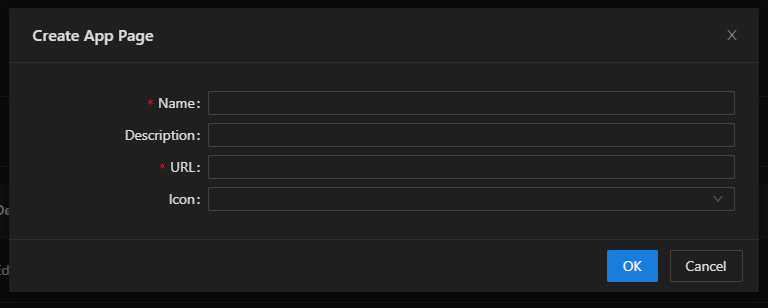
Then, you can see it in the list:
And edit the code with the familiar pencil icon.That will save the page code into its own .ps1 file, which you can see in the server’s files: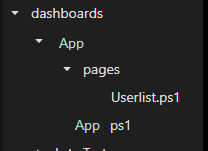
Let me know if there’s something else I’m missing (:
a8704d8aec82a4288f38a95dc579d8ee417ef52e.png
446468480f986717e83440936cdb0502c826e380.png
b2d5c86a08547f5d7f3e6a37c951788879e1f10b.png
4527d62d6daf4ca3289193ff0e5968059e6aa8b2.png
Yep. I did all of that. I have the .ps1
I am really not sure what i am doing wrong.
# Main dashboard.ps1
$Pages = @()


$Pages += New-UDPage -Name 'test' -url '/test' -Content {
    #if i put the code here it works but i want to store the code in a page.

}

# Navigation
$Nav = New-UDList -Content {

    New-UDListItem -Label "Test" -Href '/test' -Icon (New-UDIcon -Icon Cog -Size 1x)
}

# Create app with all components
New-UDApp -Title 'Navigation' -Pages $Pages -Navigation $Nav -NavigationLayout permanent
Page:
# pages/Overview.ps1
New-UDTypography -Text "test" -Variant h3
New-UDCard -Title "test" -Content {
New-UDTypography (Get-Date)
}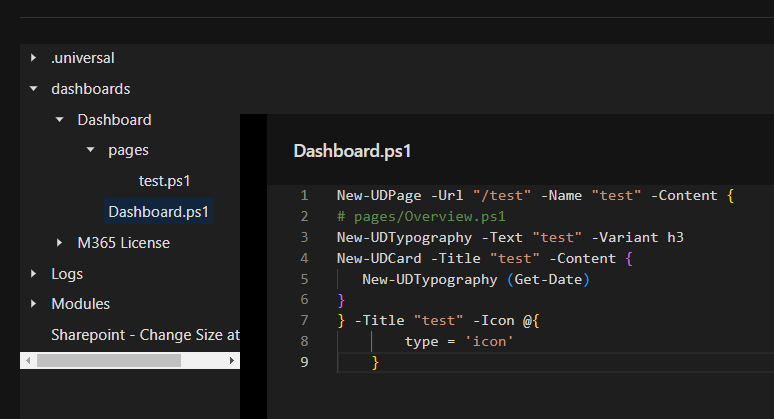
If i insert New-UDTypography (Get-Date) in the page’s content on the app code i see it exactly where i want it. but my goal is to store that code in the page’s .ps1
5acea1a94f07dd4ae2e86f155fddae425ef5468d.png
OH - Instead of New-UDPage, if the page exists, use Get-UDPage with -Name. So, your $Pages becomes:
$Pages = @(
Get-UDPage -Name "test"
Get-UDPage -Name "test2"
)
Then your New-UDApp should work.
You can use it in combination too, so you can then do
$Pages += New-UDPage -Name "newTestPage" -url "/newTestPage" -Content { "Hello, World!" }
Let me know if that works!
Oh my god YES. Thank you. Thats what i was doing wrong.
Glad we got to it eventually! Sorry I misunderstood for so long haha.
Happy hunting!
ZG
