Add icon on Get-UDPage

Product: PowerShell Universal
Version: 4.2.12
Hello everyone,
I’m making a navigation menu but I’m having an aesthetic issue.
i want to add an icon on Get-UDPage but, in the docs, the -icon option is not available.
This is my code :
$Navigation = New-UDList -Content {
    New-UDListItem -Label 'Menu Principal' -Icon (New-UDIcon -Icon Home -Size 1x)  -OnClick {
        Invoke-UDRedirect -url '/menu'
    }
    New-UDListItem -Label 'Serveur' -OnClick {
        Invoke-UDRedirect -url '/serveur'
    } -Icon (New-UDIcon -Icon Laptop -Size 1x)
}

New-UDApp -Title 'Dashboard' -HeaderPosition sticky -Pages @(
    Get-UDPage -Name 'Menu Principal'
    Get-UDPage -Name 'Serveur'

) -Navigation $Navigation -Theme $Theme -NavigationLayout Permanent
But I want to add an icon next to the tab text. I’ve tried in the page settings but it doesn’t work.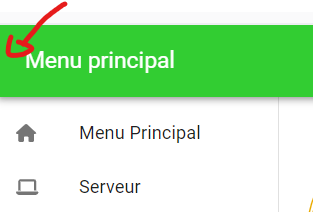
Can you help me ?
Thank you so much
37cdca99a05378790553cf4b8e06748a471eed57.png
All Comments (7)
It’s not showing up when you specify it here?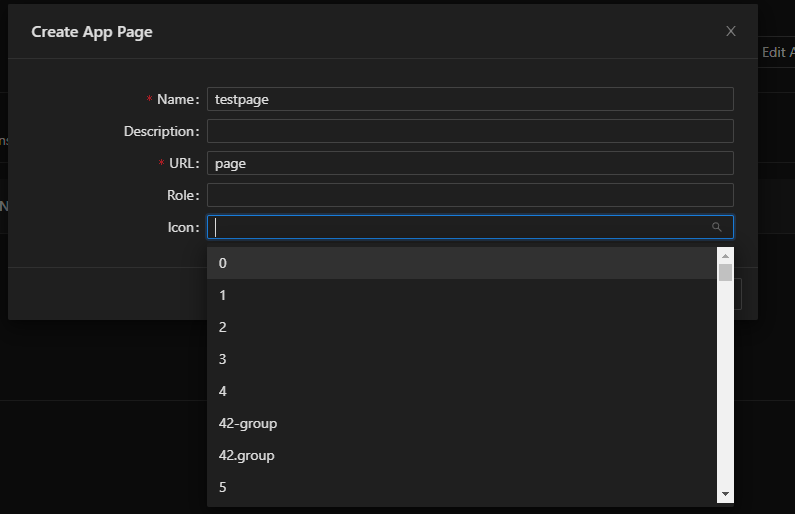
e88ca592d7c858dfb74b5a5862ed86982611e021.png
This just got interesting. I can’t reproduce it on 5.0.9: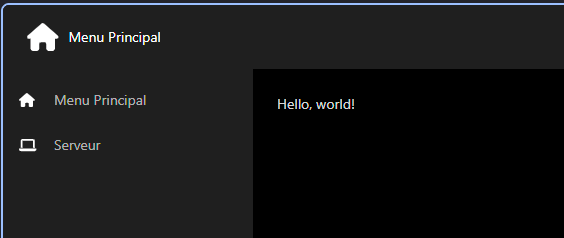
Code used:
$Navigation = New-UDList -Content {
    New-UDListItem -Label 'Menu Principal' -Icon (New-UDIcon -Icon Home -Size 1x)  -OnClick {
        Invoke-UDRedirect -url '/menu'
    }
    New-UDListItem -Label 'Serveur' -Icon (New-UDIcon -Icon Laptop -Size 1x) -OnClick {
        Invoke-UDRedirect -url '/serveur'
    }
}

$Pages = @(
    Get-UDPage -Name "Menu Principal"
    Get-UDPage -Name "Serveur"
)

New-UDApp -Title 'Dashboard' -HeaderPosition sticky -Pages $Pages -Navigation $Navigation -NavigationLayout Permanent
The only real difference is the lack of the -Theme flag, and I can verify the test page icon is set as in the above screenshot.
86393fc074eea945e73cd2f904548b648547c82a.png
I tried in the page settings but it doesn’t work… The page settings don’t want add the icon…
I tried with your code. but it still doesn’t work.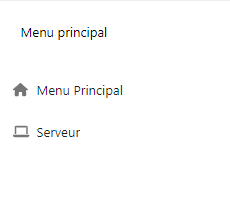
you didn’t write some code in the other page ?
I think it’s because i’m in V4
fa4da2ea42798b1bdea1e7bddfc7ce902f263233.png
That sounds correct. Both pages are just the default “Hello, World!” text. Are you able to update to v5 to take advantage of the new features?
You can also try manually editing the page within your Repository\dashboards\<dashboard name>\pages\Page.ps1 to include the -Icon parameter like so:
New-UDPage -Url "menu" -Name "Menu Principal" -Content {
    'Hello, world!'
} -Icon @{
    icon = 'home'
    type = 'icon'
}I think i am able to update to v5 but i need to do some test before update. I’m scared that it brokes my code… (3000 lines)
I tried with “New-UDPage” on my page but now, Universal don’t want to display the content of my page
66846b9d28acf90bd52dfc45618dd5e228eeb2ce.png
Best of luck! I’m sorry I couldn’t have been more help.
Don’t be sorry ! Thank you so much for your help !