How do i change the Positioning of an image in Universal Dashboard?
How do i change the Positioning of an image in Universal Dashboard?

i have figured out the commands like -height and -width but i want to position my image to a different spot on the website. (i have my Image in a -path)
All Comments (13)
how can i use this grid with my New-UDimage command?
For example, If you were to use the example in the docs
New-UDGrid -Container -Content {
    New-UDGrid -Item -ExtraSmallSize 12 -Content {
        New-UDPaper -Content { "xs-12" } -Elevation 2
    }
    New-UDGrid -Item -ExtraSmallSize 6 -Content {
        New-UDPaper -Content { "xs-6" } -Elevation 2
    }
    New-UDGrid -Item -ExtraSmallSize 6 -Content {
        New-UDPaper -Content { "xs-6" } -Elevation 2
    }
    New-UDGrid -Item -ExtraSmallSize 3 -Content {
        New-UDPaper -Content { "xs-3" } -Elevation 2
    }
    New-UDGrid -Item -ExtraSmallSize 3 -Content {
        New-UDPaper -Content { "xs-3" } -Elevation 2
    }
    New-UDGrid -Item -ExtraSmallSize 3 -Content {
        New-UDPaper -Content { "xs-3" } -Elevation 2
    }
    New-UDGrid -Item -ExtraSmallSize 3 -Content {
        New-UDPaper -Content { "xs-3" } -Elevation 2
    }
}
You’d get this: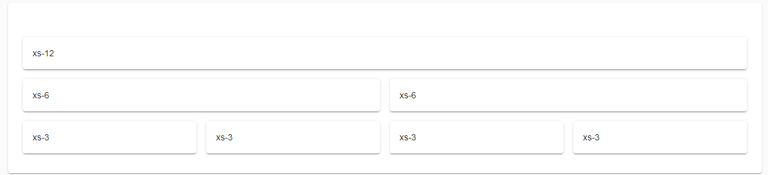
If you wanted to place your image in the 3rd space on the last row, you would take your New-UDimage, and replace the UDPaper there.
New-UDGrid -Container -Content {
    New-UDGrid -Item -ExtraSmallSize 12 -Content {
        New-UDPaper -Content { "xs-12" } -Elevation 2
    }
    New-UDGrid -Item -ExtraSmallSize 6 -Content {
        New-UDPaper -Content { "xs-6" } -Elevation 2
    }
    New-UDGrid -Item -ExtraSmallSize 6 -Content {
        New-UDPaper -Content { "xs-6" } -Elevation 2
    }
    New-UDGrid -Item -ExtraSmallSize 3 -Content {
        New-UDPaper -Content { "xs-3" } -Elevation 2
    }
    New-UDGrid -Item -ExtraSmallSize 3 -Content {
        New-UDPaper -Content { "xs-3" } -Elevation 2
    }
    New-UDGrid -Item -ExtraSmallSize 3 -Content {
        New-UDimage
    }
    New-UDGrid -Item -ExtraSmallSize 3 -Content {
        New-UDPaper -Content { "xs-3" } -Elevation 2
    }
}
The docs go on about how one can arrange stuff on screen.
bb841f30c781f544cde3ee075a83896522fdb173.png
thank you so much, i got it figured out!
i had one more qeustion tho, i now have all the buttons to the left but i want to put them straight in the middle of my website how do i do that?
c87372afbd12380ee579370ecefe4b886f29c794.png
New-UDButton -Text "Click Me" -OnClick {
    Show-UDToast -Message "Hello, World!"
} -Style @{
    "position" = "absolute"
    "left" = "50%"
}

this is the problem im having atm. is there something wrong with my code?
30d335565b7107153d6ea5bef94e6629746dbdcb.png
10eee32b260c2c9bbed30c8d7db1c059c61d5acb.png
Hi,
my code snippet is for your question to center a button, not for the image.
New-UDImage does not have a parameter “style”
what kind of parameter does it need? since i only want to change the position of my image
Put your image in an HTML parent element, such as a div. Then, style the div. Like:
New-UDElement -Tag "div" -Content {
  New-UDImage <... your stuff here>
} -Style @{
  # styles you want
  # you could make use of flex instead of absolute positioning
  # if you're familiar with html and css. up to you
}Sadly this does not work, im still getting issues when putting -style @{ as a command
This should work for your usecase:
New-UDElement -Content {
    New-UDStyle -Style '.MyClassName { position: relative; left: 50%;}' -content {
        New-UDImage -Url 'https://via.placeholder.com/150' -ClassName 'MyClassName'
    }
}
Im not that good in CSS so you may have to try a bit yourself but with this code the image should not overlap because of the “position: relative”
Yes this works! thank you!