PSU5 Apps - Dynamic HTML generation

Product: PowerShell Universal
Version: 5.0.7
Feeling a little stupid for even having to ask this, but I’m trying to generate a dot matrix with different colors to represent quick status for a large number of data points. So, I’ve defined my (granted, very minimal) custom component as follows:
#region Define device indicator dots
    function New-MDMDeviceIndicator($Device) {
        return New-UDHtml -Markup "<div id='Indicator_$Device' style='width:12px;height:12px;background-color:$($null -eq $Device ? "gray" : "green");border-radius:50%;' />"
    }
#endregion Define device indicator dots
This looks great! Except it doesn’t: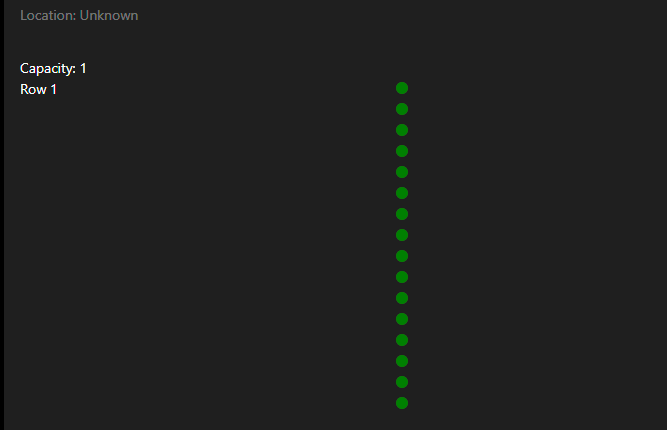
I would like the dot matrix to expand horizontally, with an inline-block display style. I’ve also tried using <span /> elements instead, but these are not the root of the issue; rather, how the New-UDHtml is being rendered in the DOM: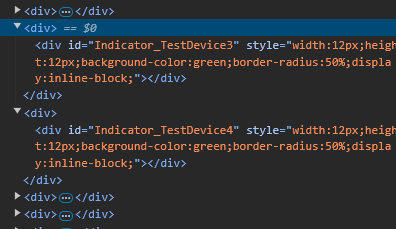
Each of my HTML elements are nested within a “bald” and inaccessible <div> element… so it’s forcing the elements to render on their own line due to the nature of <div>s being of block display type.
I can use some JS to do some node tree traversal to alter the display style but that doesn’t seem very in-the-spirit of things, and I’m also trying to minimize the use of JS and HTML in general as much as possible for readability by my less JS-comfortable colleagues.
So, what other methods could I use? I’m sure I’m just missing something or coming at the problem from the wrong angle, but please enlighten me if that is the case!
ZG
e5b626a253ecb780f16bc75d447929d15dc4c0cb.png
0e91a49198a3d82b0a23941123ea29c7fa425312.png
Recommended Answer
I need to stop posting here since I keep solving my own problems immediately after doing so.
I found what I need through the use of New-UDHelmet. For any future readers as the documentation[1] is out of date:
- Add a class to the parent element these will go into
- Throw
New-UDHelmetat the top of your content block forNew-UDApp - Parameters:
-Tag 'style'
# or 'script' for JavaScript; basically what goes in the <>
-Attributes @{ type = 'text/css' }
# what goes in the < type=''> attribute
-Content ".IndicatorContainer div { display: inline-block; }"
# a string version of the css to compute.
# not sure why this is one of the only -Content params to
# accept string instead of a script block but what can ya do
All Comments (1)
I need to stop posting here since I keep solving my own problems immediately after doing so.
I found what I need through the use of New-UDHelmet. For any future readers as the documentation[1] is out of date:
- Add a class to the parent element these will go into
- Throw
New-UDHelmetat the top of your content block forNew-UDApp - Parameters:
-Tag 'style'
# or 'script' for JavaScript; basically what goes in the <>
-Attributes @{ type = 'text/css' }
# what goes in the < type=''> attribute
-Content ".IndicatorContainer div { display: inline-block; }"
# a string version of the css to compute.
# not sure why this is one of the only -Content params to
# accept string instead of a script block but what can ya do