Connection problem (redirection fails after entering login and password) after version 5.0.8
Connection problem (redirection fails after entering login and password) after version 5.0.8

Product: PowerShell Universal
Version: 5.0.8
Hello everybody
Since installing version 5.0.8, I can no longer connect with a local account, I’m redirected to a URL that doesn’t work.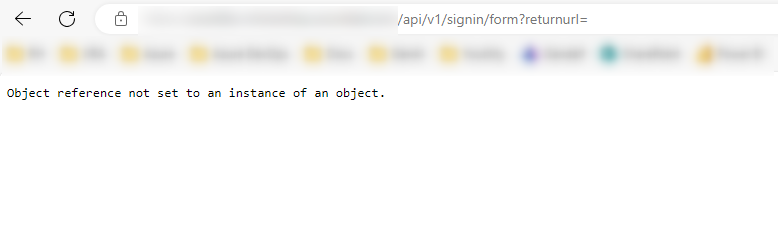
The SAML2 connection with our Entra ID (Azure) works without a hitch. Only the connection via a local account doesn’t work.
Thanks in advance for your help
651e9add05812c807014734cad3567e7db6a26ab.png
Recommended Answer
Also, from changelog this issue was fixed in the just released 5.0.9.
All Comments (6)
Can you let me know how you are hosting this? I had a report of this issue when hosting in a Linux docker container.
The issue is that the Kestrel BasePath setting in appsettings.json is null on Linux when blank and causing a redirect failure that we’ve since added a safe guard against.
Adam Driscoll
PowerShell Expert and Developer at Devolutions
I’m running Kubernetes (docker image ironmansoftware/universal:5.0.8-ubuntu-20.04)
Below is my config file appsettings.linux.json
{
  "Kestrel": {
    "Endpoints": {
      "HTTP": {
        "Url": "http://*:5000",
        "Protocols": "Http1AndHttp2"
      }
    },
    "RedirectToHttps": "false",
    "Hsts": {
      "MaxAgeDays": 365
    },
    "AddServerHeader": "true",
    "Headers": {}
  },
  "ApplicationInsights": {
    "InstrumentationKey": "xxxxxxxxxxxxxxxxxxxxxxxx"
  },
  "Plugins": [
    "SQLite"
  ],
  "AllowedHosts": "*",
  "SystemLogPath": "%HOME%/PowerShellUniversal/systemLog.txt",
  "SystemLogLevel": "Error",
  "PSUTelemetry": false,
  "Data": {
    "RepositoryPath": "%HOME%/.PowerShellUniversal/Repository",
    "ConnectionString": "Data Source=%HOME%/.PowerShellUniversal/psu.db",
    "RunMigrations": true,
    "DatabaseType": "LiteDB",
    "GitRemote": "",
    "GitUserName": "",
    "GitPassword": "",
    "GitBranch": "",
    "GitSyncBehavior": "TwoWay",
    "GitInitializeBehavior": "",
    "GitSyncInterval": "1",
    "GitSyncTimeout": 60,
    "ConfigurationScript": "",
    "ExternalGitClient": false,
    "Mode": "Manual"
  },
  "Api": {
    "Url": "",
    "GrpcPort": 0,
    "SecurityModel": "Strict",
    "TrustCertificate": false
  },
  "Authentication": {
    "Windows": {
      "Enabled": "false"
    },
    "WSFed": {
      "Enabled": "false",
      "MetadataAddress": "",
      "Wtrealm": "",
      "CallbackPath": "/auth/signin-wsfed",
      "Wreply": "",
      "UseTokenLifetime": true,
      "CorrelationCookieSameSite": ""
    },
    "OIDC": {
      "Enabled": "false",
      "CallbackPath": "/auth/signin-oidc",
      "ClientID": "",
      "ClientSecret": "",
      "Resource": "",
      "Authority": "",
      "ResponseType": "",
      "SaveTokens": "false",
      "CorrelationCookieSameSite": "",
      "UseTokenLifetime": true,
      "Scope": "openid profile groups",
      "GetUserInfo": false
    },
    "ClientCertificate": {
      "Enabled": "false"
    },
    "SessionTimeout": "25"
  },
  "Jwt": {
    "SigningKey": "PleaseUseYourOwnSigningKeyHere",
    "Issuer": "IronmanSoftware",
    "Audience": "PowerShellUniversal"
  },
  "UniversalAutomation": {
    "Queues": [],
    "JobHandshakeTimeout": 30,
    "JobDebugging": false,
    "ContinueJobOnServerStop": false,
    "HangfireWorkerCount": 100
  },
  "UniversalDashboard": {
    "AssetsFolder": "%HOME%/.PowerShellUniversal/Dashboard",
    "DashboardStartupTimeout": 10
  },
  "Secrets": {
    "SecretStore": {
      "Password": "PSUSecretStore"
    },
    "Database": {
      "EncryptionKey": "xxxxxxxxxxxxxxxxxxxxxxxxxxxxxx",
      "Password": "",
      "KeySize": "128"
    }
  },
  "ShowDevTools": false,
  "HideAdminConsole": false,
  "Profiling": false,
  "NodeName": ""
}
What configuration do I need to change?
Can it be changed via an environment variable?
Thanks for your help
appsettings.linux.json
Add the following line after “RedirectToHttps”: “false”,
"BasePath": "",
Sorry for the delay.
Thanks for your help byte0.
I’m using docker (Kubernetes), so the config file is reset on each reboot.
To override the config file, I use environment variables.
Is it possible to do the same thing with this parameter?
Yes, the BasePath URL can be set with environment variables. Everything in the appsettings can be. Per this documentation, it looks like the syntax should be:$Env:Kestrel__BaseUrl = ""
And yes, that is two underscores in between.
Let us know if that works!
Also, from changelog this issue was fixed in the just released 5.0.9.