Powershell Universal Upgrade to 5 Issue

Anyone else get this?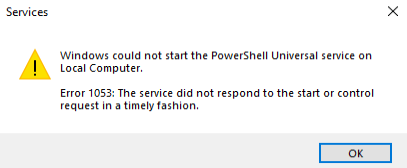
I have the fun job of rolling this back now.
ed5c292a4388723b43ae1509224c5997700f9321.png
All Comments (9)
Can you share a snippet from the system log? I would search for [err]
%ProgramData%\PowerShellUniversal
Adam Driscoll
PowerShell Expert and Software Architect at Devolutions
I already reverted back a snapshot. I’ll try again and see what that error is; I may be able to figure it out at that point.
If you try again, please use 5.0.1.
Adam Driscoll
PowerShell Expert and Software Architect at Devolutions
The same issue and we have tried all version of v5 to upgrade from 4.3.4.
Can you please check the system log for any [err] messages?
%programdata%\PowerShellUniversal\systemlog*.txt
Adam Driscoll
PowerShell Expert and Software Architect at Devolutions
I had the same issue on 2 test servers upgrading von 4.2.17 and 4.3.4 to 5.0.1 and 5.0.2.
Installation of v5 was asking for the service account but the v4 was still running.
When I did the installation without “start service at the end” the installation worked, but I got that “cannot start the service” error message from windows.
Solution in both cases:
Uninstall v4 → reboot machine → install v5 (same service user as before)
in my case the problem was the missing DB conversion and some missing informations in the appsettings.json
Do you lose your scripts, apps, etc., if you uninstall?
No but I recommend backing up the data files.
docs.powershelluniversal.com
Adam Driscoll
PowerShell Expert and Software Architect at Devolutions