New-UDDatePicker shows year when clicking a day
Product: PowerShell Universal
Version: 4.2.20
Just noticed that New-UDDatePicker will show the year when clicking on a date. I’ve never noticed behavior in the past so I’m assuming a bug has been introduced somewhere along the way from version 2.x. Clicking on the Month/Year at the top will go back to the day selection. Anyone else seeing this?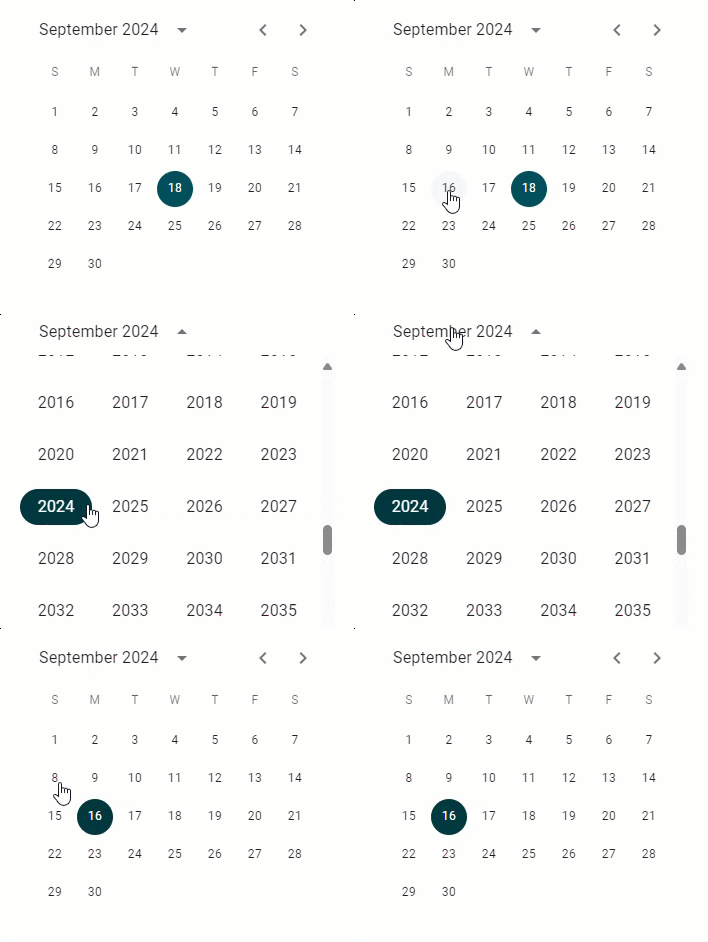
54601d7ee7266a6507d0a777ea28aa7bcae3a836.gif
All Comments (6)

You can limit which portions of the date picker are included by using the -Views parameter. For example, if you wanted to remove the year selector and limit to the current year, you could do the following.
$Year = (Get-Date).Year
$MinDate = [DateTime]::new($year, 1, 1)
$MaxDate = [DateTime]::new($year, 12, 31)
New-UDDatePicker -Views "day" -MinimumDate $MinDate -MaximumDate $MaxDate
That’s a good workaround, but the behavior to prompt for a year after clicking a day seems odd from anything I’ve every seen. This cannot be normal.
based on the docs it seems by design its not a bug but can maybe improved in future if adam decide to change its function.
Not sure I agree it is by design. It didn’t do this before and I do not see that in the docs, unless I’m missing it.
Any date picker I have ever used doesn’t jump to a year unless I ask it to.
Here is a demo on how it should work: React Date Picker component - MUI X
I agree that this isn’t normal behavior. It has never worked this way in years past of using this. Typically, if you are selecting a date on a calendar, than it is for a specific year.
