PSU - Github deploy keys

Product: PowerShell Universal
Version: 4.2.19
Hi,
We have had some issues with getting PSU and Github deploy keys to work, and i wanted to share the simple steps we ended up with, in order for it to work.
Hopefully someone will find it useful.
In the example here, i have used a docker container running version 4.2.19
- Connect to the docker container (docker exec -it pwsh)
- Execute the ssh-keygen command:
ssh-keygen -t ed25519 -C "git@github.com"
- Fetch the public key, and insert into the Github repo:
cat /root/.ssh/id_ed25519.pub
- Update the ssh config file:
"Host github.com" | Out-file /root/.ssh/config -Append
"   HostName github.com" | Out-file /root/.ssh/config -Append
"   IdentityFile /root/.ssh/id_ed25519" | Out-file /root/.ssh/config -Append
"   IdentitiesOnly yes" | Out-file /root/.ssh/config -Append
- Update the global variables for Git:
git config --global user.email "automation@domain.com"
git config --global user.name "system user"
- Prevent ssh from prompting if you want to trust the ssh keys for Github:
ssh -o StrictHostKeyChecking=no git@github.com
- Go the the PSU web interface, and perform a change so that the .universal folder is created - its a known bug. If the folder is not there, then PSU will fail to trigger Git properly - Adam is aware and will fix in an upcoming version.
Setup Git like this:
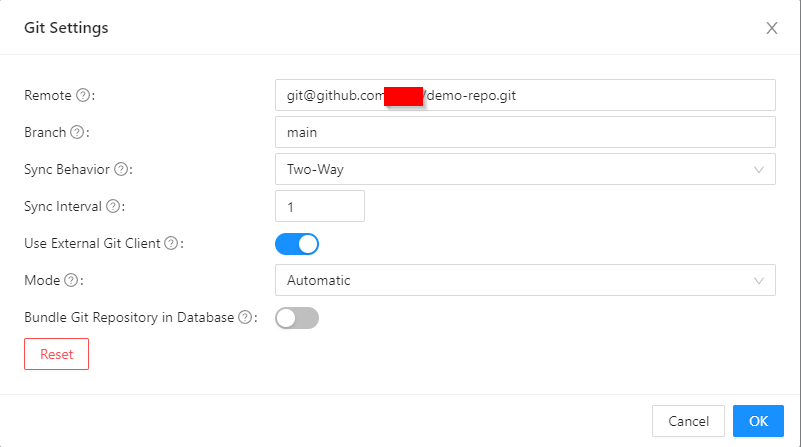
- Done
We will look into having this automated by a pipeline or such, to avoid all these manual steps.
57d8bd00a3d7e041a8c232423007b869dcf507d7.png