vsCode plugin, multiple PSU instances

Product: PowerShell Universal
Version: 4.2.13
VSCode plugin v4.2.2
Hello!
Soon we will have multiple psu instances, some serving pages to staff, others handling our back end processes.
Does anyone have a working example of setting up the vsCode plugin to hop between multiple instances? It has a ‘connections’ node in settings.json. If anyone had a working example of this they could share that would be great.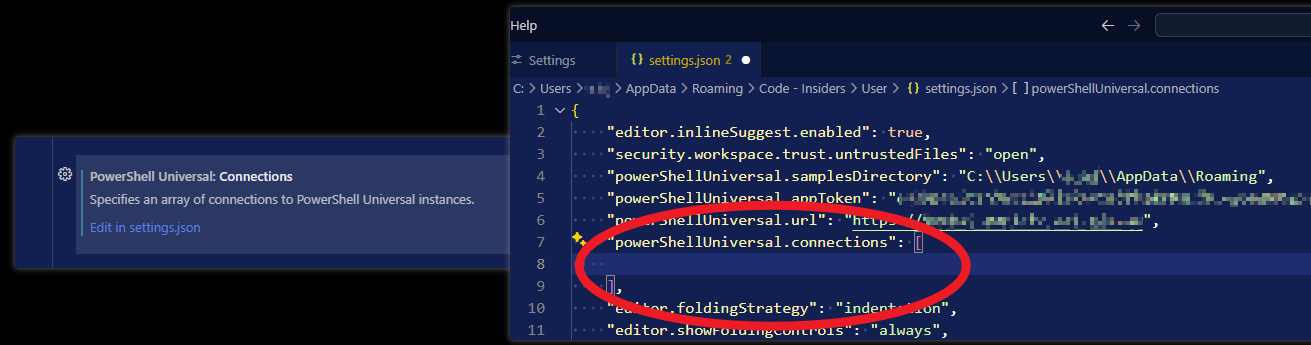
f035905cbc286737c98197620fd3c1432ffec15d.png
Recommended Answer
    "powerShellUniversal.connections": [
        {
            "name": "psu1",
            "url": "https://servername1",
            "appToken": "eyJhbxyz1rest_of_really_long_string_goes_here"
        },
        {
            "name": "psu2",
            "url": "https://servername2",
            "appToken": "eyJhbxyz1rest_of_really_long_string_goes_here"
        },
        {
            "name": "psu3",
            "url": "http://192.168.1.5:5001",
            "appToken": "eyJhbxyz1rest_of_really_long_string_goes_here"
        },
],All Comments (3)
In VSCode you can setup multiple profiles by navigating to settings in the bottom left hand corner.
That would be your best bet.
    "powerShellUniversal.connections": [
        {
            "name": "psu1",
            "url": "https://servername1",
            "appToken": "eyJhbxyz1rest_of_really_long_string_goes_here"
        },
        {
            "name": "psu2",
            "url": "https://servername2",
            "appToken": "eyJhbxyz1rest_of_really_long_string_goes_here"
        },
        {
            "name": "psu3",
            "url": "http://192.168.1.5:5001",
            "appToken": "eyJhbxyz1rest_of_really_long_string_goes_here"
        },
],Oh that’s perfect. Thank you!