Issue with Render in a Column

I’m building a dashboard to lookup users and wanted a button to click to show the user details in a modal. The issue is sometimes when the table loads the button is not able to get the $EventData.PersonID, even though the previous column is just PersonID. If I refresh the page it typically thene shows, it’s very inconsistent. Is my assumption that the first column showing the personID means that the render should “always” work as well?
$Columns = @(
        New-UDTableColumn -Property PersonID -Title "User Number"  -ShowSort -Filter -FilterType text
        New-UDTableColumn -Property PersonIDbtn -Title "Details" -Render {
            if($EventData.PersonID)
                {
                    $buttonText = "Details"
                }
            else
                {
                    $buttonText = "Error"
                }
            New-UDButton -Id "btnPersonID$($EventData.PersonID)" -Text "$buttonText" -OnClick {
				Show-UDModal -Content {
					New-UDTypography -Id 'detailsHeader' -Text "User:  $($currentUserData.FirstName) $($currentUserData.LastName) - $EventData.PersonID"
					}
				}
			}
			)
Product: PowerShell Universal Version: 3.10.5
Recommended Answer
Wanted to just follow up and let you all know I have figured this one out.
The issue is if you define Columns as a Variable to pass to New-UDTalbe such as
New-UDTable -Data $Data -dense -ShowSort -DefaultSortDirection ascending -ShowPagination -PaginationLocation both -PageSize 20 -Columns $Columns
The render is in the $Columns Variable
The fix was to NOT use a $Columns variable and to put the columns explicitly in the New-UDTable.
New-UDTable -Data $Data -dense -ShowSort -DefaultSortDirection ascending -ShowPagination -PaginationLocation both -PageSize 20 -Columns @(
New-UDTableColumn -Property PersonID -Title “User Number” -ShowSort -Filter -FilterType text)
Didn’t put my render code in , but hopefully this is enough to help anyone else who was having issues.
All Comments (9)
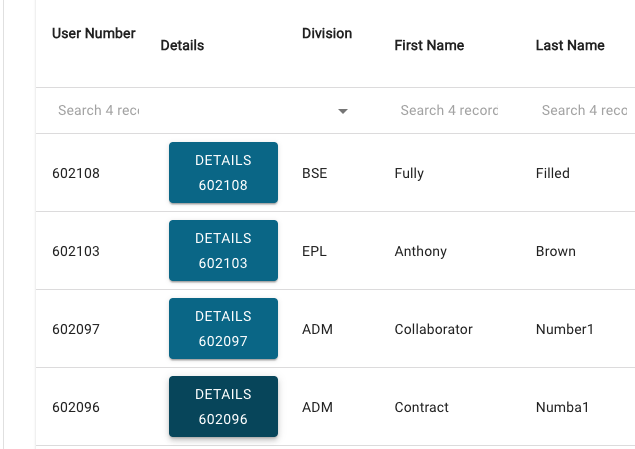
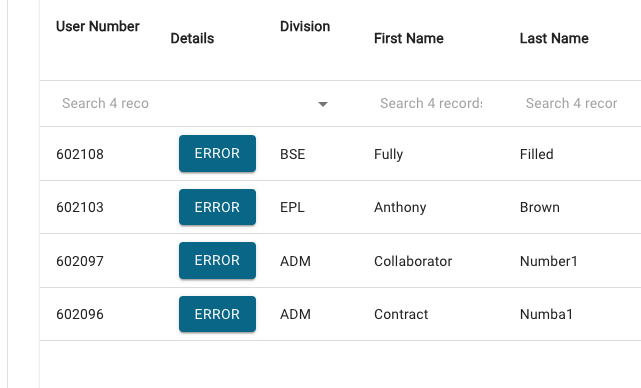
Screenshots of the dashboard, showing that in BOTH cases the data is present, just for some reason $($EventData.PersonID) is rendering as Null in the Render section.
752c1f9d004b44a5a96d8a58791137c78f3329ae.png
526ad26d14b029d2f729e59e4cf1d87dcaafee02.png
Try storing $EventData in another variable. It might be getting cleared out for some reason in the button handler.
$Columns = @(
        New-UDTableColumn -Property PersonID -Title "User Number"  -ShowSort -Filter -FilterType text
        New-UDTableColumn -Property PersonIDbtn -Title "Details" -Render {
            if($EventData.PersonID)
                {
                    $buttonText = "Details"
                }
            else
                {
                    $buttonText = "Error"
                }
$Person = $EventData
            New-UDButton -Id "btnPersonID$($EventData.PersonID)" -Text "$buttonText" -OnClick {
				Show-UDModal -Content {
					New-UDTypography -Id 'detailsHeader' -Text "User:  $($currentUserData.FirstName) $($currentUserData.LastName) - $Person.PersonID"
					}
				}
			}
			)
Adam Driscoll
PowerShell Expert and Developer at Devolutions
$EventData seems to be cleared in the Render, because the if/else is prior to the button handler.
I tried the code you sent with the same results unfortunately.
Is there a reason to set the ID of the button? I wonder if something is happening there.
-Id "btnPersonID$($EventData.PersonID)"
If you don’t set the ID, it’ll generate a unique GUID and endpoint instead of potentially replacing one.
Adam Driscoll
PowerShell Expert and Developer at Devolutions
Removed the Button ID varialbe (I just was doing that as I saw it in the examples) still no go, the render seems to be hit or miss.
Just wanted to follow up, still haven’t been able to get a consistently working dashboard.
Trying to determine if there is a racing condition that is causing this, but the fact that the table data all refreshes, it’s just the button that seems to not render. Do the buttons render before the tables? Since the button is defined in the Column deffinition I would expect the table and button to both render at the same time.
Wanted to just follow up and let you all know I have figured this one out.
The issue is if you define Columns as a Variable to pass to New-UDTalbe such as
New-UDTable -Data $Data -dense -ShowSort -DefaultSortDirection ascending -ShowPagination -PaginationLocation both -PageSize 20 -Columns $Columns
The render is in the $Columns Variable
The fix was to NOT use a $Columns variable and to put the columns explicitly in the New-UDTable.
New-UDTable -Data $Data -dense -ShowSort -DefaultSortDirection ascending -ShowPagination -PaginationLocation both -PageSize 20 -Columns @(
New-UDTableColumn -Property PersonID -Title “User Number” -ShowSort -Filter -FilterType text)
Didn’t put my render code in , but hopefully this is enough to help anyone else who was having issues.
Just to follow up, I was having the same issue although I already had my columns explicitly in the New-UDTable but as soon as I removed the -id from the button it fixed my issue. So maybe its remove the -id and explicitly list the columns. I also didn’t have to store $EventData to another variable. Weird all the way around though