Issues with endpoints

I count’t solve the below issue:
I didn’t configure any other auth method. From developer tools I can see: 414 URI Too Long 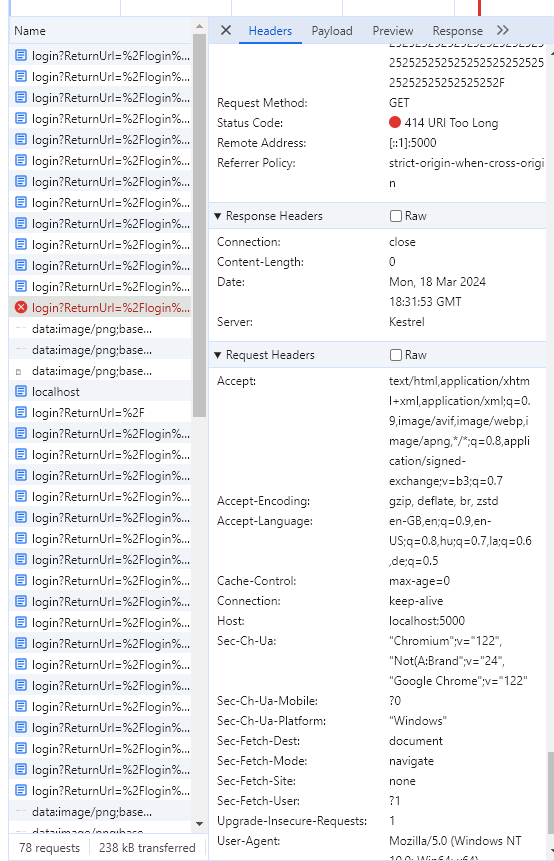
The url is the below, I shortened it, it was much longer. http://localhost:5000/login?ReturnUrl=%2Flogin%3FReturnUrl%3D%252Flogin%253FReturnUrl%253D%25252Flogin%25253FReturnUrl%25253D%2525252Flogin%2525253FReturnUrl%2525
Then I tried to install it to windows server 2016. I used a cert and changed the port to 8081 and the protocol to https. I also kept http but on 8080. The site worked correctly.
After that I set up some test end points and pages. Endpoints worked for a little but but then the below issue persists, endpoints don’t work correctly since then. Test apps are still working.
After service restart it works for a little bit but not always. When I create new endpoint it sometimes work sometimes not.
I got this error: Error returned by endpoint.
In powershell: Invoke-RestMethod : The remote server returned an error: (404) Not Found.
then sometimes I got this and only server restart helps:
I uninstalled the software completely based on this description:
docs.powershelluniversal.com
but it seems something still persist somewhere.
Product: PowerShell Universal
Version: 4.2.14
bdc17e0253b50ec2be11b92e8a0877ffabf2df18.png
9c924c16bfab912ee5b411e307f8dad14dacea4a.png
All Comments (1)
I don’t necessarily want to fix this issue, it would be enough to completely reinstall the software, but with the mentioned remove method, the same issue persists.
I tried it on another win server 2016. Everything is the same, but I got this error.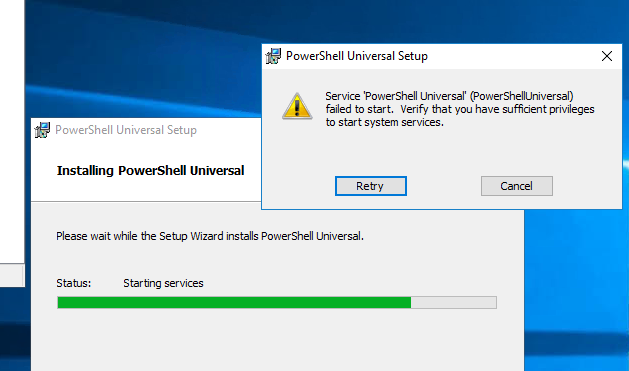
This is very good software, but personally I don’t have too much luck with it so far.
45133fa4939731a4a4d2defc5cd2776a94e290cf.png