Powershell universal upgrade from 3.10.4 to 4.2.13

Product: PowerShell Universal
Version: 4.2.13
Hi,
I Upgrade PSU from 3.10.4 to 4.2.13, when I navigate to the “Apps” screen all dashboards disappear.
Any help to resolve this issue?
All Comments (4)
Following this as, strangely, I plan to upgrade from 3.10.4 to 4.2.13 in the next day or two.
Please update
Do you have any errors in the notification drop down?
Adam Driscoll
PowerShell Expert and Software Architect at Devolutions
Yes,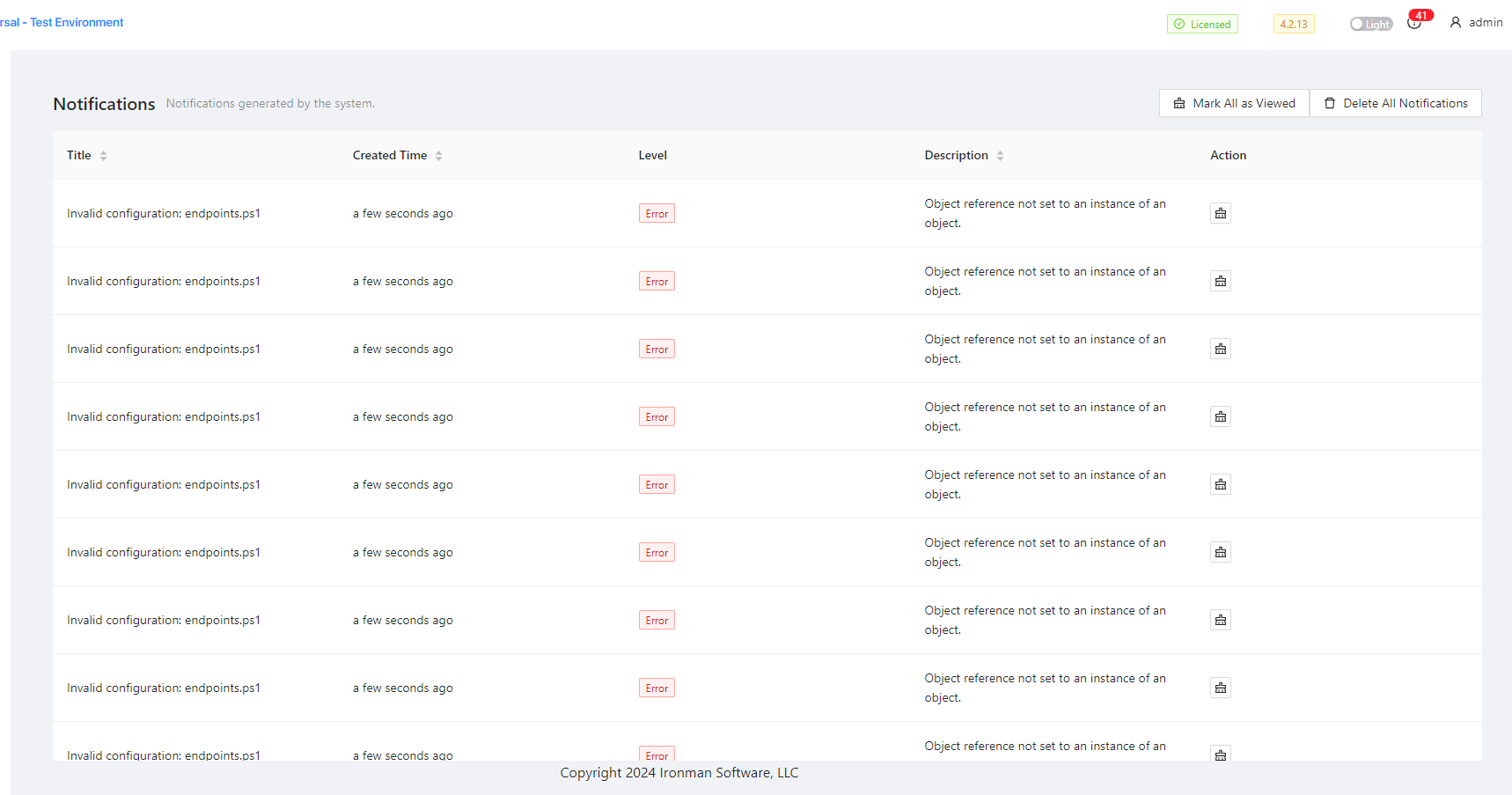
There is 41 errors
This is the content of endpoints.ps1
New-PSUEndpoint -Url "/process" -Method @('GET') -Endpoint {
Get-Process | Select-Object name
} -Authentication
New-PSUEndpoint -Url "/user" -Method @('GET') -Endpoint {
$ENV:USERNAME
}
New-PSUEndpoint -Url "/identity" -Method @('GET') -Endpoint {
$Identity
} -Authentication
New-PSUEndpoint -Url "/psversion" -Method @('GET') -Endpoint {
$PSVersionTable
}
New-PSUEndpoint -Url "/say/:text" -Method @('POST') -Endpoint {
param($Text)

$Text
}
New-PSUEndpoint -Url "/headers" -Method @('GET') -Endpoint {
$Headers
}
New-PSUEndpoint -Url "/chart" -Method @('GET') -Endpoint {
@(
    @{
        Name = "Name1"
        Value = Get-Random
    }
    @{
        Name = "Name2"
        Value = Get-Random
    }
    @{
        Name = "Name3"
        Value = Get-Random
    }
) | ConvertTo-Json
}
New-PSUEndpoint -Url "/random" -Method @('GET') -Endpoint {
(1..100 | Get-Random) / 100
}
New-PSUEndpoint -Url "/process" -Method @('GET') -Endpoint {
Get-Process | Select-Object name
} -Authentication
New-PSUEndpoint -Url "/user" -Method @('GET') -Endpoint {
$ENV:USERNAME
}
New-PSUEndpoint -Url "/identity" -Method @('GET') -Endpoint {
$Identity
} -Authentication
New-PSUEndpoint -Url "/psversion" -Method @('GET') -Endpoint {
$PSVersionTable
}
New-PSUEndpoint -Url "/say/:text" -Method @('POST') -Endpoint {
param($Text)

$Text
}
New-PSUEndpoint -Url "/headers" -Method @('GET') -Endpoint {
$Headers
}
New-PSUEndpoint -Url "/chart" -Method @('GET') -Endpoint {
@(
    @{
        Name = "Name1"
        Value = Get-Random
    }
    @{
        Name = "Name2"
        Value = Get-Random
    }
    @{
        Name = "Name3"
        Value = Get-Random
    }
) | ConvertTo-Json
}
New-PSUEndpoint -Url "/random" -Method @('GET') -Endpoint {
(1..100 | Get-Random) / 100
}
New-PSUEndpoint -Url "/process" -Method @('GET') -Endpoint {
Get-Process | Select-Object name
} -Authentication
New-PSUEndpoint -Url "/user" -Method @('GET') -Endpoint {
$ENV:USERNAME
}
New-PSUEndpoint -Url "/identity" -Method @('GET') -Endpoint {
$Identity
} -Authentication
New-PSUEndpoint -Url "/psversion" -Method @('GET') -Endpoint {
$PSVersionTable
}
New-PSUEndpoint -Url "/say/:text" -Method @('POST') -Endpoint {
param($Text)

$Text
}
New-PSUEndpoint -Url "/headers" -Method @('GET') -Endpoint {
$Headers
}
New-PSUEndpoint -Url "/chart" -Method @('GET') -Endpoint {
@(
    @{
        Name = "Name1"
        Value = Get-Random
    }
    @{
        Name = "Name2"
        Value = Get-Random
    }
    @{
        Name = "Name3"
        Value = Get-Random
    }
) | ConvertTo-Json
}
New-PSUEndpoint -Url "/random" -Method @('GET') -Endpoint {
(1..100 | Get-Random) / 100
}
New-PSUEndpoint -Url "/aig/resetpassword" -Method @('POST') -Endpoint {
Param(
		$ChallengeInputData
	)
	if($ChallengeInputData -eq "AcceptableInput") {
		$IsChallengePassed = $true
	}
	if($IsChallengePassed) {
		"Challenge passed. Here is Sensitive Information"
	} else {
		"Challenge not passed"
	}
}
New-PSUEndpoint -Url "/TestIncomingSMS" -Method @('POST') -Endpoint {
# Enter your script to process requests.
param(
    [Parameter(Mandatory)]$phoneNumber,
    [Parameter(Mandatory)]$smsContent
)

Write-Host "Got SMS from $phoneNumber with content: '$smsContent'"
write-host $args
} -Authentication -Role @('SMS_Receiver')
25040000f3821cad79aa8e20f88968f16bcb9be7.png