Is there a shortcut for accessing the current element?

I am working on a datagrid-based dashboard, pulling information from a sqlite database. See screenshot below. Several of the columns will have either a UDAlert or a Button (using a button while I plan things out), that I would like to change OnClick. However, since the table is dynamically built, I am not setting the ID of the button manually; thus changing the text through set-udelement does not work.
I looked at the $EventData, but it returns only the values in the row. I am just wondering if there is a way to self-reference the button in the -OnClick, or a way to determine the ID of the element so I can change the text?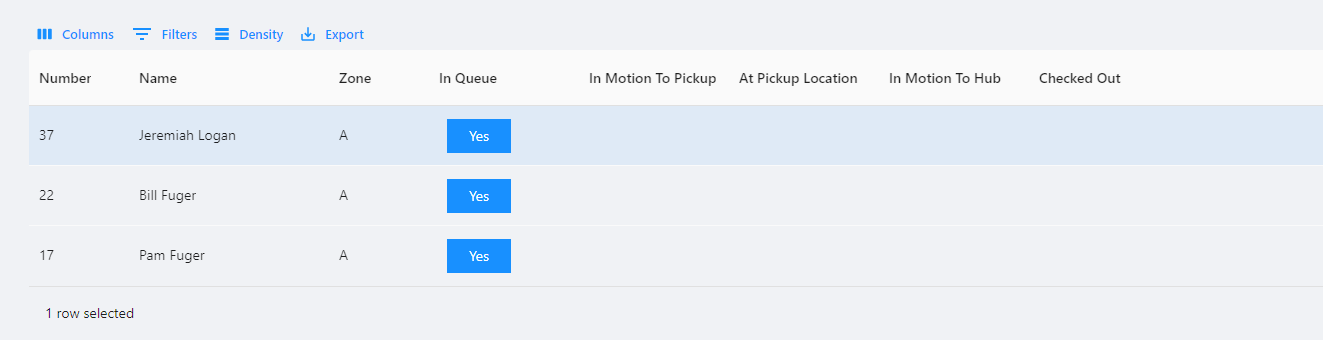
Product: PowerShell Universal
Version: 3.10.5
ca85370237efdb2a855363a2202d2919fe7117aa.png
Recommended Answer
It’s defo possible but I think we’d need to see more of your code to understand what you’re trying to acheive and how.
When you say the button is dynamically built and therefore you cant get at the ID - what do you mean by that? are you not providing an ID and letting it auto generate one?
Why not just dynamically provide an ID to that element yourself? e.g give it a name but use a variable relating to a unique item in your table row - such as the ID or number of that record. so your button might be called “button_inqueue_$Number” (which translates to button_inqueue_37), then you can just reference it using that.
All Comments (3)
I’m still not finding a way to accomplish this. @Support is this possible, or can we make it a feature request?
It’s defo possible but I think we’d need to see more of your code to understand what you’re trying to acheive and how.
When you say the button is dynamically built and therefore you cant get at the ID - what do you mean by that? are you not providing an ID and letting it auto generate one?
Why not just dynamically provide an ID to that element yourself? e.g give it a name but use a variable relating to a unique item in your table row - such as the ID or number of that record. so your button might be called “button_inqueue_$Number” (which translates to button_inqueue_37), then you can just reference it using that.
Thanks for the suggestion, I was able to get this to work; must not have been getting the syntax correct. Posting a snippet below in case anyone is looking for something similar in the future:
$transportDB = Invoke-SQLiteQuery -DataSource $dbFile -Query "Select * From  Vehicles ORDER By Number"

$Data = @(
    foreach ($row in $transportDB) {
        @{Number = $row.Number; Name = $row.Name; Zone = $row.Zone; Queue = $row.In_Queue; Pickup = $row.In_Motion_To_Pickup; AtLocation = $row.At_Pickup_Location; ToHub = $row.In_Motion_To_Hub; Gone = $row.CheckedOut}
    }
)

$Columns = @(
    New-UDTableColumn -Property Number -Title Number
    New-UDTableColumn -Property Name -Title Name
    New-UDTableColumn -Property Zone -Title Zone -Render {
        New-UDSelect -Id "zone$($EventData.Number)" -Option {
            New-UDSelectOption -Name A -Value A
            New-UDSelectOption -Name B -Value B
            New-UDSelectOption -Name C -Value C
        }
    }
    New-UDTableColumn -Property Queue -Title "In Queue" -Render {
        $inQueue = (Invoke-SQLiteQuery -DataSource $dbFile -Query "Select In_Queue From Vehicles Where Number = '$($EventData.Number)'").In_Queue
        if ($inQueue -eq "No") {
            New-UDAlert -Id "queue_alert$($EventData.Number)" -Severity warning -Text $inQueue
            $btnText = "Move"
        } else {
            New-UDAlert -Id "queue_alert$($EventData.Number)" -Severity success -Text $inQueue
            $btnText = "Clear"
        }

        New-UDButton -Id "queue_btn$($EventData.Number)" -Text $btnText -OnClick {
            $inQueue2 = (Invoke-SQLiteQuery -DataSource $dbFile -Query "Select In_Queue From Vehicles Where Number = '$($EventData.Number)'").In_Queue

            if ($inQueue2 -eq "No") {
                Invoke-SQLiteQuery -DataSource $dbFile -Query "UPDATE Vehicles SET In_Queue='Yes' WHERE Number = '$($EventData.Number)'"

                Set-UDElement -Id "queue_btn$($EventData.Number)" -Properties @{
                    Text = "Clear"
                }

                Set-UDElement -Id "queue_alert$($EventData.Number)" -Properties @{
                    children = "Yes"
                    Severity = "success"
                }
            } else {
                Invoke-SQLiteQuery -DataSource $dbFile -Query "UPDATE Vehicles SET In_Queue='No' WHERE Number = '$($EventData.Number)'"
                Set-UDElement -Id "queue_btn$($EventData.Number)" -Properties @{
                    Text = "Move"
                }

                Set-UDElement -Id "queue_alert$($EventData.Number)" -Properties @{
                    children = "No"
                    Severity = "warning"
                }
            }
        }
    }
    New-UDTableColumn -Property Pickup -Title "In Motion To Pickup"  -Render {
        New-UDAlert -Id "pickup_alert$($EventData.Number)" -Severity warning -Text "No"
        New-UDButton -Id "pickup_btn$($EventData.Number)" -Text "Move" -OnClick {
            if ((Get-UDElement -Id "pickup_alert$($EventData.Number)").Children -eq "No") {
                Set-UDElement -Id "pickup_btn$($EventData.Number)" -Properties @{
                    Text = "Clear"
                }

                Set-UDElement -Id "pickup_alert$($EventData.Number)" -Properties @{
                    children = "Yes"
                    Severity = "success"
                }
            } else {
                Set-UDElement -Id "pickup_btn$($EventData.Number)" -Properties @{
                    Text = "Move"
                }

                Set-UDElement -Id "pickup_alert$($EventData.Number)" -Properties @{
                    children = "No"
                    Severity = "warning"
                }
            }
        }
    }
    New-UDTableColumn -Property AtLocation -Title "At Pickup Location" -Render {
        New-UDAlert -Id "atLocation_alert$($EventData.Number)" -Severity warning -Text "No"
        New-UDButton -Id "atLocation_btn$($EventData.Number)" -Text "Move" -OnClick {
            if ((Get-UDElement -Id "atLocation_alert$($EventData.Number)").Children -eq "No") {
                Set-UDElement -Id "atLocation_btn$($EventData.Number)" -Properties @{
                    Text = "Clear"
                }

                Set-UDElement -Id "atLocation_alert$($EventData.Number)" -Properties @{
                    children = "Yes"
                    Severity = "success"
                }
            } else {
                Set-UDElement -Id "atLocation_btn$($EventData.Number)" -Properties @{
                    Text = "Move"
                }

                Set-UDElement -Id "atLocation_alert$($EventData.Number)" -Properties @{
                    children = "No"
                    Severity = "warning"
                }
            }
        }
    }
    New-UDTableColumn -Property ToHub -Title "Returning to Hub" -Render {
        New-UDAlert -Id "toHub_alert$($EventData.Number)" -Severity warning -Text "No"
        New-UDButton -Id "toHub_btn$($EventData.Number)" -Text "Move" -OnClick {
            if ((Get-UDElement -Id "toHub_alert$($EventData.Number)").Children -eq "No") {
                Set-UDElement -Id "toHub_btn$($EventData.Number)" -Properties @{
                    Text = "Clear"
                }

                Set-UDElement -Id "toHub_alert$($EventData.Number)" -Properties @{
                    children = "Yes"
                    Severity = "success"
                }
            } else {
                Set-UDElement -Id "toHub_btn$($EventData.Number)" -Properties @{
                    Text = "Move"
                }

                Set-UDElement -Id "toHub_alert$($EventData.Number)" -Properties @{
                    children = "No"
                    Severity = "warning"
                }
            }
        }
    }
    New-UDTableColumn -Property Gone -Title "Checked Out" -Render {
        New-UDAlert -Id "gone_alert$($EventData.Number)" -Severity warning -Text "No"
        New-UDButton -Id "gone_btn$($EventData.Number)" -Text "Move" -OnClick {
            if ((Get-UDElement -Id "gone_alert$($EventData.Number)").Children -eq "No") {
                Set-UDElement -Id "gone_btn$($EventData.Number)" -Properties @{
                    Text = "Clear"
                }

                Set-UDElement -Id "gone_alert$($EventData.Number)" -Properties @{
                    children = "Yes"
                    Severity = "success"
                }
            } else {
                Set-UDElement -Id "gone_btn$($EventData.Number)" -Properties @{
                    Text = "Move"
                }

                Set-UDElement -Id "gone_alert$($EventData.Number)" -Properties @{
                    children = "No"
                    Severity = "warning"
                }
            }
        }
    }

)

New-UDTable -Id "table1" -Data $Data -Columns $Columns -Sort -ShowRefresh
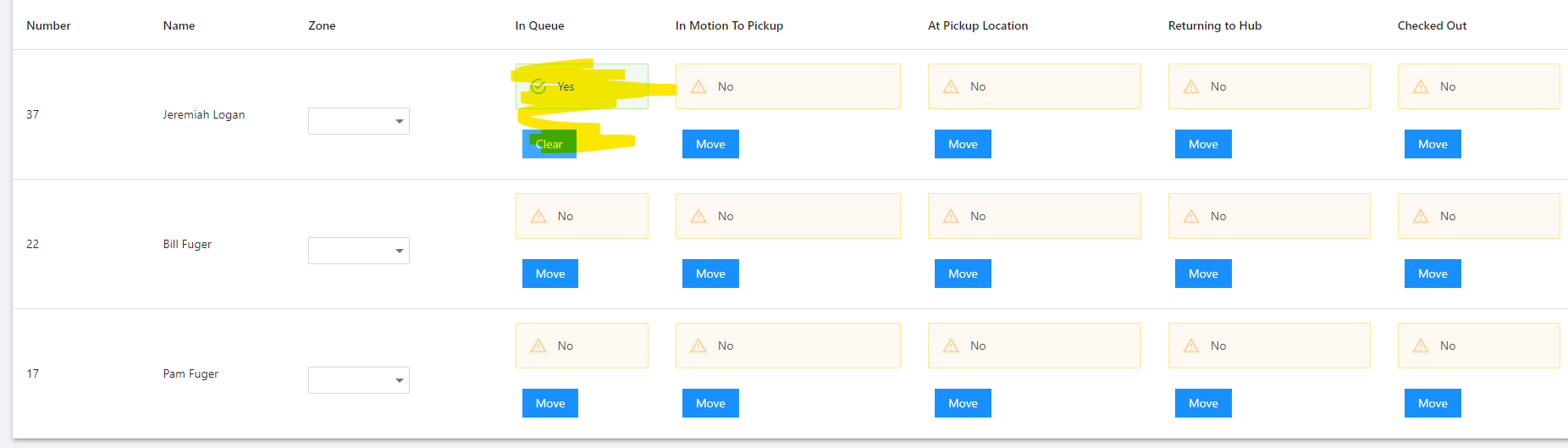
This gives me a table with UDAlerts, and I can act upon each alert in the different rows and columns as needed.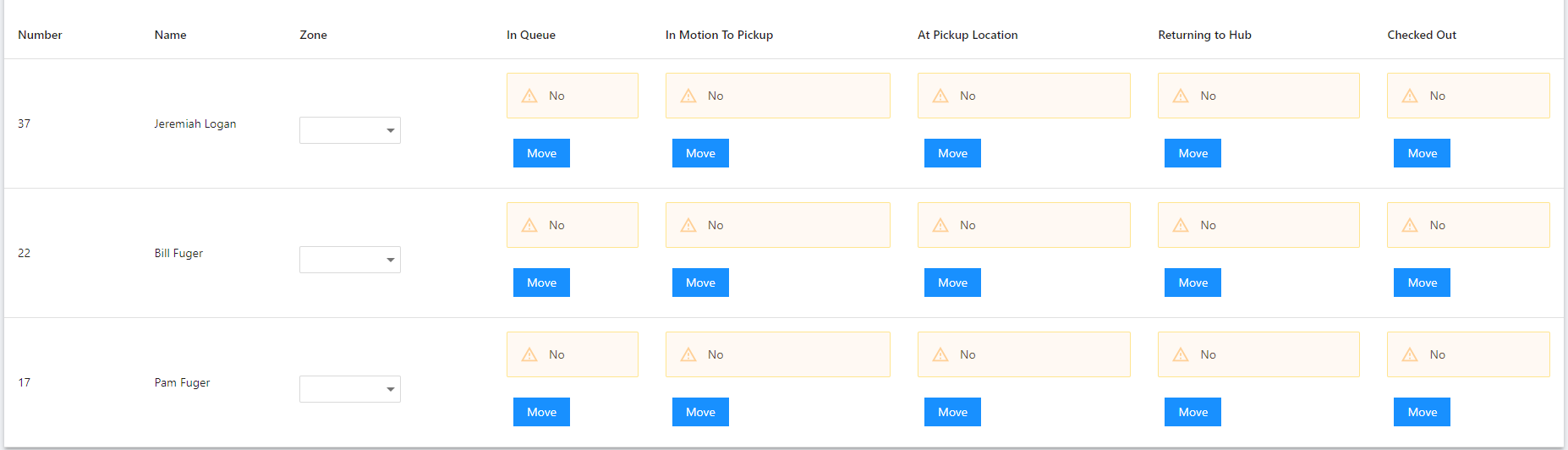
06b8e1de05f2beb703593c68aa9d7ba5bdc0eb44.png
0197554afca3fc01b67bfc86c5789830adb6c048.png